
Licencias seguras y legales de Windows 10: Tu guía 2026
TL;DR:
- Windows 10 no longer receives free security updates after support ended in October 2025, increasing vulnerability.
- Cheap gray-market keys are risky, often revoked by Microsoft, and may include malware or legal issues.
- Legitimate licenses from authorized sellers offer security, support, and legal compliance, especially vital for small businesses.
Windows 10 is no longer under Microsoft’s active support umbrella. End of support 2025 arrived on October 14, 2025, meaning no more free security patches or updates. Yet millions of individuals and small businesses still run Windows 10 daily. The real danger? Many are hunting for the cheapest license key they can find, not realizing those bargain deals can cost far more in the long run. This guide walks you through what end-of-support actually means, why cheap keys are a 🛑 red flag, and how to buy a genuine Windows 10 license safely and legally in 2026.
Índice
- Understanding Windows 10 licensing: End-of-support and options
- The risks of cheap license keys: Gray-market dangers explained
- How to buy Windows 10 legally: Safe channels and verification
- Business and compliance essentials: Licensing for small businesses
- Our take: Why shortcuts in Windows 10 licensing backfire
- Where to buy genuine Windows 10 safely
- Preguntas más frecuentes
Principales conclusiones
| Punto | Detalles |
|---|---|
| Fin de la compatibilidad con Windows 10 | Microsoft stopped free updates for Windows 10 after October 2025, affecting security and features. |
| Cheap keys are risky | Gray-market keys may be revoked, lack support, and expose buyers to malware or compliance issues. |
| Buy from verified sources | Using official retailers and Microsoft partners ensures your license is genuine and your data protected. |
| Businesses need compliance | Small businesses should use volume or partner licensing for support, flexibility, and legal protection. |
| Shortcuts backfire | Saving money on unofficial licenses often leads to higher costs and hassle down the line. |
Understanding Windows 10 licensing: End-of-support and options
When Microsoft ends support for an operating system, it stops releasing security updates, bug fixes, and technical assistance. For Windows 10, that cutoff was October 14, 2025. After that date, any vulnerability discovered in Windows 10 stays unpatched unless you pay for Microsoft’s Extended Security Updates (ESU) program.
This does not mean Windows 10 stops working. It means running it becomes riskier every day. Hackers actively target unsupported systems because they know patches will never arrive. For small businesses especially, this is a serious liability.
So why are people still buying Windows 10 licenses in 2026? Several real reasons exist:
- Legacy software compatibility: Some specialized business applications only run on Windows 10.
- Hardware limitations: Older machines cannot meet Windows 11’s TPM 2.0 requirements.
- Budget constraints: Windows 11 upgrades require new hardware investments some businesses cannot afford right now.
- Transition planning: Some organizations are buying licensed Windows 10 installs as a short-term bridge while planning a full upgrade.
Understanding the license type you buy matters just as much as buying one at all. Here is a quick comparison:
| Tipo de licencia | Transferible | Nivel de apoyo | Lo mejor para |
|---|---|---|---|
| OEM | ❌ No | Limitado | Single device, personal use |
| Venta al por menor | ✅ Sí | Completo | Individuals, flexible use |
| Volumen | ✅ Sí | Business-grade | SMBs, IT teams |
| Partner-supplied | ✅ Sí | Full + reseller support | Businesses needing compliance |
For secure licensing for Windows 10 Pro, the retail or partner-supplied route gives you the most protection and flexibility. OEM keys tie to one machine and cannot move with you if hardware changes.
Pro Tip: Before you buy, confirm what license type you actually need. If you plan to upgrade hardware within 12 months, an OEM key will leave you buying again. A retail license travels with you.
Comprender la types of Windows OS licenses before purchasing prevents costly mistakes. The cheapest option upfront is rarely the cheapest option overall.
🔥 Key stat: Microsoft’s ESU program for Windows 10 is available for businesses, but it comes at a cost per device per year, making legitimate licensing even more important to get right the first time.
The risks of cheap license keys: Gray-market dangers explained
You have seen them. Websites selling Windows 10 keys for $10 or $15. It looks like a deal. It is not.

Llaves baratas de terceros priced between $10 and $50 from obscure sites are almost always gray-market OEM or volume licenses. These keys were not sold to you legitimately. They were often bulk-purchased through unauthorized channels, leaked from hardware bundles, or obtained through fraudulent Microsoft partner accounts.
Here is what can go wrong:
- Revocation: Microsoft can and does deactivate keys that were obtained through fraud. Your activated Windows suddenly shows as unlicensed, locking features or displaying constant warnings.
- No support: If something goes wrong during activation, you have zero recourse. The seller disappears, and Microsoft will not help you with a key they did not authorize.
- Malware risk: Some cheap key sites bundle malware with their download links. You pay for a key and get a virus as a bonus.
- Compliance failure: For businesses, using unauthorized software is a legal liability. Software audits can result in fines that dwarf the cost of a legitimate license.
| Factor | Cheap gray-market key | Legitimate license |
|---|---|---|
| Precio | $10 to $50 | $30 to $150+ |
| Revocation risk | 🛑 High | ✅ Ninguno |
| Soporte técnico de Microsoft | ❌ Ninguno | ✅ Completo |
| Malware exposure | 🛑 Posible | ✅ Ninguno |
| Business compliance | ❌ Fails audit | ✅ Passes audit |
Knowing how to start distinguishing real from fake Windows keys is a skill every buyer needs before spending a single dollar.
“The $10 key that activates today may leave you with an unlicensed system tomorrow. The cost of that disruption, lost productivity, and potential data exposure far exceeds what you saved.”
Pro Tip: Always check Windows license validity immediately after purchase. Do not wait weeks to discover a key was already used or flagged.
The gray market thrives because buyers focus on the sticker price. Think about total cost instead: the key, plus the risk of revocation, plus the time lost troubleshooting, plus potential compliance fines. Suddenly that $15 key looks very expensive.
How to buy Windows 10 legally: Safe channels and verification
Buying a legitimate Windows 10 license does not have to be complicated. It just requires a few deliberate steps.
Here is how to do it safely:
- Identify verified sellers. Look for Microsoft Authorized Resellers or partners listed on Microsoft’s official partner directory. These sellers are vetted and accountable.
- Check reviews and history. A legitimate seller has verifiable customer reviews, a real business address, and transparent return policies. If a site looks like it was built last week, walk away.
- Confirm the license type before paying. Ask directly: is this OEM, Retail, or Volume? Get it in writing. A legitimate seller will answer clearly.
- Use secure payment methods. Pay with a credit card or a trusted payment processor that offers buyer protection. Avoid wire transfers or cryptocurrency payments to unknown sellers.
- Verify after activation. Once you activate, go to Settings > Update and Security > Activation. It should say “Windows is activated with a digital license.” If it says anything else, contact the seller immediately.
For businesses, the stakes are even higher. Avoid obscure cheap key sites that lack Microsoft partner verification. A software audit finding unlicensed installations can result in fines, legal action, and reputational damage.
What to look for in a legitimate seller:
- ✅ Clear business registration and contact information
- ✅ Transparent refund and support policy
- ✅ Instant digital delivery with email confirmation
- ✅ Positive, verifiable customer reviews
- ✅ Explicit statement of license type (OEM, Retail, Volume)
Learning how to buy Windows 10 legally protects both your data and your investment. The process is straightforward when you know what to look for.
Pro Tip: Bookmark the secure software purchase steps guide before you start shopping. Having a checklist open while you evaluate sellers keeps you from making impulse decisions based on price alone.
Business and compliance essentials: Licensing for small businesses
If you run a small business, licensing is not just a technical issue. It is a legal one.
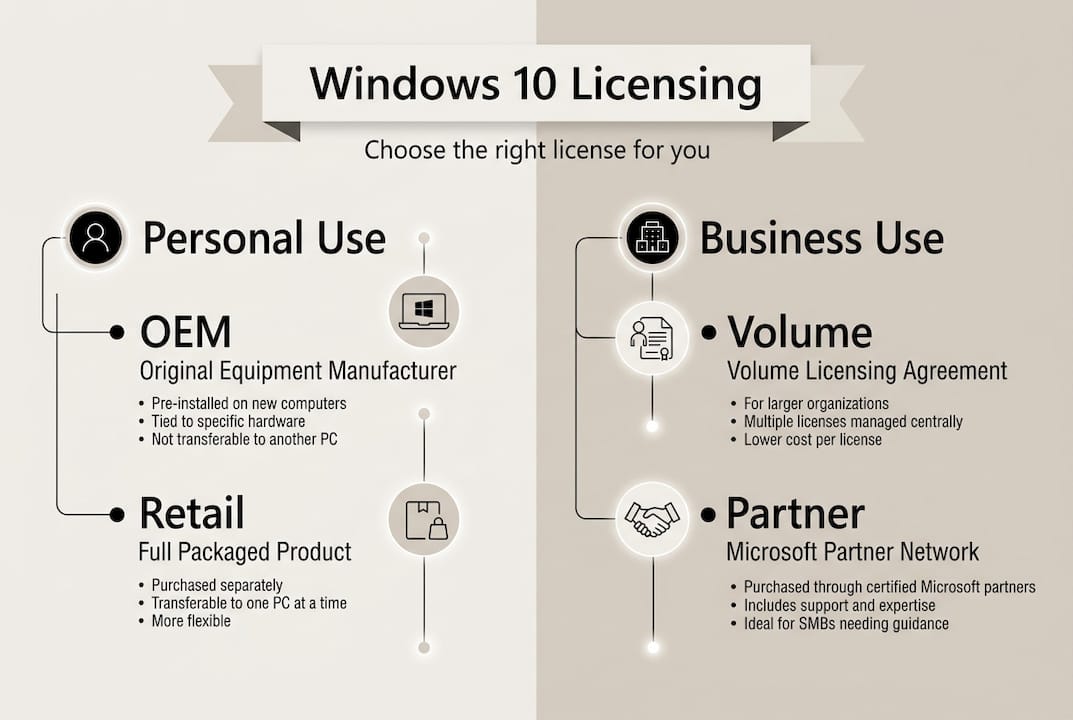
Volume Licensing or Microsoft partner channels provide legitimate Pro and Enterprise licenses with full support. OEM keys, by contrast, are hardware-bound and cannot be transferred to another machine. That matters when employees change computers or when you replace aging hardware.
Here is what small businesses need to know:
- Licencias OEM are tied to the original device. If that machine dies, the license dies with it. They are not suitable for businesses that rotate hardware.
- Licencias por volumen allow you to manage multiple activations under one agreement. They come with centralized management tools and dedicated support.
- Partner-supplied licenses give you a reseller relationship, meaning you have a real point of contact for compliance questions, renewals, and support.
- Compliance audits are real. The Business Software Alliance (BSA) actively investigates businesses for unlicensed software. Fines can reach thousands of dollars per unlicensed installation.
For businesses planning ahead, the SMB software compliance checklist is a practical starting point to audit what you currently have and what you need.
🔥 Key stat: Businesses using unlicensed software risk fines that can reach $150,000 per title under U.S. copyright law, far outweighing any savings from cheap keys.
Understanding how to compare software license types helps you match the right license to your actual business needs, not just the lowest price on the screen.
Small businesses also benefit from the customer support that comes with legitimate licensing. When something breaks, you need a real person to call. Gray-market sellers do not offer that.
Our take: Why shortcuts in Windows 10 licensing backfire
We have seen this pattern repeat itself. A business owner saves $30 on a cheap key. Three months later, Windows flags the license as invalid. The machine locks up during a critical project. They spend hours troubleshooting, lose client work, and end up buying a legitimate license anyway, paying twice.
The math never works out in favor of the shortcut.
What we have learned from working with individuals and small businesses is that the real cost of a fake or gray-market license is not just financial. It is the anxiety of not knowing if your system will work tomorrow. It is the risk of a security breach on an unpatched, unlicensed system. It is the compliance exposure that could shut down your business.
Legitimate software authenticity and security is not a luxury. It is the baseline. A verified, genuine license gives you peace of mind that no $10 key can replicate. And in 2026, with Windows 10 no longer receiving free security updates, that peace of mind is worth every penny of the difference.
Choose reliability. The savings from a fake key are never worth the risk.
Where to buy genuine Windows 10 safely
Now that you know the risks and what to look for, the next step is simple: get your license from a trusted source. 🎁

En operacinesistema.lt, we specialize in genuine Microsoft licenses with instant email delivery, full customer support, and verified authenticity. Whether you need a single key for personal use or multiple licenses for your team, we have you covered. You can buy and activate Windows 10 directly through our secure checkout in minutes. And if you have questions about key types or need help with activation, our support team is ready to help. Avoid the gray market. Get a real license, real support, and real peace of mind. Do not let a Windows 10 generador de claves de producto scam put your system at risk.
Preguntas más frecuentes
Is it safe to use Windows 10 after support ends in 2025?
You can still use Windows 10, but end of support 2025 means no free security updates, leaving your system vulnerable to new threats unless you enroll in Microsoft’s paid Extended Security Updates program.
Why are cheap Windows 10 keys risky?
Cheap third-party keys are often unauthorized gray-market licenses that Microsoft can revoke at any time, leaving you with an unlicensed system and no support to fix it.
How can I verify a Windows 10 license is genuine?
Buy only from authorized resellers or verified Microsoft partners, then confirm activation status in Settings > Update and Security > Activation immediately after installing your key.
What’s the best licensing option for small businesses?
Volume Licensing or Microsoft partner channels are the best fit for SMBs, offering transferable licenses, business-grade support, and compliance protection that OEM keys simply cannot provide.
Are OEM keys a good choice for personal use?
OEM keys work fine for a single device you do not plan to replace, but they cannot be transferred to new hardware and come with limited support compared to retail or partner-supplied licenses.





