
Qué son las licencias de SO: guía para particulares y PYME
Most people assume operating system licenses are complicated legal documents filled with confusing terms. The truth is simpler. Understanding software authenticity helps you make smart purchasing decisions and avoid costly mistakes. Whether you’re an individual user or running a small business, knowing what OS licenses actually are protects your investment and keeps your systems secure. This guide breaks down everything you need to know about Microsoft operating system licenses in plain language.
Índice
- Principales conclusiones
- What are operating system licenses and why do they matter
- Types of Microsoft OS licenses: retail, OEM, and volume explained
- Risks of unlicensed software and benefits of buying genuine Microsoft OS licenses
- How to choose and purchase the right Microsoft OS license for your needs
- Get genuine Microsoft OS licenses with confidence
- PREGUNTAS FRECUENTES
Principales conclusiones
| Punto | Detalles |
|---|---|
| OS license basics | An OS license is a legal agreement that grants permission to use Windows software. |
| Software authenticity matters | Genuine licenses ensure access to security updates and protect against malware and data breaches. |
| License types explained | Retail licenses are transferable to new hardware, OEM licenses stay with the original device, and volume licenses fit larger deployments. |
| Secure purchase tips | Buy from authorized retailers and regularly verify activation status to keep your system protected and compliant. |
What are operating system licenses and why do they matter
An operating system license is a legal agreement between you and Microsoft that grants permission to use Windows software. Think of it as a digital deed that proves you own the right to run the operating system on your computer. Without this agreement, you’re technically using software without authorization, which creates both legal and practical problems.
Software authenticity directly impacts your system’s security and functionality. Genuine licenses ensure you receive critical security patches that protect against viruses, ransomware, and data breaches. Microsoft releases these updates regularly, but only licensed users get access. When you skip licensing, you’re essentially leaving your digital front door unlocked.
The legal risks of unlicensed software extend beyond fines. Businesses caught using counterfeit or pirated operating systems face potential lawsuits, damaged reputations, and operational disruptions. For individuals, the consequences might seem less severe, but you still lose access to customer support and face increased vulnerability to cyber threats.
Genuine licenses provide peace of mind through guaranteed access to Microsoft’s technical support team. When something goes wrong with your system, having official support means faster solutions and expert guidance. Unlicensed users have nowhere to turn when problems arise.
Here’s why choosing licensed OS software matters:
- Access to continuous security updates that patch vulnerabilities
- Legal protection against copyright infringement claims
- Eligibility for official Microsoft technical support and resources
- Compatibility with enterprise tools and professional software
- Reduced risk of malware infections and system compromises
- Ability to activate all operating system features without restrictions
Pro Tip: Check your Windows activation status regularly through Settings > Update & Security > Activation to ensure your license remains valid and your system stays protected.
Small businesses particularly benefit from proper licensing because it demonstrates professionalism to clients and partners. When you’re handling customer data or financial information, proving you use legitimate software builds trust and shows you take security seriously.
Types of Microsoft OS licenses: retail, OEM, and volume explained
Microsoft offers three main license types, each designed for different use cases and user needs. Understanding these distinctions helps you choose the right option and avoid purchasing a license that doesn’t match your situation.
Retail licenses represent the most flexible option for individual users and small businesses. You purchase these directly from Microsoft or authorized retailers, and they come with full transfer rights. If you upgrade your computer or buy a new machine, you can move your retail license to the new hardware. This transferability makes retail licenses ideal for users who frequently upgrade their systems or want long-term investment protection.
OEM licenses come pre-installed on new computers or sold as system builder packages. These licenses are permanently tied to the first machine they’re activated on. You cannot legally transfer an OEM license to different hardware, even if you stop using the original computer. The trade-off for this restriction is typically a lower price point. OEM licenses work well for users who plan to keep the same computer for its entire lifespan.

Volume licenses serve organizations that need to deploy Windows across multiple machines. These licenses simplify management through centralized activation and typically include additional deployment tools. Small businesses with five or more computers often find volume licensing more cost-effective and easier to manage than individual retail purchases.
| Tipo de licencia | Transferible | Nivel de apoyo | Lo mejor para | Typical Price Point |
|---|---|---|---|---|
| Venta al por menor | Yes, unlimited transfers | Soporte completo de Microsoft | Individual users, frequent upgraders | Más alto |
| OEM | No, hardware-bound | Manufacturer support only | Single-machine users, budget-conscious buyers | Baja |
| Volumen | Limited, organization-specific | Enterprise support options | Businesses with 5+ computers | Varies by volume |
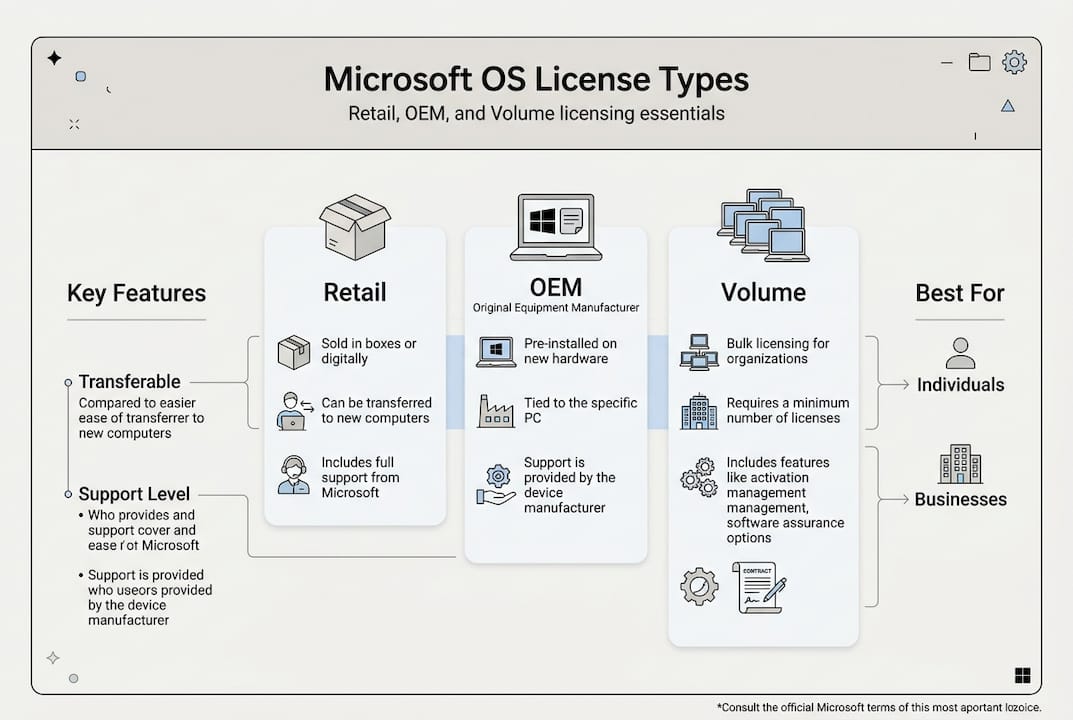
Each license type includes different support structures. Retail licenses give you direct access to Microsoft’s support team. OEM licenses route support through the computer manufacturer, which can mean longer wait times. Volume licenses often include dedicated account managers for larger deployments.
Key advantages and limitations:
- Retail licenses offer maximum flexibility but cost more upfront
- OEM licenses provide budget savings with hardware commitment
- Volume licenses simplify deployment but require minimum purchase quantities
- Retail and volume licenses support virtualization in most cases
- OEM licenses may restrict certain enterprise features
Pro Tip: Many buyers overlook the fact that OEM licenses prohibit transfer even within the same household. If you plan to give your computer to a family member later, a retail license protects that option.
The right license type depends on your specific needs and future plans. Consider how long you’ll keep your current hardware, whether you need support flexibility, and if you’re purchasing for personal or business use.
Risks of unlicensed software and benefits of buying genuine Microsoft OS licenses
Counterfeit and pirated operating systems expose users to serious security threats that genuine licenses prevent. Unlicensed software often contains hidden malware, keyloggers, or backdoors that criminals use to steal personal information, banking credentials, and business data. These malicious additions operate invisibly, compromising your system from the moment you install the fake OS.
Genuine software reduces malware risk by up to 300% compared to counterfeit versions. This dramatic difference stems from Microsoft’s rigorous security testing and the absence of malicious modifications. When you use authentic licenses, you’re installing software that hasn’t been tampered with by unknown third parties.
Legal consequences for businesses using unlicensed software include hefty fines, legal fees, and potential criminal charges in extreme cases. Software audits can happen without warning, and companies found violating licensing agreements face penalties that far exceed the cost of purchasing legitimate licenses. The financial damage extends beyond fines to include lost productivity during investigations and remediation.
Operational disruptions from unlicensed software create unexpected downtime and compatibility issues. Without access to official updates, your system becomes increasingly unstable over time. Critical security patches never arrive, leaving vulnerabilities open for exploitation. Professional software may refuse to run on unlicensed operating systems, limiting your ability to use essential business tools.
“Organizations using genuine Microsoft licenses experience significantly fewer security incidents and maintain better compliance postures. The investment in legitimate software pays for itself through reduced breach risks and avoided legal complications.”
Genuine licenses provide continuous access to Windows Update, ensuring your system receives the latest security patches, feature improvements, and compatibility fixes. These updates address newly discovered vulnerabilities and keep your computer running smoothly. Unlicensed systems either cannot access updates or receive modified versions that may contain additional threats.
Peace of mind represents an often-overlooked benefit of legitimate software. Knowing your operating system is authentic eliminates worries about sudden deactivation, security breaches, or legal problems. You can focus on your work instead of constantly wondering if your system is compromised.
Financial and functional advantages of genuine purchases:
- Guaranteed access to all Windows features without artificial limitations
- Eligibility for free upgrades to newer versions in some license types
- Protection against identity theft and financial fraud
- Ability to pass compliance audits for business certifications
- Professional appearance when clients or partners see your legitimate software
- Long-term cost savings through avoided security incidents
Small businesses particularly benefit from the professional credibility that comes with properly licensed software. Clients and partners notice when you invest in legitimate tools, and this attention to detail builds trust in your overall business practices.
How to choose and purchase the right Microsoft OS license for your needs
Selecting the appropriate Microsoft OS license starts with honestly assessing your current and future needs. Consider how many computers require licensing, whether you plan to upgrade hardware soon, and if you need specific Windows features available only in certain editions.
Follow this systematic approach to make an informed purchase:
- Identify which Windows edition you need (Home, Pro, Enterprise) based on required features
- Determine if you need transfer flexibility or if hardware-bound licensing works
- Calculate total licensing costs for multiple machines if applicable
- Research authorized Microsoft resellers and compare their offerings
- Verify the seller’s legitimacy through Microsoft’s partner directory
- Confirm the license type matches your use case before purchasing
- Keep all purchase documentation and product keys in secure storage
- Activate your license immediately and verify successful activation
Buying from authorized sellers protects you from counterfeit licenses and ensures you receive genuine product keys. Microsoft maintains a network of certified partners who meet strict standards for legitimate software distribution. Purchasing through these channels guarantees you’re getting authentic licenses with full support eligibility.
Verifying authenticity after purchase involves checking your activation status and using Microsoft’s built-in verification tools. Navigate to Windows Settings and confirm your license shows as activated and genuine. If anything seems incorrect, contact the seller immediately while you’re still within the return window.
Pro Tip: Many scammers offer licenses at suspiciously low prices by selling volume license keys to individual users, which violates Microsoft’s terms. If a deal seems too good to be true, it probably involves licensing fraud that could leave you with a deactivated system.
Understanding license terms before purchasing prevents costly mistakes. Read the end user license agreement carefully, paying special attention to transfer restrictions, usage limitations, and support entitlements. Different license types have different rules, and violating these terms can result in deactivation.
Maintaining compliance after purchase requires keeping accurate records of all licenses and their associated hardware. For businesses, implementing a software license checklist helps track renewals, transfers, and upgrades. Regular audits of your own licensing ensure you catch any discrepancies before they become problems.
Common pitfalls to avoid during purchasing:
- Buying OEM licenses when you plan to transfer to new hardware
- Purchasing from unauthorized resellers offering steep discounts
- Failing to verify activation status immediately after installation
- Losing product key documentation without creating backups
- Assuming all licenses include the same features and support
- Neglecting to check compatibility with your specific hardware
Small businesses should also consider future growth when selecting licenses. Volume licensing might seem unnecessary for a three-person company today, but if you plan to hire more staff within a year, the simplified management and potential cost savings become more attractive.
Get genuine Microsoft OS licenses with confidence
Navigating the operating system licensing landscape doesn’t have to feel overwhelming when you work with trusted sources. Finding secure Microsoft OS licenses from authorized resellers ensures you receive authentic products backed by proper support and legal protections.

Small businesses benefit from comprehensive resources that simplify compliance and purchasing decisions. Access detailed guidance through our software license compliance guide to ensure your organization maintains proper licensing across all systems. Understanding the full scope of benefits official software ayuda a justificar la inversión y demuestra su valor a las partes interesadas.
Tanto si necesita una única licencia minorista para uso personal como varias licencias para su empresa en crecimiento, la elección de productos originales de Microsoft protege su inversión y mantiene sus sistemas en perfecto funcionamiento. El socio de licencias adecuado ofrece precios transparentes, condiciones claras y asistencia continua para ayudarle a tomar decisiones seguras que se ajusten a sus necesidades específicas y a sus limitaciones presupuestarias.
PREGUNTAS FRECUENTES
¿Cuál es la diferencia entre una licencia de SO minorista y una OEM?
Las licencias de venta al público ofrecen una flexibilidad de transferencia total, lo que le permite trasladar su licencia de Windows a un nuevo hardware cada vez que actualice. Las licencias OEM permanecen vinculadas permanentemente al ordenador original en el que se activaron por primera vez. Las versiones minoristas suelen costar más, pero aportan valor a largo plazo gracias a la posibilidad de reutilización, mientras que las licencias OEM ofrecen menores costes iniciales con compromiso de hardware.
¿Cómo puedo comprobar si mi licencia del sistema operativo Microsoft es auténtica?
Utilice la verificación integrada de Windows accediendo a Configuración > Actualización y seguridad > Activación para comprobar el estado de su licencia. Las licencias auténticas muestran una confirmación de activación clara y no muestran advertencias sobre su autenticidad. Microsoft también ofrece herramientas de verificación en línea en las que puede introducir su clave de producto para confirmar la legitimidad antes o después de la instalación.
¿Es seguro utilizar claves de producto de Windows gratuitas o pirateadas?
Las claves pirateadas exponen su sistema a 300% mayores tasas de infección por malware y eliminan el acceso a actualizaciones de seguridad críticas. Más allá de los riesgos técnicos, el uso de licencias falsificadas infringe las leyes de derechos de autor y puede acarrear consecuencias legales tanto para particulares como para empresas. Las claves gratuitas o sospechosamente baratas suelen proceder de licencias por volumen revendidas ilegalmente, que Microsoft puede detectar y desactivar de forma remota.
¿Puedo transferir mi licencia de Windows a un ordenador nuevo?
Los derechos de transferencia dependen totalmente del tipo de licencia. Las licencias de venta al público permiten transferencias ilimitadas a distintos ordenadores, aunque sólo puedes utilizar la licencia en un equipo a la vez. Las licencias OEM no pueden transferirse legalmente, aunque dejes de utilizar por completo el ordenador original. Las licencias por volumen tienen políticas de transferencia específicas de la organización que varían en función de los términos de su acuerdo.
¿Qué ocurre si mi licencia de Windows caduca o se desactiva?
Las instalaciones de Windows desactivadas siguen funcionando, pero entran en un modo de funcionalidad limitada con recordatorios de activación persistentes. Se pierde el acceso a las funciones de personalización, las actualizaciones de seguridad dejan de llegar y algunas aplicaciones pueden negarse a ejecutarse. Las empresas se enfrentan a riesgos de cumplimiento adicionales y a posibles sanciones de auditoría. La reactivación requiere resolver el problema de licencia subyacente o adquirir una nueva licencia original para restaurar la funcionalidad completa y las protecciones de seguridad.





