
Fitur keamanan perangkat lunak: 300% berisiko lebih rendah dengan lisensi asli
Perangkat lunak Windows bajakan mengekspos bisnis kecil untuk hingga 300% risiko infeksi yang lebih tinggi daripada lisensi Microsoft yang asli. Bagi pemilik bisnis kecil dan pengecer TI Lithuania, hal ini berarti gangguan operasional yang kritis, kegagalan kepatuhan, dan pelanggaran keamanan yang mahal. Lisensi Microsoft asli mengaktifkan fitur-fitur keamanan penting seperti Windows Defender, SmartScreen, dan pembaruan keamanan otomatis yang melindungi infrastruktur bisnis Anda. Panduan ini menjelaskan cara kerja fitur keamanan Microsoft, membandingkan kemampuan keamanan Windows 10 dan 11, dan menunjukkan kepada Anda cara mendapatkan lisensi yang sah yang menjaga bisnis Anda tetap terlindungi.
Daftar Isi
- Bagaimana Fitur Keamanan Microsoft Melindungi Bisnis Kecil
- Kesalahpahaman Umum Tentang Fitur Keamanan Perangkat Lunak
- Risiko Menggunakan Perangkat Lunak Tidak Berlisensi atau Bajakan
- Perbandingan Fitur Keamanan Windows 10 dan Windows 11
- Bagaimana Operacinesistema.lt Memastikan Lisensi dan Keamanan Asli
- Rekomendasi Praktis Untuk Pemilik Usaha Kecil Dan Reseller TI
- Amankan Lisensi Microsoft Anda Dengan Aman Dengan Operacinesistema.lt
- Pertanyaan yang Sering Diajukan Tentang Fitur Keamanan Perangkat Lunak Dan Lisensi
Hal-hal penting yang dapat diambil
| Titik | Detail |
|---|---|
| Lisensi asli mengaktifkan perlindungan penting | Microsoft Windows Defender, SmartScreen, dan pembaruan otomatis memerlukan lisensi yang sah agar dapat berfungsi sepenuhnya. |
| Risiko keamanan berlipat ganda dengan perangkat lunak bajakan | Windows yang tidak berlisensi menghadapi tingkat infeksi malware 3x lebih tinggi dan kehilangan akses ke patch keamanan. |
| Windows 11 menambahkan keamanan berbasis perangkat keras | TPM 2.0 dan keamanan berbasis virtualisasi memberikan perlindungan yang lebih baik daripada pertahanan perangkat lunak Windows 10. |
| Kepatuhan tergantung pada lisensi yang sah | GDPR dan peraturan perlindungan data memerlukan lingkungan operasi yang didukung dan diperbarui secara berkala. |
| operacinesistema.lt memastikan pembelian yang aman | Verifikasi lisensi yang aman, dukungan aktivasi, dan kebijakan pengembalian dana melindungi investasi Anda dalam perangkat lunak Microsoft yang asli. |
Pengenalan fitur keamanan perangkat lunak dalam produk Microsoft
Fitur keamanan perangkat lunak adalah perlindungan keamanan bawaan dalam sistem operasi Microsoft Windows yang dirancang untuk mempertahankan diri dari malware, serangan phishing, dan kerentanan sistem. Untuk bisnis kecil dan reseller TI di Lithuania, fitur-fitur ini mewakili garis pertahanan pertama terhadap ancaman dunia maya yang dapat melumpuhkan operasi dan mengekspos data pelanggan yang sensitif. Memahami apa saja perlindungan ini dan bagaimana fungsinya sangat penting untuk membuat keputusan lisensi yang tepat.
Lisensi asli Microsoft membuka tiga komponen keamanan utama yang bekerja sama untuk melindungi sistem bisnis Anda:
- Windows Defender Antivirus menyediakan deteksi dan penghapusan malware secara real-time
- Filter Layar Cerdas memblokir situs web dan unduhan berbahaya sebelum mencapai sistem Anda
- Pembaruan keamanan otomatis menambal kerentanan yang baru ditemukan dalam beberapa jam setelah diidentifikasi
Salinan Windows palsu atau bajakan sering kali tidak dapat mengakses fitur keamanan Microsoft yang penting termasuk Pembaruan Windows dan Defender, yang mengakibatkan risiko infeksi dan gangguan operasional 3x lebih tinggi. Ketika instalasi Windows Anda tidak dapat menerima patch keamanan, setiap kerentanan baru yang ditemukan akan menjadi titik lemah permanen dalam infrastruktur bisnis Anda.
Bisnis kecil menghadapi risiko tertentu karena mereka sering kekurangan staf keamanan TI yang berdedikasi. Fitur keamanan Microsoft bertindak sebagai personel keamanan otomatis, yang terus memantau ancaman dan menerapkan perbaikan tanpa memerlukan pengetahuan khusus. Anda dapat memverifikasi keaslian lisensi Windows untuk memastikan sistem Anda memiliki akses penuh ke perlindungan ini.
Tip Pro: Periksa status aktivasi Windows Anda segera setelah instalasi dengan membuka Pengaturan > Pembaruan & Keamanan > Aktivasi untuk mengonfirmasi bahwa semua fitur keamanan telah diaktifkan.
Bagaimana fitur-fitur keamanan Microsoft melindungi bisnis kecil
Fitur keamanan Microsoft menciptakan beberapa lapisan pertahanan yang mencegah ancaman dunia maya membahayakan operasi bisnis Anda. Windows Defender Antivirus memindai file dan aplikasi secara real time, memblokir kode berbahaya sebelum dieksekusi. SmartScreen Filter mengevaluasi situs web dan unduhan terhadap basis data ancaman Microsoft yang terus diperbarui, memperingatkan Anda sebelum mengakses konten berbahaya.
Pembaruan keamanan otomatis merupakan tulang punggung perlindungan jangka panjang. Microsoft merilis tambalan untuk kerentanan yang baru ditemukan secara teratur, dengan pembaruan darurat yang segera diterapkan untuk ancaman kritis. Lisensi Windows asli Anda memastikan Anda menerima pembaruan ini secara otomatis, menutup celah keamanan sebelum penyerang dapat mengeksploitasinya.
Windows 11 memperkenalkan perlindungan berbasis perangkat keras yang melampaui pertahanan perangkat lunak:
- TPM 2.0 (Modul Platform Tepercaya) mengenkripsi data sensitif di tingkat perangkat keras
- Keamanan berbasis virtualisasi (VBS) mengisolasi proses sistem yang penting dari malware
- Boot Aman mencegah sistem operasi yang tidak sah memuat selama pengaktifan
Perlindungan ini memberikan manfaat bisnis yang nyata. Menggunakan hanya perangkat lunak Microsoft berlisensi membantu bisnis kecil memenuhi GDPR dan kepatuhan perlindungan data regional lainnya dengan memastikan lingkungan operasi yang didukung dan diperbarui. Kepatuhan bukanlah pilihan bagi bisnis yang menangani data pelanggan. Audit peraturan memverifikasi bahwa sistem Anda mempertahankan patch keamanan terkini dan konfigurasi perangkat lunak yang disetujui.
Berkurangnya gangguan operasional merupakan keuntungan penting lainnya. Infeksi malware memaksa bisnis offline selama rata-rata 3 hingga 5 hari sementara tim TI membangun kembali sistem yang disusupi. Fitur keamanan Microsoft mencegah sebagian besar infeksi sebelum terjadi, sehingga bisnis Anda tetap berjalan dengan lancar. Anda dapat meninjau Panduan kepatuhan lisensi Microsoft untuk persyaratan terperinci yang spesifik untuk lingkungan bisnis.
Tip Pro: Aktifkan perlindungan berbasis cloud Windows Defender di Pengaturan untuk memanfaatkan jaringan intelijen ancaman global Microsoft untuk deteksi malware yang lebih cepat.
Kesalahpahaman umum tentang fitur keamanan perangkat lunak
Many small business owners believe third-party antivirus software eliminates the need for Windows built-in protections. This misunderstanding creates dangerous security gaps. Windows Defender integrates directly with the operating system at a level third-party software cannot match, detecting threats that bypass conventional antivirus programs. The two work best as complementary layers, not replacements.
Here are the most common misconceptions that lead to security vulnerabilities:
Installing antivirus on pirated Windows provides adequate protection. Counterfeit Windows installations lack access to Microsoft’s security update infrastructure. Your antivirus might catch known malware, but unpatched system vulnerabilities remain exposed to zero-day exploits.
Windows 11 security features require expensive hardware upgrades. Most computers manufactured after 2018 already include TPM 2.0 chips and UEFI firmware. The hardware exists but may need BIOS activation. Only very old systems lack compatible components.
Pirated software becomes secure after applying fake updates. Counterfeit update tools often contain malware themselves. Fake Windows updates cannot patch genuine Microsoft code because they lack cryptographic signing keys.
Small businesses are too small to attract cyber attacks. Attackers specifically target small businesses because they typically have weaker security than enterprises but still process valuable customer payment data.
One-time security setup provides permanent protection. Cyber threats evolve daily. Without continuous updates through genuine licensing, your security becomes outdated within weeks.
The official vs unofficial software impacts extend beyond immediate security concerns to long-term business viability. Each misconception represents a decision point where small businesses unknowingly accept massive risks to save minor costs.
Risks of using unlicensed or pirated software
Unlicensed Windows software creates a cascade of security and legal problems that threaten small business survival. The statistics paint a clear picture of the danger.
Counterfeit or pirated copies of Windows often cannot access critical Microsoft safety features including Windows Update and Defender, resulting in 3x higher risk of infection and operational disruptions.
This 300% increase in infection risk isn’t theoretical. Small businesses running pirated Windows face regular malware incidents that genuine licenses prevent. Each infection costs an average of €8,000 to €15,000 in recovery expenses, lost productivity, and customer trust damage.
The specific risks of unlicensed software include:
- Complete loss of access to Windows security updates and patches
- Inability to use Windows Defender or receive virus definition updates
- Preinstalled malware and backdoors in pirated Windows installations
- System instability from missing or corrupted core files in counterfeit copies
- Legal liability for software piracy during business audits
- GDPR compliance failures exposing you to regulatory fines up to €20 million or 4% of annual revenue
Compliance-related audit failures decrease by up to 35% when businesses use regularly updated genuine software. This reduction occurs because legitimate licensing creates verifiable documentation that auditors require. Pirated software leaves no audit trail, automatically triggering compliance violations.
Lithuanian businesses face additional risks under EU data protection regulations. If a security breach occurs due to unlicensed software, you cannot claim reasonable security measures in your defense. Insurance policies often exclude coverage for losses resulting from software piracy. Review the legal and security risks of unofficial software and consult the Microsoft OS security checklist to assess your current exposure.
Comparison of Windows 10 and Windows 11 safety features
Both Windows 10 and Windows 11 provide core security protections, but Windows 11 adds hardware-based defenses that significantly enhance threat resistance. Understanding these differences helps small businesses make informed upgrade decisions based on their security needs and existing hardware capabilities.
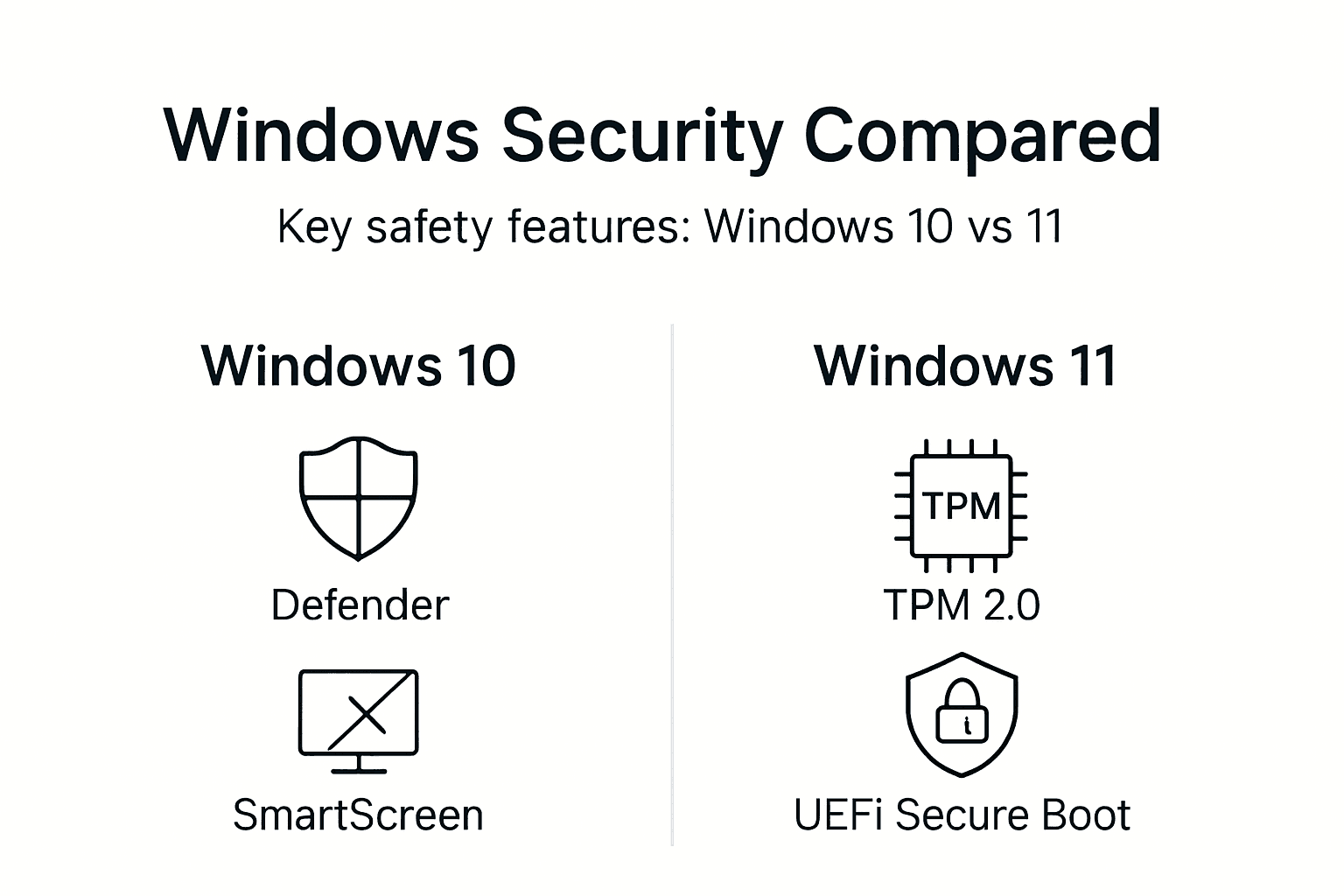
| Fitur | Windows 10 | Windows 11 |
|---|---|---|
| Windows Defender Antivirus | Real-time malware protection | Enhanced with improved cloud detection |
| SmartScreen Filter | Phishing and malware site blocking | Same core functionality with faster updates |
| Automatic Security Updates | Regular patch delivery | Same update schedule with streamlined installation |
| TPM Requirement | Optional (TPM 1.2) | Mandatory (TPM 2.0) for hardware encryption |
| Virtualization-Based Security | Available but not default | Enabled by default on compatible hardware |
| Boot Aman | Didukung | Required for installation |
| Hardware Isolation | Terbatas | Full memory integrity and core isolation |
Windows 10 relies primarily on software-based protections. Windows Defender and SmartScreen work effectively, but sophisticated attacks can potentially bypass software-only defenses. The operating system supports hardware security features, but they remain optional, and many users never enable them.
Windows 11 makes hardware security mandatory. TPM 2.0 chips encrypt sensitive data like passwords and encryption keys at the hardware level, where software malware cannot access them. Virtualization-based security runs critical system processes in isolated containers, preventing malware from tampering with Windows security functions even if it gains system access.
Deployment considerations for small businesses include:
- Most computers from 2018 onward support Windows 11 hardware requirements
- Older systems may need BIOS updates to enable TPM 2.0 and Secure Boot
- Migration costs include potential hardware upgrades for pre-2018 computers
- Security benefits justify upgrade costs for businesses handling sensitive customer data
You can upgrade from Windows 7 to 11 safely while ensuring all security features activate properly. Windows 7 reached end of support in 2020, leaving those systems completely unprotected regardless of antivirus software installed.
How operacinesistema.lt ensures genuine licensing and safety
Purchasing legitimate Microsoft licenses requires a trusted reseller that verifies authenticity and provides ongoing support. operacinesistema.lt specializes in genuine Windows 10 and Windows 11 Pro licenses for Lithuanian small businesses and IT resellers, ensuring you receive full access to Microsoft safety features from day one.
The secure purchase process includes:
- Digital license keys delivered instantly via email after payment confirmation
- Physical USB installation media with authentic retail packaging for businesses preferring tangible products
- License verification tools that confirm authenticity directly with Microsoft servers
- Activation assistance from customer support if you encounter technical issues
- Refund policies for unopened physical products if you change requirements
operacinesistema.lt sources licenses directly from authorized Microsoft distribution channels. Each license key activates genuine Windows installations that receive full security updates, Windows Defender protection, and SmartScreen filtering. You’re not purchasing gray market or volume license keys repurposed for retail sale.
The platform’s customer support team assists with activation questions specific to business environments. Many small businesses need to activate multiple computers or transfer licenses between hardware. operacinesistema.lt provides guidance that ensures compliance with Microsoft licensing terms while maximizing your investment.
Impact on security and compliance extends beyond initial purchase. Genuine licenses establish the documentation trail that auditors require for GDPR compliance. You can validate your Windows license key at any time to confirm continued legitimacy and support status.
Pro Tip: Save your license key purchase confirmation and activation records in a secure location separate from the computer itself for audit documentation and disaster recovery.
Practical recommendations for small business owners and IT resellers
Implementing comprehensive software security requires systematic steps that ensure every component functions correctly. Follow this sequence to maximize protection for your business systems:
Purchase genuine Microsoft licenses from verified resellers. Select Windows 10 or 11 based on your hardware capabilities and security requirements. operacinesistema.lt provides authentic licenses with proper documentation.
Verify license activation immediately after installation. Open Settings > Update & Security > Activation to confirm Windows recognizes your license as genuine. Unactivated installations lack access to security updates.
Enable all Windows Defender components. Navigate to Windows Security settings and activate real-time protection, cloud-based protection, and automatic sample submission for maximum threat detection.
Configure SmartScreen Filter for all users. Set SmartScreen to warn before running unrecognized applications and block malicious websites in Microsoft Edge and other browsers.
Establish automatic update schedules. Configure Windows Update to install security patches automatically during off-hours to avoid interrupting business operations.
Document your licensing for compliance audits. Maintain purchase records, activation confirmations, and license keys in secure backup locations separate from the computers themselves.
Assess hardware readiness for Windows 11 security features. Check BIOS settings to enable TPM 2.0 and Secure Boot on compatible computers for enhanced protection.
Train employees on security best practices. Even the best technical protections fail if users disable security warnings or ignore SmartScreen alerts.
Lithuanian small businesses should review the Microsoft licensing compliance guide for region-specific requirements. GDPR auditors increasingly verify software licensing as part of data protection assessments.
Pro Tip: Schedule quarterly license audits using the verification tools at operacinesistema.lt to catch any licensing issues before they become compliance problems during official audits.
Regular maintenance ensures continued protection. Security updates release monthly, with critical patches deployed immediately for severe vulnerabilities. Genuine licenses automatically receive these updates, while pirated installations remain permanently vulnerable. The manfaat perangkat lunak berlisensi extend beyond immediate security to long-term business continuity.
Secure your Microsoft licenses safely with operacinesistema.lt
Protecting your small business from the 300% higher infection risk of pirated software starts with purchasing genuine Microsoft licenses from a trusted provider. operacinesistema.lt serves as Lithuania’s reliable source for authentic Windows 10 and Windows 11 Pro licenses, offering the security and compliance assurance that small businesses and IT resellers require.

Every license purchased through operacinesistema.lt comes with comprehensive support that ensures successful activation and ongoing access to Microsoft safety features. The platform’s services include license validation assistance, technical support for activation issues, and clear refund policies that protect your investment.
Genuine licensing provides peace of mind that your business systems maintain the security protections and compliance documentation required for GDPR adherence and cyber threat defense.
Key services that safeguard your licensing investment:
- Instant digital delivery of authentic license keys via secure email
- Physical USB installation media with retail packaging for tangible verification
- Access to the license key validation tool for ongoing authenticity confirmation
- Detailed guidance through the Windows 11 activation keys guide for proper setup
- Comprehensive documentation of benefits of licensed software for informed decision making
Pro Tip: Use the license validation tool immediately after receiving your key to verify authenticity before installing Windows, ensuring you can resolve any issues while support is most readily available.
Frequently asked questions about software safety features and licensing
What are the essential Microsoft safety features I get with a genuine license?
Genuine Microsoft licenses activate Windows Defender Antivirus for real-time malware protection, SmartScreen Filter to block malicious websites and downloads, and automatic security updates that patch vulnerabilities as Microsoft discovers them. These three components work together to create layered defense against cyber threats.
Can I enable Windows 11 security features on older computers?
Most computers manufactured after 2018 support Windows 11 security requirements, including TPM 2.0 and UEFI Secure Boot. You may need to enable these features in your BIOS settings if they’re disabled by default. Computers from before 2016 typically lack compatible hardware and cannot run Windows 11.
How does using genuine Windows software help with GDPR compliance?
GDPR requires businesses to implement appropriate technical measures to protect personal data. Genuine Windows licenses ensure you receive security updates that address known vulnerabilities, creating the documented security posture that auditors verify during compliance assessments. Pirated software cannot demonstrate reasonable security measures.
What risks do I face if I use pirated or counterfeit Microsoft software?
Pirated Windows exposes you to 300% higher malware infection rates, complete loss of security updates, potential preinstalled malware in the counterfeit installation itself, and legal liability during software audits. GDPR violations from inadequate security can result in fines up to €20 million or 4% of annual revenue.
How can operacinesistema.lt help me ensure my licenses are legitimate and fully supported?
operacinesistema.lt provides authentic Microsoft licenses sourced from authorized distribution channels, offers license verification tools that confirm authenticity with Microsoft servers, and delivers customer support for activation issues. The platform maintains documentation that establishes the audit trail required for compliance verification.





