
Windows 10 explained: Features, support, and secure licensing
简而言之:
- Microsoft ended free security updates for Windows 10 in October 2025, increasing security risks.
- Upgrading to Windows 11 is recommended if hardware permits, but many devices may require hardware upgrades.
- Ensuring a genuine license and using ESU can provide limited security support, but long-term solutions are essential.
Windows 10 still runs on hundreds of millions of PCs in 2026, but something critical changed on October 14, 2025: Microsoft officially ended free security updates. That does not mean your PC stops working overnight. But it does mean every day you run Windows 10 without a plan, you are taking a real security risk. This guide covers what Windows 10 actually is, what changed after support ended, how it compares to Windows 11, and most importantly, how to stay secure and legally licensed in 2026. Whether you are an individual user or running a small business, you will find practical answers here.
目录
- What is Windows 10 and its legacy
- Windows 10 support timeline and what changed in 2026
- Windows 10 vs Windows 11: Key differences and upgrade options
- How to stay secure and legit on Windows 10: Licensing and practical tips
- The real-world reality of Windows 10 in 2026: What most guides miss
- Get genuine Windows licenses and security support
- 常见问题
主要收获
| 点 | 详细信息 |
|---|---|
| Windows 10 still works | Windows 10 is operational in 2026 but lacks free security and feature updates. |
| End-of-support risks | Without ESU or upgrading, Windows 10 users face increased security vulnerabilities. |
| Upgrade and ESU options | Microsoft urges upgrading to Windows 11 or using ESU temporarily for critical patches. |
| Genuine licensing matters | Buying a valid Windows key from trusted sources protects your data and compliance. |
| Expert advice for SMBs | Small businesses should use Windows 10 Pro + ESU as a bridge and plan for Windows 11 upgrades. |
What is Windows 10 and its legacy
Windows 10 is a major operating system released by Microsoft in July 2015. It succeeded Windows 8.1 and was later followed by Windows 11 in 2021. For most users, Windows 10 was a welcome return to simplicity after the confusing tile-heavy interface of Windows 8. It brought back the classic Start menu, introduced the Cortana voice assistant, launched the Microsoft Edge browser, and shifted to a continuous update model called “Windows as a Service.”
Think of Windows 10 as the operating system that rebuilt trust. After Windows 8 frustrated millions of users, Windows 10 delivered a familiar, stable experience that businesses and home users could rely on.
Key features of Windows 10 at a glance:
- ✅ Revamped Start menu combining classic and modern tiles
- ✅ Microsoft Edge browser (replacing Internet Explorer)
- ✅ Cortana digital assistant built in
- ✅ Virtual desktops for multitasking
- ✅ Windows Hello biometric login
- ✅ DirectX 12 support for gaming
- ✅ Frequent semi-annual feature updates
At its peak, Windows 10 held roughly 43% market share globally in July 2025, making it one of the most widely used desktop operating systems in history. That is an enormous installed base, and it explains why so many users and businesses are still running it today.
| Windows version | Launch year | End of support | Key feature |
|---|---|---|---|
| Windows 8.1 | 2013 | January 2023 | Touch-first interface |
| Windows 10 | 2015 | October 2025 | Start menu restored |
| 视窗 11 | 2021 | Ongoing | TPM 2.0, new UI |
In 2026, Windows 10 remains the second most used desktop OS globally, sitting just behind Windows 11. Millions of PCs, especially older hardware, cannot meet Windows 11’s strict requirements, so Windows 10 is not going away anytime soon. Understanding Windows 10 vs 11 differences is now more important than ever for making the right call.
“Windows 10 was not just an operating system. It was Microsoft’s apology to users after Windows 8, and it worked.”
Now that we understand Windows 10’s status, let’s look at what changed after Microsoft ended support.
Windows 10 support timeline and what changed in 2026
Here is the hard truth: Windows 10 support has ended as of October 14, 2025. No more free security patches. No more bug fixes. No more feature updates. Your PC still boots and runs your apps, but it is now exposed to any new vulnerabilities that Microsoft discovers and fixes only for Windows 11 users.
What end-of-support actually means:
- No new security updates from Microsoft (free)
- No bug fix patches delivered automatically
- No new features or compatibility improvements
- Continued functionality of existing software and files
- Increased exposure to malware, ransomware, and exploits
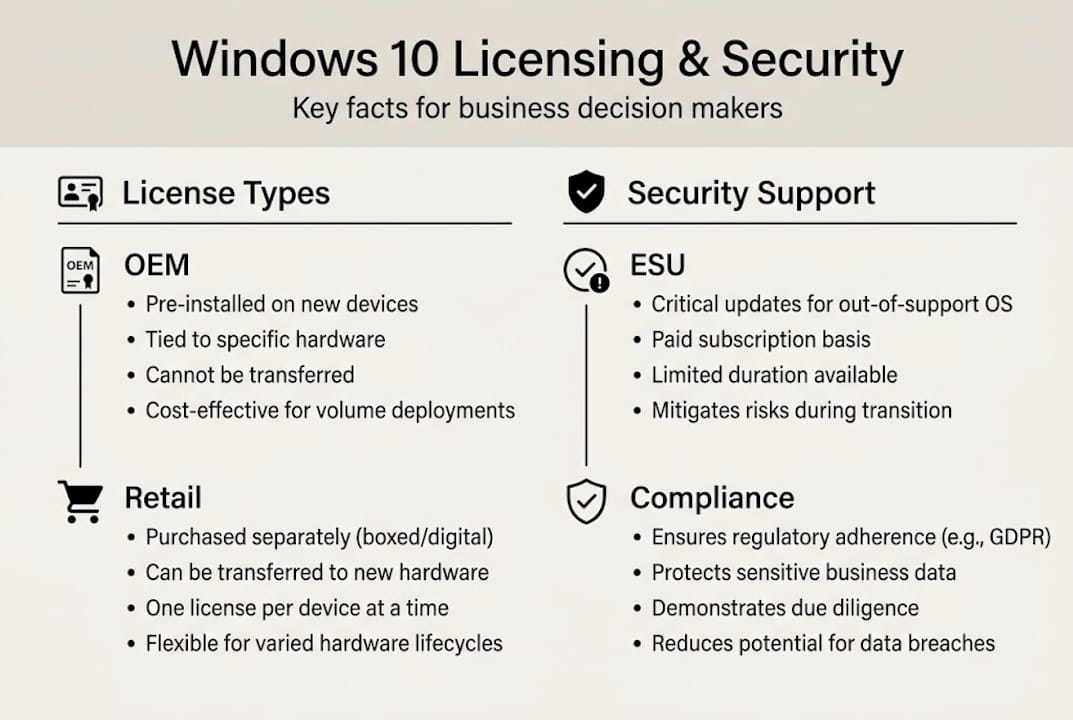
Microsoft did create a safety net called Extended Security Updates (ESU). This is a paid program that delivers critical security patches only, with no new features. It is designed as a short-term bridge, not a permanent fix. You can learn more about your options through this Windows 10 support explained guide.

| 特点 | During support | After support (no ESU) | After support (with ESU) |
|---|---|---|---|
| Security patches | ✅ Free | 🛑 无 | ✅ Paid, critical only |
| Feature updates | ✅ 是 | 🛑 No | 🛑 No |
| Bug fixes | ✅ 是 | 🛑 No | 🛑 Limited |
| Microsoft support | ✅ 满 | 🛑 无 | ⚠️ Limited |
For small businesses, ESU can buy time. But it is not cheap, and costs increase each year you stay on the program. Microsoft’s official end-of-support guidance is clear: upgrade to Windows 11 if your hardware allows.
📊 Statistic: As of early 2026, an estimated 240 million PCs running Windows 10 may not meet Windows 11’s hardware requirements, leaving a massive portion of the global user base in a vulnerable position.
Pro Tip: If you are a small business owner running Windows 10 Pro, ESU gives you a temporary secure window to plan your upgrade budget. But set a hard deadline. ESU is not a long-term strategy.
With clarity on Windows 10’s support status, we’ll explore how its features fare compared to Windows 11, especially for those deciding whether to upgrade.
Windows 10 vs Windows 11: Key differences and upgrade options
Windows 11 is not just a cosmetic refresh. It comes with tighter security requirements and a redesigned interface. But the upgrade is not right for everyone, especially if your hardware is older.
Feature comparison:
| 特点 | Windows 10 | 视窗 11 |
|---|---|---|
| Start menu | Classic, customizable | Centered, simplified |
| Security baseline | Standard | TPM 2.0 + Secure Boot required |
| Support status | Ended Oct 2025 | Active, ongoing |
| Hardware requirements | Flexible | Strict (TPM 2.0 minimum) |
| Update model | Semi-annual | Annual feature updates |
| Android app support | ❌ 否 | ✅ Yes (via Amazon store) |
Windows 11 requires TPM 2.0 (Trusted Platform Module, a security chip) and 安全启动 enabled in your BIOS. Many PCs made before 2017 do not meet these requirements. That is why millions of users are stuck on Windows 10 even if they want to upgrade.
Microsoft encourages upgrading to Windows 11 for all users whose hardware qualifies. If you are unsure whether your PC qualifies, Microsoft’s PC Health Check tool gives you a quick answer.
Upgrade options available to you:
- ✅ Free upgrade via Windows Update (if hardware compatible)
- ✅ Purchase a new Windows 11 license for a clean install
- ✅ Buy a new PC with Windows 11 pre-installed
- 🛑 Bypass hardware checks (not recommended, unsupported by Microsoft)
If you are ready to move, the Windows 11 upgrade guide walks you through the process step by step. You can also check out the specifics of updating to Windows 11 for free if your device qualifies.
For SMBs, the upgrade decision also affects licensing costs, compliance requirements, and software compatibility. Plan it carefully rather than rushing.
With upgrade options understood, the next step is protecting your PC and data, whether you remain on Windows 10 or transition to 11.
How to stay secure and legit on Windows 10: Licensing and practical tips
Staying on Windows 10 in 2026 is a choice many users are making. But it comes with responsibilities. Here is how to do it right.
Step-by-step: Keeping Windows 10 secure post-support
- Verify your license is genuine. A fake or pirated key puts you at risk of deactivation and leaves you ineligible for ESU.
- Enroll in ESU if you need more time. ESU covers critical vulnerabilities but not new features or general bug fixes, so understand its limits.
- Use a reputable third-party antivirus. Microsoft Defender still works, but pairing it with a dedicated security tool adds a layer of protection.
- Back up your data regularly. Without OS-level patches, your exposure to ransomware increases. A solid backup routine is your safety net.
- Avoid suspicious software and email attachments. Unpatched systems are prime targets for phishing and malware campaigns.
Pro Tip: Always buy your Windows license from a verified reseller. Cheap keys from unknown marketplaces are often pirated, revoked, or tied to stolen volume licenses. You save a few dollars now and risk losing everything later.
Common pitfalls to avoid:
- 🛑 Buying keys from unofficial marketplaces or social media sellers
- 🛑 Using cracked or “loader” activation tools
- 🛑 Ignoring ESU enrollment deadlines
- 🛑 Skipping antivirus because “Windows Defender is enough”
- 🛑 Delaying backups until after something goes wrong
For a full breakdown of your options, the Windows 10 licensing guide covers OEM vs. retail licenses, what each covers, and where to buy safely.
Genuine licenses are not just about legality. They are about access. Only genuine keys unlock ESU eligibility, full Microsoft support, and clean activation without risk of being blocked.
Having covered how to secure and legitimize your Windows 10 installation, let’s look at the bigger picture, what most guides overlook about staying on Windows 10 in 2026.
The real-world reality of Windows 10 in 2026: What most guides miss
Most articles will tell you Windows 10 still works fine. And technically, that is true. But “works fine” and “is safe” are two very different things.
Here is what we see from experience: users and small businesses treat ESU as a permanent solution rather than a bridge. Microsoft itself warns against long-term reliance on ESU, yet many organizations renew year after year without a real upgrade plan.
The hidden risks go beyond security patches. Staying on Windows 10 long-term means your software vendors will eventually drop compatibility. Your compliance requirements, especially if you handle customer data, may be affected. And when hardware finally fails, replacing it with a Windows 10 machine becomes harder and more expensive.
Our honest recommendation: if your hardware supports Windows 11, upgrade now. If it does not, use ESU as a budget bridge while you plan a hardware refresh. Review the Windows 10 vs Windows 11 comparison to make a fully informed decision. The short-term convenience of staying put is real. The long-term cost is higher than most people expect.
Get genuine Windows licenses and security support
If you are running Windows 10 in 2026 and want to stay secure and compliant, the first step is making sure your license is genuine. A valid, official license is the foundation of everything else: ESU eligibility, Microsoft support, and clean activation.

在 operacinesistema.lt, we offer affordable, genuine Windows 10 and Windows 11 Pro licenses for individuals and small businesses. Whether you need a digital key delivered instantly or a physical USB version, we have you covered. Start by validating your Windows license key to confirm your current status. Then follow our secure license buying guide for a step-by-step purchase process. Not sure which license type fits your needs? Our 软件许可证类型 guide breaks it all down clearly. 🔥
常见问题
What happens to Windows 10 after October 2025?
After October 14, 2025, Windows 10 continues to function but receives no free security or feature updates. Extended Security Updates (ESU) are available for a fee to cover critical patches only.
Can I still upgrade from Windows 10 to Windows 11 in 2026?
Yes, if your device meets Windows 11’s hardware requirements, the upgrade is still available. Microsoft recommends upgrading as the primary path to staying secure.
What is ESU for Windows 10, and who should use it?
ESU delivers critical security patches without new features or bug fixes. It is best suited as a short-term bridge for businesses that cannot upgrade immediately, not as a permanent solution.
How do I check if my Windows 10 license key is valid?
You can verify your key through official Microsoft activation settings or use a trusted tool from a genuine vendor. A valid license ensures you are eligible for ESU and full Microsoft support.
Is it safe to keep using Windows 10 past end-of-support?
Using Windows 10 without ESU or upgrades is genuinely risky due to unpatched security vulnerabilities. Enrolling in ESU or upgrading to Windows 11 is strongly advised.





