
รับ Windows 10 แท้: คำอธิบายเกี่ยวกับการอนุญาตใช้สิทธิ์ การสนับสนุน และการอัปเกรด
สรุปสั้น:
- Windows 10 support ended in October 2025, eliminating free security updates and official support.
- Migrating to Windows 11 offers ongoing security, better compatibility, and improved hardware performance.
- Running unsupported Windows 10 poses compliance, security, and insurance risks; timely planning is essential.
วินโดวส์ 10 support has ended as of October 14, 2025, and millions of small businesses and individual professionals are still running it daily. No more free security patches. No more feature updates. No more official help from Microsoft. If you’re one of the many still depending on Windows 10, the risks are real and growing fast. This guide cuts through the confusion and gives you a clear, practical look at your legal licensing options, how to upgrade safely, and what to do if upgrading right now simply isn’t possible for your setup.
สารบัญ
- What Windows 10 end of support really means
- How to get a genuine and compliant Windows 10 license today
- Upgrading to Windows 11: When and why to move on
- What if you can’t upgrade? Extended Security Updates (ESU) explained
- Our take: Why clinging to Windows 10 misses the bigger risk
- Next steps: Secure your OS license and plan ahead
- คำถามที่พบบ่อย
ประเด็นสำคัญ
| จุด | รายละเอียด |
|---|---|
| Windows 10 is Unsupported | No free security or feature updates are available after October 2025. |
| Genuine Licensing Matters | Use only trustworthy CSP partners or official sellers to avoid compliance risks. |
| Upgrade is the Safest Path | Switch to Windows 11 if your hardware allows to ensure ongoing support and security. |
| ESU is Temporary | Extended Security Updates can buffer your transition but increase in cost each year. |
| Check Compatibility Early | Assess your hardware and applications now to avoid last-minute disruptions. |
What Windows 10 end of support really means
Now that you’re aware Windows 10 support has officially ended, it’s crucial to understand what this means for your devices and business.
“End of support” sounds technical, but the impact is straightforward. Once Microsoft stops supporting an operating system, it stops sending free security updates, bug fixes, and patches. Your computer keeps working, but it becomes a target. Every new vulnerability discovered after October 14, 2025 stays open and unpatched unless you pay for Extended Security Updates (more on that below).
Here’s what specifically stops when support ends:
- ✅ Free security updates — gone
- ✅ Feature updates and improvements — gone
- ✅ Official Microsoft technical support — gone
- ✅ Compatibility guarantees for new software — no longer assured
For individual users, this is inconvenient. For small businesses and professionals, it’s a serious problem.
🛑 Why this matters for compliance: Many industries, including healthcare, finance, and legal services, require organizations to run supported software. Using an unsupported OS can void your cyber insurance policy, trigger compliance violations, and expose you to liability if a breach occurs.
Software incompatibility is another growing concern. Developers are already building new apps and updates for Windows 11. Over time, more tools will simply refuse to install or run properly on Windows 10. That means productivity losses on top of security risks.
For a deeper look at how Windows 10 and Windows 11 differ in terms of business use, the Windows 10 upgrade guide covers the key decision points. You can also check the 10 vs 11 differences to see which version fits your workflow best.
The bottom line: running Windows 10 without a plan isn’t a neutral choice anymore. It’s an active risk.
How to get a genuine and compliant Windows 10 license today
Understanding the risks makes it even more important to use only legitimate, compliant Windows 10 licenses.
Some users still need Windows 10 for specific reasons, whether it’s legacy software compatibility, hardware limitations, or a planned transition timeline. If that’s you, here’s how to get a genuine license legally.
Legitimate paths to a Windows 10 license:
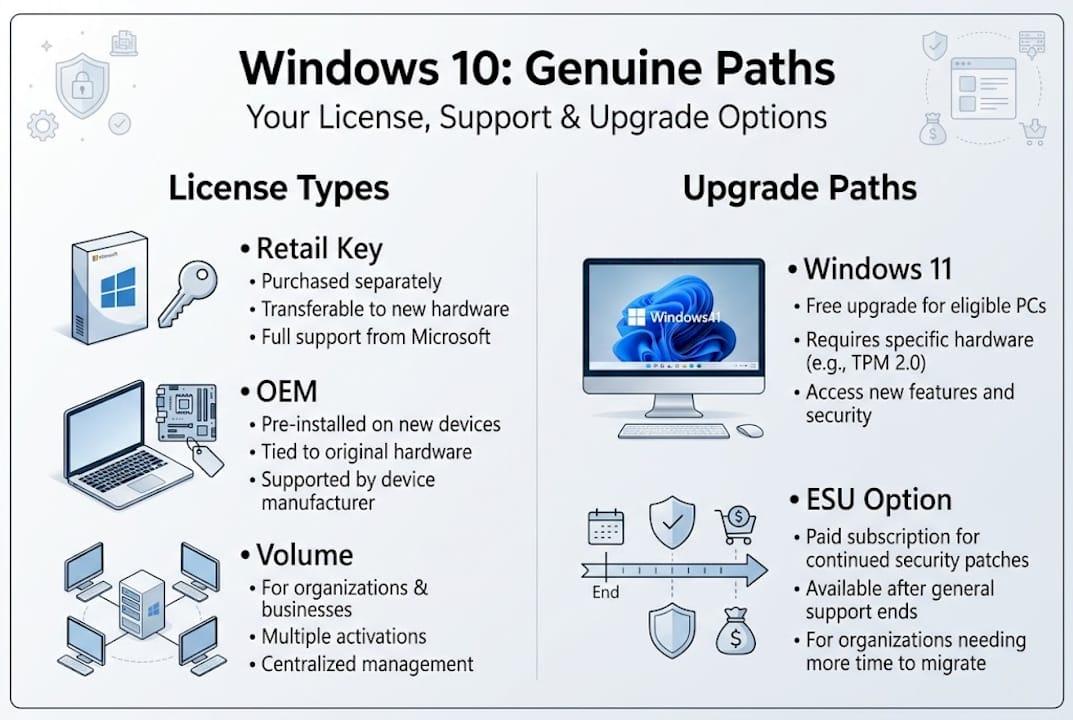
- Microsoft CSP partners — Cloud Solution Provider partners are authorized to sell Windows licenses directly to businesses. This is the most common route for small and mid-size organizations.
- Volume Licensing Service Center (VLSC) — Designed for larger organizations managing multiple devices, VLSC lets you purchase and manage licenses at scale.
- Authorized retail re-sellers — Individual users and small teams can buy genuine retail licenses from trusted re-sellers. Always verify the seller’s credentials before purchasing.
- Microsoft Enterprise E3 subscription — This subscription upgrades Windows Pro to Enterprise features without requiring a new activation key or system reboot. It’s priced per user per month and is flexible for teams of 1 to 300 users, making it a strong fit for growing SMBs.
Pro Tip: Before buying any license, run the Windows Activation troubleshooter (Settings > Update & Security > Activation) to check if your current copy is already genuine. You might already be covered.
Here’s a quick comparison of your main options:
| ประเภทใบอนุญาต | เหมาะที่สุดสำหรับ | Cost model | ความยืดหยุ่น |
|---|---|---|---|
| Retail license | Individuals, small teams | One-time purchase | โอนได้ |
| ใบอนุญาต OEM | Single device, builders | One-time, device-locked | Not transferable |
| CSP/Enterprise E3 | SMBs, growing teams | Monthly per user | สูง |
| VLSC volume | Larger organizations | Annual agreement | ปานกลาง |
🛑 Watch out for fake keys. Suspiciously cheap activation keys sold on unverified marketplaces are often invalid, already used, or flagged by Microsoft. They may activate temporarily but get blocked later, leaving you without a working OS. Stick to genuine Windows 10 Pro licenses from verified sources.
A genuine license protects you legally, keeps your system activatable, and ensures you’re covered if anything goes wrong.

Upgrading to Windows 11: When and why to move on
But with support for Windows 10 ended, the most robust solution for most is upgrading. Let’s see when that’s possible and how to do it.
Windows 11 is fully supported, actively updated, and increasingly the standard for business software compatibility. Moving to it is the cleanest way to eliminate the risks that come with running an unsupported OS.
Key benefits of upgrading to Windows 11:
- 🔥 Ongoing security updates and feature improvements
- ✅ Better compatibility with new business software
- ✅ Improved performance on modern hardware
- ✅ Stronger compliance posture for regulated industries
- ✅ Enhanced security features like TPM 2.0 integration
The free upgrade to Windows 11 is still available for qualifying hardware. To check if your device qualifies, use Microsoft’s PC Health Check tool, available directly from Microsoft’s website.
| ข้อกำหนด | Minimum spec |
|---|---|
| โปรเซสเซอร์ | 1 GHz, 2+ cores, 64-bit |
| RAM | 4 GB |
| การจัดเก็บ | 64 GB |
| TPM | Version 2.0 |
| แสดง | 720p, 9″ or larger |
If your hardware meets these specs, upgrading to Windows 11 costs you nothing and gives you years of continued support. The process is straightforward through Windows Update.
Pro Tip: Back up your files before upgrading. Use an external drive or cloud storage. Most upgrades go smoothly, but it’s always smart to protect your data first.
Not sure how to do it step by step? The guide on how to update to Windows 11 for free walks you through the entire process without the technical headaches.
The one scenario where you might not upgrade yet: your device doesn’t meet the hardware requirements, or you rely on software that isn’t yet certified for Windows 11. In those cases, read the next section carefully.
What if you can’t upgrade? Extended Security Updates (ESU) explained
Still, not every business can immediately upgrade. Here’s what you can do if you’re temporarily stuck on Windows 10.
Microsoft offers Extended Security Updates (ESU) as a paid bridge for users who need more time. ESU delivers security patches only, keeping your system protected from newly discovered vulnerabilities while you plan your transition.
What ESU covers and what it doesn’t:
- ✅ Critical and important security patches
- ❌ No new features
- ❌ No technical support from Microsoft
- ❌ No compatibility updates for new software
- ❌ Does not resolve compliance risks in regulated industries
📊 ESU pricing escalates sharply each year:
- Year 1: $61 per device (business)
- Year 2: $122 per device
- Year 3: $244 per device
As the ESU cost data shows, by year three you’re paying nearly $250 per device just for security patches, with no added functionality. For a team of 10 devices, that’s $2,440 in year three alone.
One upside for ESU users: Microsoft 365 Apps remain supported on Windows 10 through 2028 when ESU is active. So your Word, Excel, and Outlook keep working and receiving updates during that window.
Pro Tip: ESU is a short-term fix, not a strategy. Use it only if you have a clear timeline for upgrading or replacing hardware. If you’re using ESU without a transition plan, you’re paying more each year for less protection.
For businesses with legacy apps that aren’t yet compatible with Windows 11, ESU buys time. But the clock is ticking and the costs keep rising. Planning your secure upgrade from Windows 10 now is far smarter than waiting until year three.
Our take: Why clinging to Windows 10 misses the bigger risk
With the technical facts laid out, here’s what most guides miss and why it matters for your future-readiness.
Most conversations about Windows 10 end of support focus on cost. Upgrade costs, ESU costs, hardware replacement costs. But the real risk is strategic, not financial.
Cyber insurance providers are already updating their policies to exclude claims from organizations running unsupported software. Compliance frameworks like HIPAA and PCI-DSS increasingly require a supported OS as a baseline control. If you experience a breach on an unpatched Windows 10 machine, you may find your insurance won’t pay out and your regulator won’t be sympathetic.
ESU delays the exposure but doesn’t eliminate it. You’re still running an OS that receives no new features, no compatibility improvements, and no real support. Every month on ESU is a month your competitors on Windows 11 are pulling ahead in capability and security posture.
We believe the smarter move is to treat this as a planning opportunity, not just a cost problem. Audit your devices now. Identify which ones can upgrade for free. Budget for hardware replacement where needed. And if Windows 10 or 11 genuinely isn’t the right fit, explore other OS alternatives before defaulting to the most expensive path.
The businesses that plan now will spend less and stress less in 2027.
Next steps: Secure your OS license and plan ahead
Being proactive starts now. Here are direct solutions and actionable resources to simplify your Windows licensing journey.
Whether you need to validate your current license, find the right license type for your team, or map out a compliant upgrade path, we’ve got you covered. Start by understanding how to choose a software license that fits your actual needs, whether that’s OEM, retail, or volume.

Not sure if your current key is valid? Use our license key validity check tool to confirm your activation status before making any decisions. And when you’re ready to purchase, our secure license buying guide walks you through every step so you buy safely, legally, and with confidence. 🎁
คำถามที่พบบ่อย
Can I still use Windows 10 on my business computers in 2026?
Yes, but it carries real risk. Since support ended October 14, 2025, Windows 10 no longer receives free security updates, so you should upgrade or enroll in paid ESU for any essential systems.
How much do Extended Security Updates (ESU) cost for Windows 10?
In 2026, ESU costs $61 per device for businesses in year one, rising to $244 per device by year three.
Is upgrading from Windows 10 to Windows 11 still free?
Yes. If your hardware meets the minimum requirements, the upgrade to Windows 11 is completely free and gives you full ongoing support and updates.
Can I still get a genuine Windows 10 license?
Yes, genuine licenses via CSP partners and authorized re-sellers are still available, but factor in long-term viability and compliance requirements before purchasing.
Will my Microsoft 365 Apps work on Windows 10 after support ends?
Microsoft 365 Apps are supported on Windows 10 through 2028 for users enrolled in ESU, so your productivity tools keep working during that period.
แนะนำ
- วิธีซื้อและเปิดใช้งาน Windows 10 ของแท้อย่างถูกกฎหมายและปลอดภัย
- Windows 10 Pro: การออกใบอนุญาตที่ปลอดภัย, คุณสมบัติ และการปฏิบัติตามข้อกำหนด
- คู่มือการซื้อลิขสิทธิ์ Windows อย่างปลอดภัย: คู่มือแบบขั้นตอนต่อขั้นตอนสำหรับการซื้อซอฟต์แวร์
- อัปเกรดจาก Windows 10 เป็น Windows 11 อย่างปลอดภัยด้วยลิขสิทธิ์แท้





