
Software Reinstallation Rights: What You Need to Know
TL;DR:
- Software reinstallation rights are defined by your license agreement and not by the act of purchase. Violating these rights can lead to license termination, legal issues, and operational risks for individuals and small businesses.
Software reinstallation rights are defined by your license agreement, not by the act of purchase. When you buy software, you acquire a license to use it under specific conditions. You do not own the software itself. That distinction controls whether you can reinstall it, move it to a new device, or transfer it to someone else. Understanding software reinstallation rights is the first step to avoiding accidental breaches, costly penalties, and sudden loss of access. This applies whether you are an individual user or a small business owner managing multiple machines.
What are software license agreements and how do they define reinstallation rights?
A software license agreement is a legal contract between the software vendor and the user that defines exactly what you can and cannot do with the software. The industry standard term for this document is the End User License Agreement, or EULA. Every major software product, including Microsoft Windows, Adobe products, and most business applications, ships with one.
The EULA contains several clauses that directly govern your reinstallation rights:
- License Grant: Specifies how many devices you can install the software on, typically 1–2 for consumer licenses.
- Restrictions: Lists prohibited actions, such as copying, sublicensing, or installing beyond the permitted device count.
- Transfer Rights: States whether you can move the license to a new device or sell it to another user.
- Termination Conditions: Describes what triggers license cancellation and what you must do afterward.
Most consumer software uses clickwrap agreements, meaning you accept the EULA by clicking “I Agree” during installation. That click creates a binding legal contract. The problem is that most users never read what they agreed to.
Proprietary licenses, such as those from Microsoft or Adobe, are far more restrictive than open-source licenses. An open-source license like the GNU General Public License (GPL) typically allows free reinstallation, redistribution, and modification. A proprietary EULA does not. Reinstallation and transfer rights must be explicitly granted in the license. If the EULA is silent on a right, copyright law treats it as prohibited.

Dica profissional: Before purchasing any software, search for the product name plus “EULA” or “license terms” online. Read the License Grant and Transfer Rights sections before you pay, not after.
Understanding software licenses at this level gives you real power. You know exactly what you bought and what you are allowed to do with it.
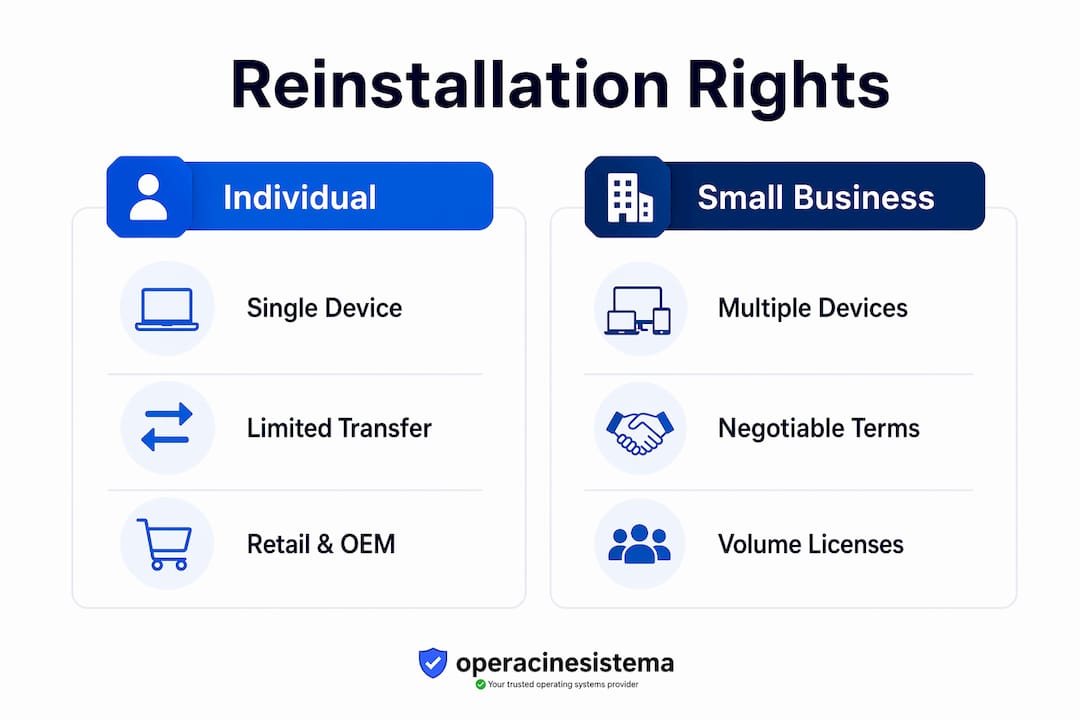
How do reinstallation and transfer policies work for individuals vs. small businesses?
The rules differ significantly depending on whether you are a personal user or a business. Individual consumers typically face the strictest limits. Most consumer licenses allow installation on one or two personal devices. If you get a new laptop and want to move your software over, you must first deactivate the license on the old machine. Skip that step, and you are in breach of contract.
Small businesses face a more complex picture. A company with ten employees needs ten seats, not one. Vendors offer several licensing models to address this:
- Seat licenses: Each individual user gets one license tied to their account or device.
- Volume licenses: A single agreement covers a defined number of installations, often at a lower per-unit cost.
- Concurrent use licenses: A set number of users can run the software simultaneously, regardless of total installs.
70% of software licenses undergo negotiation in B2B contexts. That means small businesses have real leverage to negotiate explicit reinstallation and transfer rights before signing. Most owners do not realize this and accept the standard terms by default.
Common pitfalls for businesses include exceeding the allowed installation count during hardware refreshes, failing to de-provision licenses when employees leave, and losing track of which machines hold active installations. Each of these scenarios can trigger a license audit or termination.
Follow these steps to stay compliant when reinstalling or transferring software:
- Locate your original EULA and confirm the permitted installation count.
- Deactivate the license on the current device using the vendor’s official tool.
- Confirm deactivation in the vendor’s account portal before wiping the device.
- Install the software on the new device using the original license key.
- Activate and verify the license is recognized as valid by the vendor’s servers.
- Update your internal license inventory to reflect the change.
Dica profissional: When negotiating a software contract for your business, ask the vendor in writing to include explicit reinstallation and transfer rights. Get the number of permitted reinstalls stated clearly in the agreement, not buried in a referenced document.
For Windows licensing for small businesses, these steps are especially relevant. Microsoft’s licensing terms for Windows 10 and Windows 11 Pro distinguish between OEM, Retail, and Volume licenses, each with different reinstallation rules.
What are the legal implications of violating software reinstallation rights?
Breaching your license agreement carries real consequences. The most immediate is license termination. Most proprietary licenses are non-transferable without vendor approval, and unauthorized transfer or over-installation is a common trigger for termination. Once terminated, you lose the right to use the software immediately.
Termination clauses are not just a slap on the wrist. Termination clauses require ceasing use and deleting all copies of the software immediately. For cloud-based software, termination often means losing access to your data entirely. That is a serious operational risk for any business.
Beyond termination, you face potential legal exposure:
- Breach of contract: The vendor can sue for damages based on the value of the licenses you used without authorization.
- Copyright infringement: Installing software beyond the permitted count may constitute copyright infringement under U.S. law, separate from the contract claim.
- Financial penalties: Enterprise vendors conduct formal license audits. If your business is found out of compliance, back payments and penalty fees can be substantial.
- Reputational damage: For businesses, a public audit finding signals poor governance to clients and partners.
Warning: Vendors like Microsoft use software activation mechanisms to enforce compliance automatically. Windows 10 and Windows 11 Pro will enter a reduced functionality mode if the license is not validated. You cannot simply ignore the issue and keep working.
Consider two real scenarios. An individual buys a retail copy of Windows 11 Pro and installs it on three personal computers without deactivating the previous installations. Microsoft’s activation servers flag the excess installs. The license is blocked on the third machine. The user must purchase an additional license or deactivate one of the existing installs to restore access.
A small business replaces ten laptops but does not de-provision the old licenses. The vendor’s audit finds 20 active installs against a 10-seat agreement. The business owes back licensing fees for the excess installs, plus potential penalties. The cost far exceeds what a proper deactivation process would have required.
How to practically manage and ensure your software reinstallation rights are respected
Good license management is not complicated. It requires discipline and a simple system. The following steps cover the full lifecycle of a software license from purchase to reinstallation.
- Archive your EULA at purchase. Keep a PDF or screenshot of the license agreement the moment you buy. Vendors update their terms over time, and your rights are governed by the version you accepted.
- Record your license keys and activation details. Store them in a secure, centralized location. A simple spreadsheet works for small teams. Dedicated tools like Microsoft’s Volume Licensing Service Center work for larger deployments.
- Deactivate before reinstalling. Proper deactivation prior to reinstalling is the single most overlooked compliance step. Use the vendor’s official sign-out or deactivation tool, not just an uninstall.
- Use official reinstallation tools. Microsoft provides the Media Creation Tool for Windows 10 and Windows 11. Adobe provides the Creative Cloud desktop app. Using unofficial sources voids your license and introduces security risks.
- Monitor your installation count. Review active installs quarterly. Most vendor portals show this data. For Windows, the Microsoft 365 Admin Center displays active device activations per account.
- Consult vendor support or legal counsel when uncertain. If your EULA is ambiguous about a specific reinstallation scenario, contact the vendor’s support team and get the answer in writing.
The table below summarizes the key license types for Windows and their reinstallation rules:
| Tipo de licença | Devices Allowed | Transferível? | Reinstall on New Device? |
|---|---|---|---|
| OEM | 1 (tied to hardware) | De | No (tied to original machine) |
| Varejo | 1 active at a time | Sim | Yes, after deactivation |
| Volume (MAK) | Per agreement | Limitada | Yes, within seat count |
| Volume (KMS) | Per agreement | Limitada | Yes, within seat count |
Dica profissional: If you are buying Windows for a business device that will be replaced in two to three years, choose a Retail license over OEM. The Retail license transfers to new hardware. The OEM license does not.
For a full breakdown of these options, the Windows license types guide at Operacinesistema covers OEM, Retail, and Volume licenses in detail.
Principais conclusões
Software reinstallation rights are controlled entirely by your license agreement, and violating those terms risks immediate termination, financial penalties, and data loss.
| Ponto | Detalhes |
|---|---|
| Purchase grants a license, not ownership | You buy the right to use software under specific conditions, not the software itself. |
| Reinstallation requires deactivation first | Always deactivate the existing install before moving a license to a new device. |
| Transfer rights must be explicit | If the EULA does not grant transfer rights, copyright law treats them as prohibited. |
| Businesses can negotiate license terms | 70% of B2B software licenses are negotiated; SMBs can request explicit reinstallation rights. |
| OEM licenses do not transfer | OEM Windows licenses are tied to the original hardware and cannot move to a new machine. |
Why I think most people are one hardware refresh away from a compliance problem
I have reviewed hundreds of license agreements across Microsoft, Adobe, and smaller SaaS vendors. The pattern is always the same. Individuals and small business owners assume that buying software means they own it outright. They reinstall freely, skip deactivation, and never read the EULA. Then a hardware refresh happens, or an employee leaves, and suddenly there are more active installs than the license allows.
The biggest misconception is equating purchase with ownership. That single misunderstanding is the root cause of most compliance problems I see. It is not malicious. People genuinely believe they paid for the software, so they can do what they want with it. The law disagrees.
What I find most frustrating is how vendors bury restrictive clauses in dense legal language. The reinstallation limit is rarely on the product page. It is on page seven of a document you clicked through in thirty seconds. That is by design.
My practical advice: treat your license agreement like a lease, not a receipt. A lease tells you exactly what you can and cannot do with the property. Violate the terms and you lose access. The same logic applies here. Read the agreement before you buy, archive it after you buy, and review it before every hardware change.
For small business owners specifically, the negotiation angle is underused. Negotiating reinstallation rights upfront is a cost-saving move that most SMBs ignore. A 30-minute conversation with a vendor before signing can prevent a five-figure compliance bill two years later. That is a return on time that is hard to beat.
— Danielius
Operacinesistema’s resources for license compliance
Managing software reinstallation rights gets much easier when you have the right checklist in front of you. Operacinesistema has built practical tools specifically for individuals and small businesses navigating Windows license compliance.

O Windows License Checklist for Individuals and SMBs walks you through every step, from verifying your license type to confirming proper deactivation before a reinstall. It covers OEM, Retail, and Volume scenarios so you know exactly where you stand. For businesses buying new licenses, the software license checklist for SMBs helps you verify compliance before and after purchase. Both resources are free and built around the real risks that individuals and small business owners face every day.
Perguntas frequentes
What does “software reinstallation rights” actually mean?
Software reinstallation rights refer to the permissions granted by your license agreement to reinstall software on the same or a different device. These rights are not automatic. They depend entirely on the terms of your EULA.
Can I reinstall Windows on a new computer with the same license key?
It depends on the license type. A Retail Windows license can transfer to a new device after deactivating the old one. An OEM license is permanently tied to the original hardware and cannot move to a new machine.
What happens if I install software on more devices than my license allows?
You breach your license agreement. The vendor can terminate your license, require you to delete all copies, and pursue financial penalties. Microsoft’s activation system will also block the excess install automatically.
Do I need to deactivate software before reinstalling on the same device?
For most proprietary software, deactivation is not required for a same-device reinstall. However, de-provisioning before hardware refreshes is critical to avoid accidental over-installation across multiple machines.
Can small businesses negotiate reinstallation rights with software vendors?
Yes. Most B2B software agreements are negotiable, and small businesses can request explicit reinstallation and transfer rights before signing. Getting these terms in writing protects you during hardware refreshes and staff changes.
Recomendado
- Software License Refund Policies: Know Your Rights
- Por que a legitimidade do software é importante para os usuários do sistema operacional da Microsoft
- Guia de instalação do sistema operacional: Instalação segura do Windows
- Lista de verificação de instalação do Windows 2026: garanta uma configuração genuína





