How to choose the right Windows OS version: a guide
Selecting a Windows operating system version can feel overwhelming when you need to balance legal compliance, robust security, and a reasonable budget. Many individuals and small business owners struggle to navigate the confusing landscape of editions, licensing types, and vendors while avoiding counterfeit software and wasted expenses. This guide walks you through understanding Windows OS versions, evaluating your specific needs, purchasing securely from verified sources, and maintaining compliance after installation. By the end, you will have a clear framework for choosing a genuine Windows OS version that fits your situation perfectly.
Satura rādītājs
- Galvenie secinājumi
- Understanding Windows OS versions and licensing types
- Evaluating your needs: security, compatibility, and budget
- Step-by-step guide to choosing and purchasing the right Windows OS version
- Verifying your Windows OS after installation and maintaining compliance
- Explore reliable sources for secure Windows OS licenses
- Frequently asked questions
Galvenie secinājumi
| Punkts | Sīkāka informācija |
|---|---|
| Edition and license match | Choose the Windows edition and license type that align with your tasks and security needs to avoid overpaying or missing essential features. |
| Buy from trusted vendors | Purchase only from verified vendors to ensure genuine product keys, proper activation, and reliable support. |
| Pārbaudiet aparatūras savietojamību | Before buying, confirm your hardware meets the minimum system requirements for your chosen edition to prevent activation issues. |
| Assess security needs | Consider whether you need encryption and remote access features, which are tied to Pro or higher editions. |
| Plan for updates and support | The level of updates and official support depends on the OS edition and licensing type you select. |
Understanding Windows OS versions and licensing types
After reviewing the key takeaways, you need foundational knowledge about Windows editions and licensing models to make an informed choice. Windows editions range from Home for casual users to Pro for professionals and small businesses requiring advanced features like BitLocker encryption, remote desktop capabilities, and domain joining. Enterprise and Education editions exist for larger organizations with volume licensing needs. Each edition targets specific user scenarios, so matching your daily tasks and security requirements to the right edition prevents overpaying for unused features or lacking critical tools.
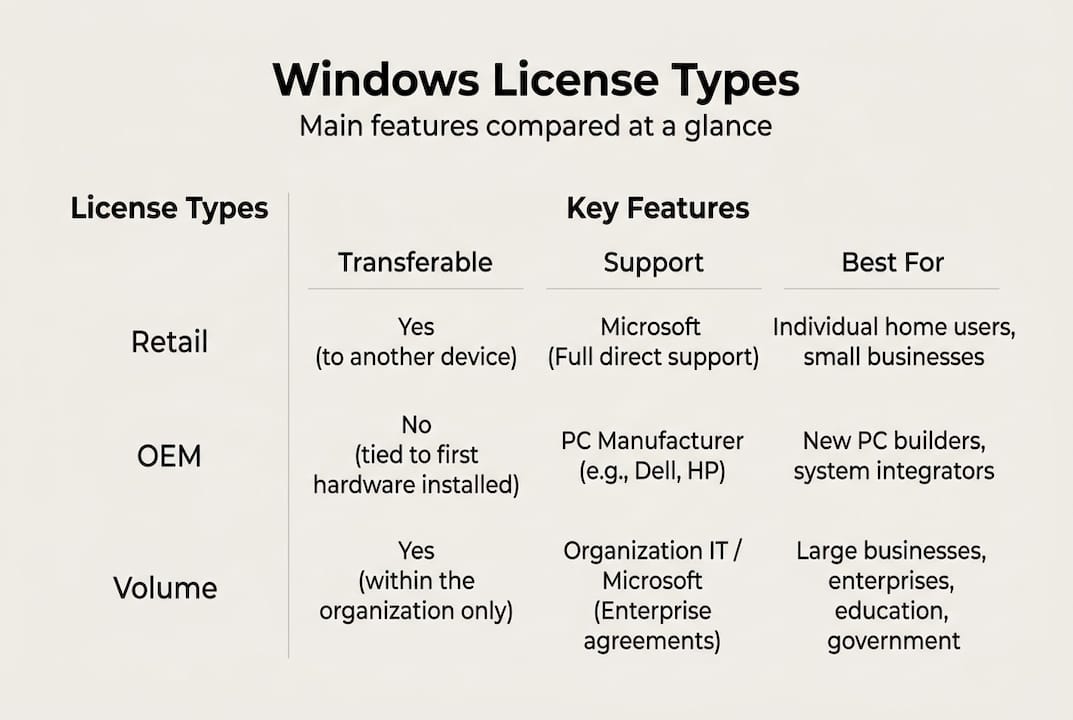
Licensing types affect how you can use, transfer, and support your Windows installation. Retail licenses offer more flexibility and transferability compared to OEM licenses, which typically bind to the original hardware and cannot be moved to another computer. OEM licenses cost less upfront but sacrifice transfer rights and direct Microsoft support. Volume licensing suits businesses deploying Windows across multiple devices, offering centralized management and cost efficiency at scale. Understanding these distinctions helps you select a license that aligns with your hardware lifecycle, support expectations, and budget constraints.
Choosing the wrong license type creates compliance headaches and activation failures. OEM licenses purchased separately from hardware may violate terms of use, while counterfeit retail keys lead to deactivation and security vulnerabilities. Small businesses often benefit from retail licenses for flexibility or volume agreements for cost savings, while individuals prioritizing budget might accept OEM limitations. Evaluate your plans for hardware upgrades, device replacement cycles, and support needs before committing to a licensing model.
Comparison of Windows licensing types:
| Licences veids | Pārnesamība | Atbalsts | Typical Cost | Vislabāk piemērots |
|---|---|---|---|---|
| Mazumtirdzniecība | Transferable to new hardware | Tiešais Microsoft atbalsts | Higher | Users upgrading devices frequently |
| OEM | Saistīts ar oriģinālo aparatūru | Manufacturer support only | Apakšējā | Budget-conscious single-device users |
| Tilpums | Organization-wide deployment | Enterprise support | Variable per seat | Businesses with multiple installations |
Pro Tip: Before purchasing any license, verify your hardware meets the minimum system requirements for your chosen Windows edition to avoid compatibility issues and wasted investment.
Exploring secure Microsoft OS licenses from trusted vendors ensures you receive genuine products with proper activation and support channels. Legitimate sellers provide clear license documentation, official product keys, and transparent terms, reducing risks associated with counterfeit software that compromises security and legal standing.
Evaluating your needs: security, compatibility, and budget
After understanding OS types and licensing models, you must evaluate your practical requirements to narrow down compatible and sustainable options. Start by inventorying your hardware specifications including processor generation, RAM capacity, storage type, and graphics capabilities. Windows 11 requires TPM 2.0 and specific CPU generations, while Windows 10 has broader hardware compatibility. Attempting to install an incompatible OS version leads to performance issues, activation failures, and frustration.

Security needs vary dramatically between casual home users and small business owners handling sensitive client data. If you require encryption for stored files, BitLocker in Windows Pro editions provides robust protection. Remote desktop access for working from multiple locations demands Pro or higher editions. Up-to-date operating systems reduce malware risk significantly and improve overall security posture, making edition choice critical for compliance and data protection. Evaluate whether your work involves regulated data, remote access requirements, or multi-user environments before selecting an edition.
Software and peripheral compatibility often gets overlooked during OS selection. Legacy business applications may require specific Windows versions or compatibility modes. Specialized hardware like printers, scanners, or industry equipment needs driver support for your chosen OS. Research compatibility for mission-critical software and devices before committing to an OS version. Windows 11 offers modern features but may lack support for older applications, while Windows 10 provides broader legacy compatibility with extended support through October 2025.
Budget considerations extend beyond initial license cost to include long-term support, update availability, and potential upgrade expenses. Windows 10 licenses cost less than Windows 11 but approach end of support, requiring eventual migration. Factor in hardware upgrade costs if your current devices cannot run newer OS versions. Calculate total cost of ownership including license price, potential hardware investment, software compatibility solutions, and support needs over your planning horizon.
Key factors for needs assessment:
- Hardware compatibility with TPM, CPU, RAM, and storage requirements
- Security features needed for encryption, remote access, and data protection
- Software compatibility for business applications and specialized tools
- Peripheral support for printers, scanners, and industry-specific devices
- Budget for license, hardware upgrades, and ongoing support costs
- Upgrade path planning for future OS versions and hardware lifecycles
Pro Tip: Create a compatibility checklist documenting your critical software, hardware peripherals, and security requirements before shopping for an OS version to ensure you select a solution that works seamlessly with your existing technology ecosystem.
Understanding the importance of OS updates helps you appreciate why choosing a version with extended support matters for long-term security and functionality. Older OS versions lose security patches and feature updates, exposing you to evolving cyber threats and compatibility issues with modern software.
Step-by-step guide to choosing and purchasing the right Windows OS version
Moving from needs assessment to actionable purchasing instructions enables you to confidently acquire and activate a genuine OS. Follow this systematic process to minimize risks and ensure you receive legitimate software that meets your requirements.
Step-by-step purchasing process:
- Research official Microsoft OS editions on the Microsoft website to understand current offerings, feature differences, and pricing structures for Home, Pro, and other editions.
- Identify authorized sellers including Microsoft Store, reputable online retailers, and certified resellers who provide genuine licenses with proper documentation and support.
- Compare prices across authorized vendors while verifying seller reputation through customer reviews, business credentials, and industry certifications to avoid counterfeit sources.
- Verify license authenticity markers including holographic labels on physical media, official packaging quality, product key format, and seller transparency about license type and terms.
- Review return policies, activation support, and warranty terms before purchase to ensure you have recourse if issues arise during installation or activation.
- Complete purchase through secure payment methods that offer buyer protection, avoiding wire transfers or cryptocurrency payments that lack fraud protection.
- Document your purchase with receipts, product keys, and license agreements stored securely for future reference, compliance audits, and potential hardware transfers.
- Activate your OS immediately after installation using the provided product key, following official Microsoft activation procedures to confirm genuine software status.
Buying from verified vendors reduces risk of counterfeit software and licensing issues that compromise security and waste money on invalid licenses. Legitimate sellers provide transparent information about license types, clear activation instructions, and responsive customer support for troubleshooting.
License verification checklist:
| Verification Item | What to Check | Red Flags |
|---|---|---|
| Product Key Format | 25-character alphanumeric code | Unusual format or length |
| Packaging Quality | Official Microsoft branding and holographic labels | Poor print quality or missing security features |
| Vendor Reputation | Established business with verified reviews | New seller with no history or negative feedback |
| Price Reasonableness | Competitive but not suspiciously low | Prices far below market average |
| Documentation | Clear license terms and activation instructions | Vague or missing license information |
| Support Availability | Responsive customer service channels | No contact information or unresponsive support |
Pro Tip: Screenshot or photograph your product key immediately after receiving it and store the image in a secure, encrypted location separate from your device to prevent loss if your computer fails or gets stolen.
Learning techniques for identifying genuine Windows licences protects you from sophisticated counterfeit operations that mimic legitimate packaging and documentation. Authentic licenses include specific security features, proper activation behavior, and access to official Microsoft update channels that fake versions cannot replicate.
Verifying your Windows OS after installation and maintaining compliance
After installation and activation, verification and ongoing maintenance steps secure your investment and ensure continued compliance. Proper verification confirms you received genuine software, while maintenance sustains security and legal standing over time.
Use Windows built-in activation tools to verify your OS status immediately after installation. Navigate to Settings, then System, then Activation to view your activation status and license type. Genuine Windows displays “Windows is activated with a digital license” or “Windows is activated with a digital license linked to your Microsoft account.” Any other message indicates activation problems requiring immediate attention. Run Windows Update to confirm your OS receives official security patches and feature updates, as counterfeit software often cannot access Microsoft update servers.
Regularly apply official updates to sustain security and performance throughout your OS lifecycle. Enable automatic updates or establish a schedule for manual update checks to ensure you receive critical security patches addressing newly discovered vulnerabilities. Failure to maintain license compliance risks legal penalties and cybersecurity vulnerabilities that expose sensitive data to attackers exploiting unpatched systems. Small businesses face particular risk from compliance audits and data breaches resulting from outdated or unlicensed software.
Watch for counterfeit software symptoms including activation errors, inability to receive updates, unexpected system behavior, or requests to reactivate frequently. Genuine Windows activates once and remains activated unless you make major hardware changes. Report suspicious software to Microsoft through their anti-piracy reporting channels and contact your vendor immediately if you suspect you received counterfeit software. Document all communications and preserve purchase records for potential refund claims or legal action.
Ongoing compliance maintenance:
- Check activation status monthly through Settings to catch deactivation early
- Apply security updates within 48 hours of release for critical patches
- Maintain organized records of purchase receipts, product keys, and license agreements
- Document hardware changes that might trigger reactivation requirements
- Schedule annual compliance reviews for business environments with multiple licenses
- Train employees on software licensing policies to prevent accidental violations
“Maintaining proper license documentation and activation records protects your business from compliance audits and demonstrates due diligence in software asset management, reducing legal exposure and ensuring uninterrupted operations.”
Understanding the importance of software legitimacy extends beyond legal compliance to encompass security, reliability, and access to support resources. Legitimate software receives timely security updates, functions reliably without unexpected behavior, and provides access to official Microsoft support channels when you encounter technical issues.
Prepare for potential compliance audits by maintaining comprehensive records of all software purchases, licenses, and activations. Business Software Alliance audits and Microsoft compliance verification requests require proof of legitimate licenses for all installed software. Organize documentation in secure, backed-up storage accessible to authorized personnel. Consider using software asset management tools for businesses with multiple devices to track license assignments, expiration dates, and compliance status across your organization.
Explore reliable sources for secure Windows OS licenses
After equipping yourself with selection and verification knowledge, finding trusted resources helps you proceed safely and confidently with your purchase. Reliable vendors provide genuine licenses, transparent terms, and responsive support that protects your investment and ensures smooth activation.

Operating system legitimacy directly impacts your security posture, legal compliance, and long-term costs. Discovering secure Microsoft OS licenses for SMBs tailored to small business requirements ensures you receive appropriate editions with business-grade features and support. These resources help you navigate licensing options, compare costs, and select solutions matching your operational needs without overpaying for unnecessary features or risking compliance violations.
Implementing a software license compliance checklist provides a systematic approach to managing your Windows licenses, tracking renewals, and maintaining audit-ready documentation. This proactive approach prevents compliance gaps, reduces legal exposure, and demonstrates responsible software asset management to stakeholders and potential auditors.
Applying secure Microsoft software buying tips protects you from common purchasing mistakes and counterfeit software schemes. These practical guidelines cover vendor verification, price reasonableness assessment, and activation validation techniques that safeguard your budget and ensure you receive genuine products backed by proper support and warranty coverage.
Frequently asked questions
Which Windows OS version is best for small business use?
Windows 11 Pro generally serves small businesses best due to comprehensive security features including BitLocker encryption, Windows Hello biometric authentication, and advanced threat protection. Pro editions also provide essential business tools like remote desktop, domain joining, and group policy management. Your specific choice depends on hardware compatibility and whether your business applications support Windows 11. Explore Windows OS for small businesses to compare editions and licensing options matching your operational requirements.
How can I tell if a Windows OS license is genuine?
Check vendor reputation through verified customer reviews and business credentials before purchasing. Examine product key format for proper 25-character structure, inspect packaging for official Microsoft branding and holographic security labels, and verify the activation process follows official Microsoft procedures. Use Microsoft’s official validation tools after installation to confirm genuine status. Learn detailed techniques for identifying genuine Windows OS licenses to protect yourself from sophisticated counterfeit operations.
What should I do if my Windows OS fails activation?
Verify your product key matches the Windows edition you installed and confirm your license type allows installation on your hardware. Check your internet connection, as activation requires online verification with Microsoft servers. Contact your vendor’s support team immediately if errors persist, providing your purchase documentation and specific error codes. Consider resolving Windows activation issues through official Microsoft troubleshooting tools or reinstalling if compatibility problems exist between your hardware and OS version.
Is it worth buying the latest Windows OS version?
Latest Windows versions offer improved security features, modern interface enhancements, better hardware support, and extended update availability that protects your investment longer. Windows 11 provides superior security architecture and will receive updates years beyond Windows 10’s October 2025 end of support. Older versions may save initial cost but carry increased security risks, compatibility limitations with new software, and shorter remaining support lifecycles. Understand benefits of updating Windows OS to make an informed decision balancing upfront cost against long-term security and functionality.
Ieteicamais
- Operētājsistēmas instalēšanas ceļvedis: droša Windows iestatīšana
- Genuine Windows 10/11 Pro licence: How to tell the real from the fake and choose the best USB version – operacinesistema.lt
- Windows instalēšanas kontrolsaraksts 2026: nodrošiniet īstu instalēšanu
- How to install Windows 11 – step by step – operacinesistema.lt