
How support drives software sales and customer loyalty
TL;DR:
- Support is the key predictor of BDR quota attainment and influences customer retention and expansion. When aligned with sales, support teams proactively identify upsell and renewal signals, resulting in predictable growth and reduced churn. Effective support processes and proactive onboarding strengthen customer trust, loyalty, and long-term revenue.
Most business owners assume sales reps are the primary engine behind revenue growth. That assumption is costing you deals. Recent data shows that support is the top predictor of BDR quota attainment, ranking above tools, headcount, and even sales methodology. For small business owners and IT managers in the software licensing space, this changes everything. Support is not a cost center you tolerate. It is the function that determines whether customers stay, expand, and refer others. This guide breaks down the evidence, the mechanics, and the practical steps you can take right now.
Table of Contents
- Why support is the hidden revenue lever in software sales
- Support as a core SaaS feature: Onboarding, troubleshooting, and retention
- What makes support effective: Processes, tools, and standards
- Structured onboarding: Proactive playbooks that drive sales and reduce churn
- Nuance: When support can limit growth and how to avoid mistakes
- Our take: What most guides miss about support-driven software sales
- Where to take your next step: Solutions for SMB software licensing
- Frequently asked questions
Key Takeaways
| Point | Details |
|---|---|
| Support drives revenue | Customer support teams are a major factor in software sales success, not just post-sale troubleshooting. |
| Core to retention | Support quality directly affects customer onboarding, perception, and renewal rates. |
| Operational excellence | Defined processes, standards, and tools transform support outcomes and enable faster sales cycles. |
| Strategic onboarding benefits | Structured onboarding and proactive playbooks reduce ticket volume and speed up expansion readiness. |
| Avoid growth brakes | Using support insights to qualify deals and avoid mismatches prevents churn and protects sales expansion. |
Why support is the hidden revenue lever in software sales
Having set the stakes for support’s impact, let’s examine how these mechanics play out in practice and why they’re so powerful.
Sales reps close deals. But support teams are the ones who actually live with the customer after the contract is signed. That daily proximity gives support agents access to information that sales reps rarely see. They hear about friction in onboarding. They know which features confuse users. They understand which customers are ready to expand and which ones are quietly looking for alternatives.
When you align support with sales workflows, something powerful happens. Support can identify customers who are hitting the limits of their current license tier and flag them for upsell conversations. They can spot early warning signs of dissatisfaction and alert the account team before a renewal is at risk. They can feed real customer language back into sales messaging so that pitches feel more relevant and less generic.
This is not a theory. BDR quota attainment approaches nearly 100% in organizations where support alignment is strong. That is a benchmark that no sales training program, no new CRM, and no additional headcount has been able to match consistently.
Support-driven vs. sales-driven outcomes: A comparison
| Outcome | Sales-driven only | Support-aligned |
|---|---|---|
| Customer retention rate | Moderate | High |
| Upsell identification | Reactive | Proactive |
| Churn detection | Late stage | Early stage |
| Customer feedback loop | Weak | Strong |
| Expansion revenue | Inconsistent | Predictable |
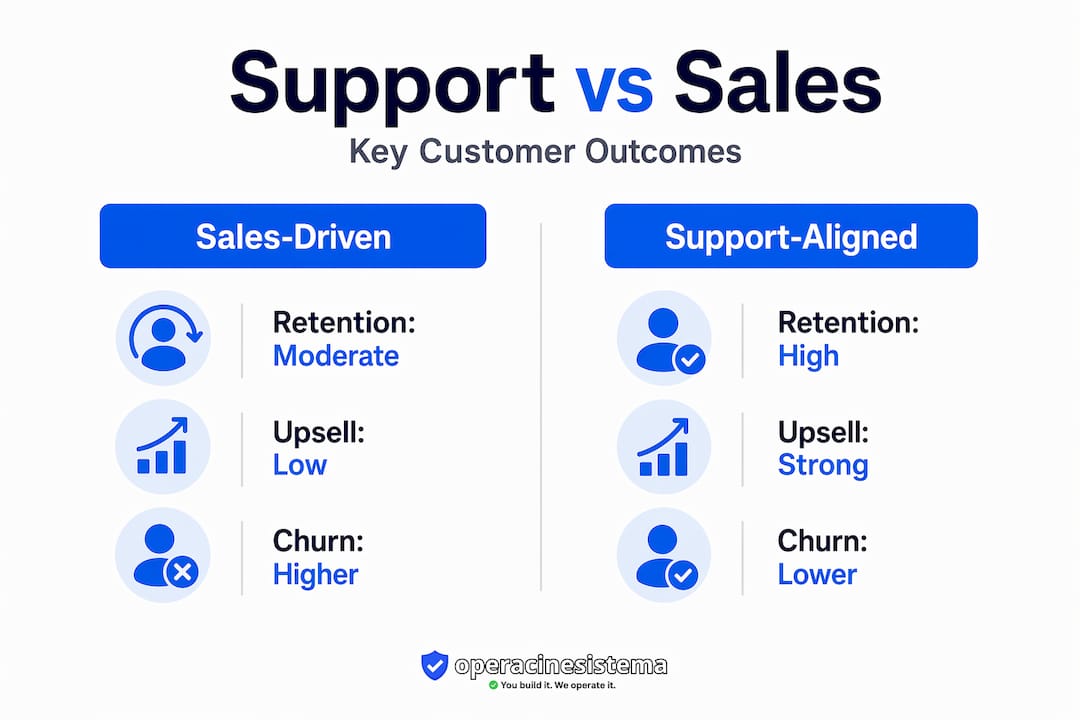
The difference is clear. When support teams are siloed from sales, you get reactive, inconsistent results. When they work together, you get a predictable growth engine.
Here is what support teams can do when they are properly integrated:
- ✅ Identify customers who are using a product near its capacity limits
- ✅ Flag accounts showing signs of dissatisfaction before renewal
- ✅ Share real customer objections with sales to sharpen messaging
- ✅ Confirm whether a new prospect’s use case matches the product’s actual strengths
- ✅ Validate that customers have the best software license fit for their needs
🛑 Without this alignment, sales teams are flying blind. They close deals based on assumptions. Support teams clean up the mess afterward. That is an expensive cycle.
Pro Tip: Set up a weekly 30-minute sync between your support lead and your sales lead. Have support share the top three recurring customer issues and the top three accounts showing expansion signals. This one habit can generate more qualified pipeline than most prospecting campaigns.
It also matters deeply that the software you are selling or supporting is legitimate. Customers who discover they have been sold a fake or gray-market license lose trust instantly and that loss is nearly impossible to recover. Understanding software legitimacy is therefore not just a compliance issue. It is a revenue protection strategy.
Support as a core SaaS feature: Onboarding, troubleshooting, and retention
With support proven as a revenue lever, its pivotal role in reducing churn and enabling seamless onboarding deserves deeper attention.
In traditional software sales, support was the department you called when something broke. In modern SaaS and digital licensing, that model is obsolete. SaaS customer support is now part of the core product offering because what customers experience during onboarding and troubleshooting directly shapes how they feel about the product itself.
Think about it from the customer’s perspective. They purchase a Windows license. The activation key does not work on the first try. If support responds within minutes and walks them through the fix, they feel confident and satisfied. If they wait 48 hours and receive a generic email, they feel cheated, even if the license itself is completely valid. The product did not change. The support experience did.
“The quality of support during onboarding is often the single biggest factor in whether a customer renews. Not the product. Not the price. The support.”
This is especially true in the first 30 to 90 days after purchase. That window is when customers form lasting impressions. It is when they decide whether the product is worth keeping and whether the vendor is trustworthy.
Common churn triggers and their support solutions

| Churn trigger | How support prevents it |
|---|---|
| Activation or setup failure | Fast, guided troubleshooting |
| Confusion about features | Proactive onboarding walkthroughs |
| Billing disputes | Clear communication and fast resolution |
| Perceived lack of value | Check-in calls and usage tips |
| Compatibility issues | Technical guidance and workarounds |
Key support touchpoints that directly affect retention after a sale:
- 🔥 Activation support: Immediate help when a license key does not activate correctly
- 🔥 Onboarding check-ins: Scheduled outreach within the first week to confirm setup success
- 🔥 Feature education: Short guides or videos that help users get value faster
- 🔥 Renewal reminders: Proactive communication before licenses expire
- 🔥 Escalation paths: Clear routes for complex technical issues so customers never feel stuck
For IT managers handling multiple endpoints, effective Microsoft OS support is not optional. It is the difference between a smooth rollout and a week of help desk tickets.
The authenticity of the software also plays a direct role here. Customers running genuine licenses rarely face activation errors, compatibility blocks, or sudden deactivation. Those problems are almost exclusively associated with non-genuine keys. Prioritizing software authenticity reduces your support burden and improves the customer experience at the same time. And the long-term benefits of official software extend beyond just fewer support tickets. They include security updates, compliance protection, and vendor accountability.
What makes support effective: Processes, tools, and standards
Understanding what makes support work, let’s move from principles to actionable strategies for SMBs and IT managers.
Good intentions are not enough. Support teams need clear processes, the right tools, and defined standards to deliver consistently. Without these, even the most motivated agents will produce inconsistent results. Consistent, timely, personalized interactions require a foundation of well-designed operations, not just good people.
Here are five steps to transform your support operations:
-
Define your service standards. Set specific targets for first response time, resolution time, and customer satisfaction scores. Make these visible to the entire team, not just managers. When agents know the standards, they work toward them.
-
Give agents access to the right tools. This means a CRM that shows purchase history, license type, and past interactions. It means a knowledge base that is current and searchable. It means communication tools that allow handoffs between agents without the customer having to repeat themselves.
-
Integrate support data with sales workflows. When a support agent flags an expansion opportunity, it should automatically create a task for the account manager. When a customer submits multiple tickets about the same issue, the sales team should know before the renewal conversation.
-
Use AI for first-line responses. AI-powered chat and automated ticket routing can dramatically reduce response times for common issues. This frees human agents to handle complex, high-value interactions where empathy and judgment matter most.
-
Review and improve continuously. Hold monthly reviews of your top ticket categories. If the same issue appears repeatedly, it is a signal that either the product, the documentation, or the sales process needs fixing.
Tracking the right metrics is equally important. Key support metrics that connect directly to commercial outcomes include:
- First response time: How quickly does a customer hear back after submitting a ticket?
- Resolution rate: What percentage of tickets are resolved on the first contact?
- CSAT (customer satisfaction score): How satisfied are customers after each interaction?
- Ticket volume by category: Which issues are most common, and are they trending up or down?
- Escalation rate: How often do tickets require senior involvement?
Following software licensing best practices reduces ticket volume on its own. When customers receive clear documentation about their license type, activation steps, and usage rights upfront, they have fewer questions and fewer problems. This is especially relevant for OEM versus retail license distinctions, which are a frequent source of confusion.
Software validation for compliance is another area where proactive support pays off. IT managers who receive clear validation documentation at the point of sale spend far less time on compliance audits later.
Pro Tip: Monitor your onboarding tickets specifically. If a large percentage of your tickets come from customers in their first 30 days, that is a signal your onboarding process has gaps. Fix those gaps and you will see both ticket volume and churn drop at the same time.
Staying current on Microsoft licensing trends also helps support teams give accurate, up-to-date guidance. Licensing rules change. Support agents who are not current will give customers wrong information, which erodes trust faster than almost anything else.
Structured onboarding: Proactive playbooks that drive sales and reduce churn
With operational models in place, let’s focus on advanced strategies that maximize support’s value in software sales.
Reactive support waits for customers to ask for help. Proactive support anticipates where customers will struggle and gets ahead of it. The difference in outcomes is dramatic. A digital-first customer experience program reduced time-to-first-value by 11 days in one documented case study. Eleven days. That is nearly two weeks of faster value realization, which translates directly into higher satisfaction scores and lower early churn.
Structured onboarding means you have a documented playbook for every customer segment. A small business buying five Windows licenses has different needs than an IT manager deploying 50 seats across a distributed team. Your onboarding playbook should reflect those differences.
Here is how to build an effective onboarding playbook:
- 📋 Map the customer journey from purchase to first value. Identify every step the customer takes from receiving their license key to successfully activating and using the software.
- 📋 Identify friction points. Where do customers most often get stuck? These are your highest-priority areas for proactive support content.
- 📋 Create segment-specific resources. Individual users need simple activation guides. IT managers need bulk deployment documentation and compliance checklists.
- 📋 Schedule proactive outreach. Send a check-in email or message at day one, day seven, and day 30. Ask specific questions, not just “How is everything going?”
- 📋 Track completion rates. If customers are not completing onboarding steps, find out why. The answer will improve both your product and your support process.
- 📋 Build expansion triggers into the playbook. When a customer has successfully activated and is using the software regularly, that is the right moment to introduce upgrade options or additional licenses.
Microsoft OS onboarding for business users involves more than just clicking “activate.” It includes understanding update settings, security configurations, and compatibility with existing business software. Support teams that guide customers through these steps create loyal customers who trust the vendor for future purchases.
Pro Tip: Personalize your onboarding sequence based on what the customer actually purchased. A customer buying Windows 11 Pro for a new workstation has different needs than one upgrading from Windows 10. Tailored communication feels more helpful and generates higher engagement than generic welcome emails.
Proactive outreach also creates natural opportunities to introduce customers to additional products or higher-tier options. When a support agent reaches out at day 30 and learns that a customer is managing 10 endpoints manually, that is an opening for a conversation about volume licensing. The support interaction becomes a sales conversation without feeling pushy, because it is grounded in genuine helpfulness.
Nuance: When support can limit growth and how to avoid mistakes
Beyond advantages, it is critical to recognize and avoid pitfalls that can undermine the positive impact of support on sales.
Support is not automatically a growth driver. In the wrong conditions, it can actually slow you down. The most common scenario is poor deal fit. When sales closes a customer who is not a good match for the product, support inherits the consequences. These customers submit more tickets, require more hand-holding, and still churn. Worse, they sometimes leave negative reviews that damage your reputation with better-fit prospects.
Support and sales alignment is the solution here. When support teams share data about which customer profiles generate the most tickets and the lowest satisfaction scores, sales can refine their qualification criteria. Over time, the quality of deals improves, support volume decreases, and both teams perform better.
Signs that support is acting as a growth brake rather than a growth driver:
- 🛑 The same customers submit tickets repeatedly without resolving the underlying issue
- 🛑 Support agents spend most of their time on customers who were never a good fit
- 🛑 Churn rates are high even when support satisfaction scores are good
- 🛑 Sales and support teams rarely communicate or share data
- 🛑 Support KPIs are measured in isolation from revenue or retention metrics
“Misassigned KPIs obscure churn drivers. When support is measured only on ticket closure speed and sales is measured only on new logos, nobody owns the customer’s long-term success.”
This is a real organizational problem. Customer success and customer support are different functions with different goals. Support focuses on fast issue resolution. Customer success focuses on long-term expansion and value realization. Confusing the two, or assigning the wrong KPIs to each, creates blind spots that let churn build up undetected.
The fix is straightforward. Define clear ownership for each stage of the customer lifecycle. Support owns the first 90 days and reactive issue resolution. Customer success owns expansion and renewal. Both teams share data and escalate to each other when they see signals outside their lane. And both teams stay connected to software legitimacy concerns, because customers running non-genuine software create support problems that no amount of process improvement can fully solve.
Our take: What most guides miss about support-driven software sales
Most articles about support and sales focus on tools. They recommend a new CRM, a better ticketing system, or an AI chatbot. Tools matter, but they are not the deciding factor. What actually drives results is ownership of outcomes.
When support agents feel personally responsible for whether a customer succeeds, they behave differently. They ask better questions. They escalate faster. They share insights with sales without being asked. No tool creates that sense of ownership. Culture and leadership do.
Here is the hard-won lesson we keep seeing validated: siloing support and sales is expensive. Not just in terms of missed upsells or avoidable churn. It is expensive in morale. Support agents who feel like they are just closing tickets burn out. Sales reps who never hear from customers after the deal closes lose touch with reality. Both problems get worse over time.
The highest-impact tactic we have seen is simple. Bring one support agent into your weekly sales meeting. Have them share what customers are actually saying. Not sanitized summaries. Real feedback, real frustrations, real wins. This single habit changes the way sales reps position the product, handle objections, and qualify prospects.
Support also drives loyalty before customers ever speak to their account manager. A customer who had a smooth activation experience and received a helpful check-in email at day seven is already a loyal customer. They do not need to be sold to again. They just need to be reminded that upgrading or expanding is easy and safe. Following licensing best practices and staying current on Microsoft licensing trends gives your support team the credibility to have those conversations confidently.
The uncomfortable truth is that most software businesses underinvest in support because they see it as a cost. The businesses that grow fastest treat support as a product feature and a sales channel. That mindset shift is worth more than any tool upgrade.
Pro Tip: Treat every support interaction as a feedback loop. After resolving a ticket, ask one question: “Was there anything about your purchase or setup experience that we could have made clearer?” The answers will improve your product documentation, your sales process, and your onboarding playbook simultaneously.
Where to take your next step: Solutions for SMB software licensing
You now have a clear picture of how support drives software sales, reduces churn, and builds lasting customer loyalty. The strategies in this guide work best when your customers are running genuine, properly licensed software from the start.

At operacinesistema.lt, we specialize in genuine Microsoft Windows licenses for small businesses and IT managers who need reliable, officially licensed software without the complexity. Whether you need a single Windows 11 Pro key or volume licenses for a full team rollout, we offer instant digital delivery, verified authentic keys, and real customer support backed by a clear refund policy. Explore our Windows license options and give your customers and your support team a foundation they can actually trust. Secure, official, and ready to activate today. 🔥
Frequently asked questions
How do support teams contribute directly to software sales?
Support teams identify expansion opportunities, provide critical customer feedback, and help sales target the most promising accounts by flagging install-base signals and real customer pain points.
What metrics should be tracked to measure support effectiveness in sales?
Key metrics include response time, resolution rate, customer satisfaction (CSAT), and onboarding friction rate, each of which connects directly to commercial outcomes like renewal and expansion revenue.
How does structured onboarding lead to better sales results?
Structured onboarding reduces time-to-value, lowers support ticket volume, and prepares customers for upgrade conversations by building confidence and product familiarity early.
What role does support play in preventing customer churn?
SaaS support reduces churn by resolving onboarding and product issues quickly, improving customer perception during the critical first 90 days, and enabling feature adoption that increases perceived value.
Can support ever limit sales growth, and how do you avoid this?
Poor deal fit turns support into a growth brake; using support data to refine sales qualification criteria prevents this by ensuring the customers you close are actually a good match for the product.





