Legit ways to access Windows 365 without risking security
TL;DR:
- Microsoft does not offer free permanent product keys for Windows 365; activation is through subscriptions.
- Windows 365 is a cloud-based service accessed via a subscription, not by entering a product key.
- Legitimate discounts exist through trials, annual billing, and authorized resellers, but beware of scams promising free keys.
If you’ve been searching for a free Windows 365 product key, you’re not alone — but you’re also heading toward a dead end. There is no free permanent key available from Microsoft or any authorized source. Windows 365 is a cloud-based subscription service, and activation works very differently from older versions of Windows. The good news? Legitimate, affordable access is absolutely within reach. This article explains exactly how Windows 365 licensing works, what your real options are, and how to stay safe while keeping costs low.
Table des matières
- Why you won’t find a free Windows 365 product key
- How Windows 365 licensing and activation actually work
- What about free alternatives? Microsoft 365 apps, Office 365, and their differences
- How to safely save money on Windows 365: trials, discounts, and avoiding scams
- Why the search for free product keys persists — and what actually works
- Find the right license for your needs — safely and affordably
- Questions fréquemment posées
Principaux enseignements
| Point | Détails |
|---|---|
| No free product key | Windows 365 does not use product keys for individuals and has no legitimate free permanent access. |
| Subscription-only model | You must activate Windows 365 with a paid Microsoft subscription—even after the trial. |
| Trials and discounts | A 30-day trial and new customer discounts help reduce first-month costs safely. |
| Risk of unofficial keys | Third-party ‘free keys’ pose significant security and legal dangers—avoid them entirely. |
| Know your options | Clarify whether you want a Windows cloud PC, Office apps, or something else so you choose the right (and safest) approach. |
Why you won’t find a free Windows 365 product key
Having set the stage, we need to address the root confusion: why can’t you actually find a free product key for Windows 365?
The short answer is that Windows 365 was never designed to use product keys the way Windows 10 or Windows 11 does. Microsoft built Windows 365 as a cloud PC service, meaning your “computer” lives on Microsoft’s servers and streams to your device. You access it through a browser or the Windows 365 app after signing in with your Microsoft account. There is no box to open, no disc to insert, and no product key to type in.
The only scenario where a product key enters the picture for Windows 365 is in a very specific partner setup. As Microsoft’s own documentation confirms, subscription-based licensing is tied to a Microsoft account, not redeemable product keys for individual users. Partners who resell Microsoft services to businesses may use a product key during the initial customer setup process. That’s a business-to-business transaction, not something an individual consumer or small business owner can access through a simple online search.
So what happens when you search for “free Windows 365 product key” online? You find scams. Almost every site claiming to offer a free or deeply discounted key is either:
- 🛑 Selling stolen or recycled keys that will be deactivated quickly
- 🛑 Running phishing schemes designed to steal your Microsoft account credentials
- 🛑 Distributing malware disguised as activation tools or “key generators”
- 🛑 Charging for something that doesn’t exist and disappearing with your money
Les risks of free product keys go far beyond just wasted money. A compromised Microsoft account can expose your emails, files, payment details, and even your business data. It’s simply not worth the gamble.
🛑 Warning: Any website promising a free, permanent, or “lifetime” Windows 365 product key is running a scam. Microsoft does not distribute product keys for Windows 365 to individual users, period.
If you’re looking for ways to use Microsoft products for free legitimately, there are some real options worth exploring — but they involve different Microsoft services, not Windows 365 product keys. We’ll cover those shortly. First, let’s make sure you understand exactly how Windows 365 access and activation actually work, because that knowledge is your best protection against being misled.
For a deeper look at what Microsoft 365 free options actually exist for individuals and small businesses, it helps to understand the full landscape of Microsoft’s product lineup.
How Windows 365 licensing and activation actually work
Now that you understand why you can’t get a free key, here’s how access and activation for Windows 365 really work.
Windows 365 is a cloud PC subscription. Think of it like renting a fully configured Windows computer that lives in Microsoft’s Azure cloud. You pay a monthly fee per user, and in return you get a virtual PC with a set amount of processing power, RAM, and storage. You can access it from any device, including a Mac, iPad, or Chromebook, which is a big part of its appeal for small businesses with mixed device environments.
Activation is completely automatic once you sign in. You don’t enter a product key. You don’t run any special software. You simply:
- Purchase a Windows 365 subscription through Microsoft’s official website or an authorized reseller.
- Receive a confirmation email from Microsoft with your account details.
- Sign in at windows365.microsoft.com using your Microsoft account or work account.
- Click “Open your Cloud PC” and your virtual machine launches in the browser or the dedicated app.
- Start working — your cloud PC is fully activated and ready to use.
That’s it. No product key. No manual activation steps. No risk of entering a wrong code and getting locked out. The Activation sécurisée de Windows process for cloud services like Windows 365 is designed to be seamless and account-driven.
Pro Tip: Always use a dedicated Microsoft account for your Windows 365 subscription. Never share your account credentials with anyone, and enable two-factor authentication immediately after signing up. This protects your cloud PC from unauthorized access.
Now let’s look at what the actual plans cost and what you get, because the pricing is more structured than many people realize.
Windows 365 Business plan comparison
| Plan | CPU | RAM | Stockage | Monthly price (per user) |
|---|---|---|---|---|
| Base de l'entreprise | 2 vCPU | 4 GB | 128 GB | ~$31 |
| Business Standard | 2 vCPU | 8 GB | 128 GB | ~$41 |
| Prime d'entreprise | 4 vCPU | 16 GB | 128 GB | ~$66 |
| Enterprise (entry) | 2 vCPU | 4 GB | 128 GB | Custom pricing |
As the official pricing page confirms, legitimate access for individuals and small businesses starts with a 30-day free trial, but a credit card is required and the subscription converts to paid automatically unless you cancel. This is a real trial, not a trick — but you do need to be organized about canceling if you decide it’s not for you.
Microsoft also confirms that individuals can subscribe directly by credit card for up to 300 users, with no ongoing free tier after the trial period ends. This makes Windows 365 genuinely accessible for solo operators and small teams, not just large enterprises.
The trial is your best legitimate starting point. Use it to test whether a cloud PC actually fits your workflow before committing to a monthly cost. Many small business owners discover during the trial that they only need a lower-tier plan, which saves money in the long run.
What about free alternatives? Microsoft 365 apps, Office 365, and their differences
If you’re hoping for a workaround or thinking of alternatives, it’s vital to understand the different Microsoft services and what they do (and don’t) offer for free.
This is where a lot of confusion happens, and it’s completely understandable. Microsoft has several products with similar-sounding names, and they serve very different purposes. Getting them mixed up can lead you to either overpay for something you don’t need or miss out on a free option that would actually solve your problem.
Here’s the key distinction:
Windows 365 is a cloud PC. It’s an entire Windows computer running in the cloud. You use it when you need a full Windows environment accessible from any device, especially useful for remote work, running legacy software, or keeping your work environment completely separate from your personal device.
Microsoft 365 (formerly Office 365) is a suite of productivity apps. It includes Word, Excel, PowerPoint, Outlook, Teams, and other tools. It runs on your existing device, not in the cloud. Microsoft 365 does have limited free web-based versions of its apps available at Office.com, which is a genuinely useful option for basic tasks.
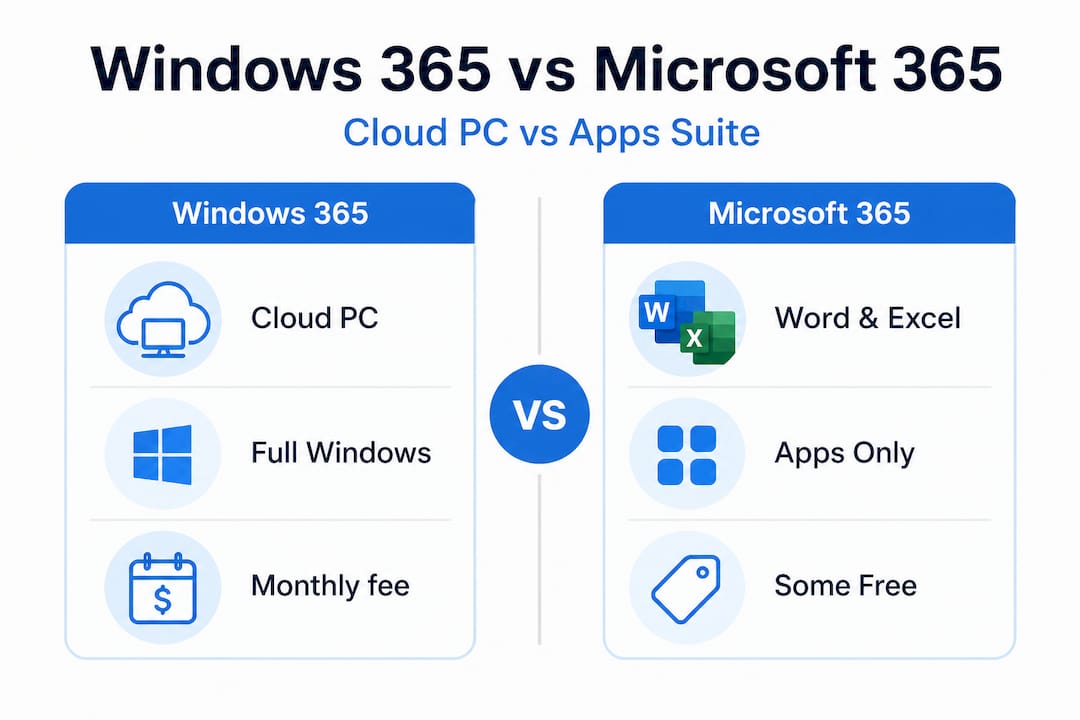
As Microsoft’s own support forums clarify, product key mechanics differ between services. Unlike Microsoft 365 apps, which have free trials and limited free web versions, Windows 365 demands a full subscription after the trial with no “product key” mechanic for individual users at all.
Free vs. paid: Windows 365 and Microsoft 365 compared
| Fonctionnalité | Windows 365 | Microsoft 365 |
|---|---|---|
| Free tier available? | No (trial only) | Yes (web apps at Office.com) |
| Product key activation? | De | For desktop installs only |
| Cloud-based? | Yes (full cloud PC) | Partial (apps run locally) |
| Trial period | 30 days (credit card required) | 30 days (credit card required) |
| Starting price | ~$31/user/month | ~$6/user/month |
| Best for | Remote work, full Windows environment | Documents, email, collaboration |
So when does a free Microsoft 365 option actually work for you? Here are some situations where the free web apps are genuinely sufficient:
- ✅ You only need to create or edit Word documents, Excel spreadsheets, or PowerPoint presentations occasionally
- ✅ You’re a student or freelancer who doesn’t need advanced desktop features
- ✅ You want to collaborate on shared documents with a small team without paying for software
- ✅ You already have a personal device and just need access to core Office tools
- ✅ You’re testing whether Microsoft’s ecosystem works for your business before committing to a paid plan
If any of those situations describe you, then you may not need Windows 365 at all. Exploring using Microsoft 365 for free through official channels is a smart first step. Similarly, understanding your options for accessing Office 365 for free legally can save you significant money if a full cloud PC isn’t what you actually need.
The bottom line: don’t pay for Windows 365 if Microsoft 365’s free web apps solve your problem. But if you genuinely need a full cloud PC, there’s no free permanent option, and pretending otherwise will only put you at risk.
How to safely save money on Windows 365: trials, discounts, and avoiding scams
Now that you know what’s real and what isn’t, let’s focus on smart, risk-free ways to make Windows 365 as affordable as possible.
The first and most important thing to understand is that legitimate savings do exist. You don’t have to pay full price or take any risks to make Windows 365 work for your budget. The key is knowing where to look and what to avoid.
Legitimate ways to reduce your Windows 365 costs
- ✅ Use the 30-day free trial to test the service before committing. Cancel before the trial ends if it doesn’t suit your needs.
- ✅ Choose annual billing instead of monthly. Microsoft typically offers a discount for committing to a full year upfront.
- ✅ Start with the lowest plan that meets your needs. You can upgrade later if you need more power or storage.
- ✅ Check for new-customer promotions. Microsoft periodically offers discounts for first-time subscribers.
- ✅ Buy through authorized resellers who may offer competitive pricing on legitimate subscriptions.
- ✅ Evaluate whether you need Windows 365 at all or whether a cheaper Microsoft 365 plan covers your actual requirements.
As Microsoft’s official promotions have shown, new customers can access up to a 20% discount on all plans through current promotional offers as of 2025. These are real, verified discounts from Microsoft itself — no sketchy third-party sites required.
🔥 Statistic to know: Research consistently shows that users who fall for fake activation keys spend an average of two to three times more money fixing the resulting security problems than they would have spent on a legitimate subscription in the first place. The “savings” from a fake key almost always become very expensive very quickly.
Pro Tip: Before signing up for any Windows 365 promotion you find online, verify it directly on Microsoft.com. If a deal isn’t listed on Microsoft’s official website, treat it as a red flag regardless of how legitimate the third-party site looks.
🛑 Red flags to watch for
Les risks around free key offers are well-documented, and the warning signs are usually obvious once you know what to look for:
- 🛑 Sites promising “lifetime access” to Windows 365 for a one-time fee
- 🛑 Sellers offering product keys at 70% to 90% below Microsoft’s official price
- 🛑 Websites with no verifiable business address, no phone number, and no clear return policy
- 🛑 Sellers who ask you to pay via cryptocurrency, wire transfer, or gift cards
- 🛑 “Key generator” software that claims to create valid activation codes
- 🛑 Social media posts or forum threads sharing “working” product keys
If you see any of these signs, walk away. Report the site to Microsoft if you can. And remember: if a deal sounds too good to be true, it always is when it comes to software licensing.
Why the search for free product keys persists — and what actually works
With those practical savings in mind, it’s worth asking: why does the myth of free product keys hold on, and what’s the real secret behind safe, lasting value?
We’ve worked with a lot of customers over the years, from solo freelancers to small business owners managing teams of 20 or more. And we’ve noticed something consistent: the people who keep searching for free product keys aren’t doing it out of bad intentions. They’re doing it because they remember a time when it worked.
Older versions of Windows, particularly Windows 7 and even early versions of Windows 10, had a more permissive activation system. Keys circulated freely online, and many of them worked for years. That experience created a mental model that stuck: “I found a free key before, so I should be able to find one now.”
But the software landscape has changed dramatically. Microsoft moved to account-based, cloud-connected licensing specifically to close those loopholes. Every activation is now tied to a Microsoft account and verified against Microsoft’s servers in real time. A key that “works” today from an unofficial source may have been stolen from a legitimate customer, and it will be revoked the moment that customer reports it or Microsoft’s automated systems flag it.
The customers we’ve seen hurt most by this are small business owners who thought they were being financially smart. They bought a cheap key, set up their cloud PC, moved their business data into it, and then found themselves locked out weeks later with no recourse. Recovering from that situation, both technically and financially, is far more painful than the original subscription cost would have been.
Here’s the uncomfortable truth: the search for free product keys is often a false economy. The real value in a legitimate Windows 365 subscription isn’t just access. It’s automatic updates, Microsoft’s security infrastructure, guaranteed uptime, and the ability to contact support when something goes wrong. You can’t put a price on not losing your business data because a fake key got revoked at the worst possible moment.
The smarter approach, the one we consistently recommend, is to use the official trial, evaluate honestly whether Windows 365 fits your needs, and then subscribe at the lowest plan that works for you. If cost is genuinely a barrier, explore affordable Microsoft 365 for businesses as a lower-cost alternative that may cover your actual requirements without the cloud PC overhead.
Legitimate activation always wins in the long run. Not because it’s the “right” thing to do in some abstract sense, but because it’s the option that actually keeps working, keeps your data safe, and keeps your business running without unexpected interruptions.
Find the right license for your needs — safely and affordably
If you want to take the next step and secure Windows or other software licenses safely, here’s where to start.
At operacinesistema.lt, we specialize in genuine Microsoft software licenses for individuals, small businesses, and IT resellers. We understand that navigating Microsoft’s licensing options can feel overwhelming, especially when so many unofficial sources are competing for your attention with offers that look legitimate but aren’t.

Our platform offers verified safe license key options for Windows 10 and Windows 11 Pro, with instant digital delivery and full customer support. Not sure which license type fits your situation? Our guide to finding the best software license for your needs walks you through OEM vs. retail licenses, what each covers, and which makes sense for personal vs. business use. And if you already have a key you’re not sure about, you can validate your Windows key directly through our verification tool before committing to anything. Safe, affordable, and legitimate — that’s the only way we operate.
Questions fréquemment posées
Can I get a free Windows 365 product key from Microsoft?
No, Microsoft does not offer free permanent keys for Windows 365. Activation is tied entirely to a paid subscription and your Microsoft account, with no product key mechanism for individual users.
Is there a trial for Windows 365, and what does it include?
Yes, you can start a 30-day free trial for a basic Windows 365 Cloud PC, but a credit card is required and the subscription converts to paid automatically unless you cancel before the trial period ends.
What are the risks of buying a cheap Windows 365 product key online?
Cheap or “lifetime” keys from third parties can expose you to scams, account lockouts, and data breaches. Microsoft’s official guidance strongly advises against third-party key sellers claiming lifetime or deeply discounted access, as these almost always result in invalidation or security issues.
How much does Windows 365 actually cost for small businesses or individuals?
Pricing starts at about $31 per user per month for the Business Basic plan with 2 vCPU, 4 GB RAM, and 128 GB storage. Individuals can subscribe directly using a credit card with no minimum team size required.
Is there any permanent free way to use Windows 365?
No, Windows 365 is a subscription service with no ongoing free tier available. Only the initial 30-day trial is free, and it requires a valid credit card on file.