
Clé d'activation gratuite d'Office 365 : Risques, options réelles et conseils
TL;DR :
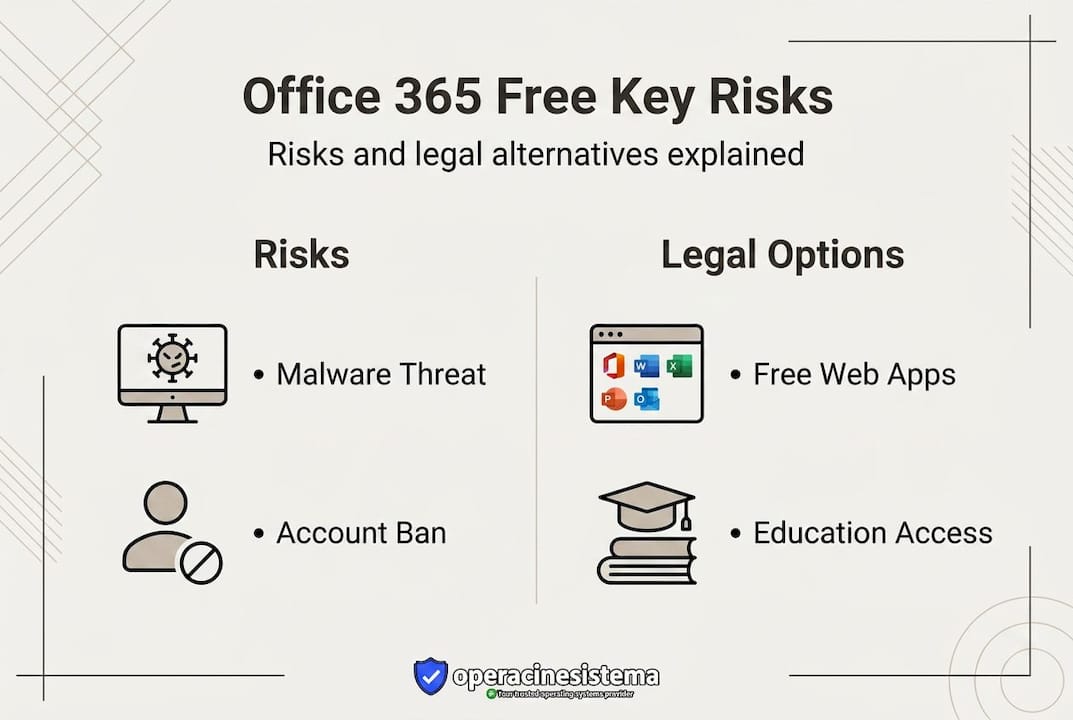
- Most free Office 365 keys from unofficial sites are scams, malware risks, and quickly revoked by Microsoft.
- Legitimate free access includes Microsoft web apps, education, nonprofit programs, or official trials.
- Buying from authorized resellers ensures safe, legal licenses, avoiding the risks of gray-market or free keys.
Every day, thousands of people type “free Office 365 activation key” into a search engine hoping to find a shortcut. It’s understandable. Microsoft 365 subscriptions cost real money, and budgets are tight for individuals and small businesses alike. But here’s the truth most of those search results won’t tell you: the vast majority of “free key” sites are either scams, security traps, or simply don’t work. This article cuts through the noise. We’ll show you exactly why free keys fail, what legitimate free options actually exist, how to evaluate discounted keys safely, and what to do if you’ve already made a risky move. No fluff. Just clear, honest answers.
Table des matières
- Why free Office 365 activation keys are risky
- Official and legal ways to use Office 365 for free
- Paid alternatives: Are discounted or reseller Office 365 keys safe?
- What to do if you already used a free key or cracked Office 365
- Why the safest Office 365 key is rarely free: Our take
- Secure your Office and Windows licenses the right way
- Questions fréquemment posées
Principaux enseignements
| Point | Détails |
|---|---|
| Free keys are unsafe | Most free Office 365 activation keys are quickly revoked by Microsoft and pose major malware risks. |
| Choose legal alternatives | Safe, official free and trial options exist for personal, student, and nonprofit use directly from Microsoft. |
| Discounted keys need scrutiny | Cheap Office 365 keys are often gray-market and risky; trust only clear, reputable resellers for any paid deals. |
| Clean up if you’ve used a free key | Remove cracked software, check for malware, and switch to an official license for long-term reliability. |
| Security and support matter | Buying legitimate keys ensures ongoing updates, tech support, and peace of mind for all users. |
Why free Office 365 activation keys are risky
With that confusion in mind, let’s break down why free Office 365 keys from websites are almost always a losing bet.
The appeal is obvious. You find a site listing what looks like a valid 25-character product key. You copy it, paste it into Office’s activation dialog, and wait. In most cases, one of two things happens: the key fails immediately, or it works briefly before Microsoft revokes it. Neither outcome is worth the risk you took to get there.
🛑 What actually happens when you use a free key
Free activation keys found on random websites are almost always generic or shared keys. Microsoft’s servers recognize these quickly and revoke them. You’ll often see error codes like 0x4004F00C, which means the license has been blocked or is no longer valid. That error isn’t a glitch. It’s Microsoft telling you the key was already flagged.
Here’s what makes it worse. Many of these sites don’t just offer a useless key. They bundle it with something extra you didn’t ask for:
- Logiciels malveillants hidden in download files or “key generator” tools
- Spyware that monitors your keystrokes and browser activity
- Ransomware that can lock your files until you pay
- Adware that hijacks your browser and slows your system
- Phishing pages conçu pour voler les informations d'identification de votre compte Microsoft
In 2026, cybersecurity researchers have flagged a growing trend: fake activation key sites now use AI-powered malware that adapts to your system’s defenses. These aren’t simple viruses from a decade ago. They’re sophisticated tools designed to evade antivirus software and stay hidden for weeks or months.
“Sites offering ‘free activation keys’ provide generic/shared keys that Microsoft revokes quickly, often bundled with malware risks, system instability, and legal violations of terms of service. No empirical success rates; keys fail with errors like 0x4004F00C.”
The legal side is just as serious. Using an unauthorized key violates Microsoft’s terms of service. That means Microsoft can disable your entire Office suite without warning. If you’re using Office for work, that’s a real business disruption. You could lose access to Word, Excel, Outlook, and Teams all at once.
Why Microsoft catches these keys so fast
Microsoft runs a global license validation system. Every activation attempt is checked against a database of valid, active licenses. When a key is shared publicly online, hundreds or thousands of people try to use it simultaneously. Microsoft’s system detects this pattern and flags the key as compromised within hours, sometimes minutes.
You can also learn more about free Windows activation risks to understand how the same problem applies across Microsoft’s product line. The pattern is consistent: free keys from unverified sources fail, and the attempt itself can put your device at risk.
There’s also a broader concern about the risques liés aux clés de produit gratuites that goes beyond Office. When you visit these sites, your IP address, browser data, and sometimes your Microsoft account information can be harvested. Even if you don’t download anything, simply visiting a malicious site can expose you.
The bottom line: No free key site has a track record of providing working, long-term Office 365 activation. The risk to your device, your data, and your business is real and immediate.
Official and legal ways to use Office 365 for free
If the risky path isn’t wise, what are your real, risk-free options? Let’s lay them out step by step.
The good news is that Microsoft does offer legitimate ways to access Office features without paying for a full subscription. These aren’t loopholes or gray areas. They’re programs Microsoft built and supports directly.
1. Microsoft 365 free web apps
Microsoft offers free, browser-based versions of Word, Excel, PowerPoint, OneNote, and more at office.com. You only need a free Microsoft account to access them. These web apps are fully functional for most everyday tasks: writing documents, building spreadsheets, creating presentations. The main limitation is that you can’t use them offline. But if you have a reliable internet connection, they cover a lot of ground.
2. Microsoft 365 for students and educators 🎁
If you’re a student or teacher at an eligible institution, you may qualify for Microsoft 365 Education for free. This includes the full desktop apps, not just the web versions. Your school’s IT department or Microsoft’s education portal can confirm eligibility. Many users don’t realize this option exists until they’ve already paid for a subscription they didn’t need.
3. Microsoft 365 for nonprofits
Registered nonprofit organizations can apply for Microsoft 365 Business Basic at no cost through Microsoft’s nonprofit program. Larger nonprofits may qualify for discounted plans on more advanced tiers. This is a legitimate, fully supported path that includes cloud storage, email, and the core Office apps.
4. Employer or school-provided subscriptions
Many companies and universities provide Microsoft 365 licenses to employees and students as part of their standard software package. Before you search for a free key, check with your HR department or IT support. You may already have access and not know it.
5. Microsoft 365 free trial
Microsoft offers a one-month free trial for new subscribers. This is a fully licensed, fully functional version of Microsoft 365. It’s not a permanent solution, but it gives you time to evaluate whether the subscription is worth it for your needs.
Pro Tip: If you’re a small business owner testing Microsoft 365 for your team, use the free trial period to audit exactly which apps your team actually uses. Many businesses pay for features they never touch. That audit can help you choose the right plan and avoid overpaying.
Now, about legal ways to use Office 365: the key difference between these options and the “free key” sites is accountability. Microsoft stands behind these programs. You get real support, real security updates, and real peace of mind.
It’s also worth understanding the Office free product key facts before you make any decisions. Some resellers claim to offer legitimate cheap keys from volume license surplus, but as experts note, official subscriptions ensure updates and security in a way that gray-market keys simply cannot guarantee. The “free” label on unofficial keys is almost always misleading.
The value of free, done right: These official free options have real limits. The web apps don’t work offline. The nonprofit and education programs require eligibility verification. The trial ends. But within those limits, they’re completely safe, completely legal, and completely supported. That’s worth a lot more than a key that might work for a week before getting blocked.
Paid alternatives: Are discounted or reseller Office 365 keys safe?
Not everyone can or wants to pay full price. So do discounted keys or reseller deals make sense, or put you at risk?
This is where things get genuinely complicated. Not all discounted keys are scams. But not all of them are safe either. The difference comes down to who’s selling the key and where it came from.
What makes a paid key legitimate?
A legitimate discounted key comes from an authorized Microsoft reseller. These are companies that have a formal relationship with Microsoft, buy licenses in volume, and are permitted to resell them. When you buy from an authorized reseller, you get:
- ✅ A receipt or invoice for your purchase
- ✅ Clear seller contact information and support policy
- ✅ A key that matches your region and Office version
- ✅ A refund or replacement policy if the key doesn’t work
- ✅ Confirmation that the license type matches your use case (personal, business, OEM, retail)
Comprendre types de licences de logiciels is important here. OEM licenses, for example, are tied to specific hardware and can’t be transferred. Retail licenses are more flexible. Knowing the difference helps you avoid buying a license that won’t work for your situation.
The gray market explained
The gray market sits between fully legitimate resellers and outright scams. Gray-market sellers often claim their keys come from “volume license surplus” or “unused corporate licenses.” Some of these claims are true. Others are not. As experts and Microsoft warn, the legality of these keys is questionable, and Microsoft has the right to revoke them at any time.
Here’s a comparison to help you evaluate your options:
| Source type | Key validity | Support available | Legal standing | Niveau de risque |
|---|---|---|---|---|
| Microsoft direct | Guaranteed | Support complet de Microsoft | Fully legal | Aucun |
| Revendeur agréé | Haut | Seller + Microsoft support | Fully legal | Very low |
| Gray-market seller | Variable | Limited or none | Questionable | Medium to high |
| Random website / forum | Very low | Aucun | Illegal | Extremely high |
| Free key sites | Essentially zero | Aucun | Illegal | Extreme |
🛑 Signs a discounted key seller is not trustworthy
- No physical address or verifiable business registration
- No invoice or receipt provided after purchase
- Price is more than 70% below Microsoft’s retail price
- No clear refund or replacement policy
- Payment only accepted via cryptocurrency or wire transfer
- No customer reviews on independent platforms
- Vague descriptions like “unused key” with no license type specified
Pro Tip: Before buying any discounted Office key, search the seller’s name plus “scam” or “review” on independent forums like Reddit or Trustpilot. Real customers leave real feedback. If you can’t find any trace of the seller online, that’s a serious red flag.
When cheap is too good to be true, it usually is. A genuine Microsoft 365 Personal subscription costs around $70 per year. If someone is offering it for $5 with no explanation, the key is almost certainly stolen, revoked, or tied to a fraudulent account. You might get it to activate once. Then it stops working, and you have no recourse.
What to do if you already used a free key or cracked Office 365
But what if you’ve already gone down the risky road and used a free or cracked key? Here’s how you can turn the situation around safely.
First, don’t panic. You’re not alone. Many people try free keys before they understand the risks. The important thing now is to act quickly and methodically to protect your device and get back to a legitimate setup.
Step 1: Run a full malware scan immediately
Use a reputable, up-to-date security tool. Windows Defender, Malwarebytes, or another trusted antivirus program can scan your system for threats. Don’t skip this step. As noted, free activation key sites frequently bundle malware with their keys, and that malware may already be running on your system without any visible signs.
Step 2: Check your Office activation status
Open any Office app, go to File > Account, and look at the product information section. If you see a message about a subscription problem or an unlicensed product warning, your key has already been flagged or revoked.
Step 3: Uninstall any cracked or modified Office version
If you used a cracked installer rather than a legitimate key, uninstall Office completely. Cracked versions often include modified system files that can cause instability and security vulnerabilities. Use Microsoft’s official Support and Recovery Assistant tool to ensure a clean removal.
Step 4: Change your Microsoft account password
If you entered your Microsoft account credentials on any suspicious site or during a fake activation process, change your password immediately. Enable two-factor authentication if you haven’t already. This protects your account from unauthorized access.
Step 5: Purchase or activate a legitimate license
Here’s a helpful overview of your recovery options:
| Situation | Recommended action | Time needed |
|---|---|---|
| Office shows “unlicensed” | Buy a valid key from an authorized reseller | Under 30 minutes |
| Malware detected | Run full scan, remove threats, then reinstall Office | 1 to 3 hours |
| Microsoft account compromised | Change password, enable 2FA, contact Microsoft support | 30 to 60 minutes |
| Cracked Office installed | Full uninstall, clean install, activate with valid key | 1 to 2 hours |
| Unsure what happened | Contact Microsoft support or an authorized partner | Variable |
“Sites offering ‘free activation keys’ provide generic/shared keys that Microsoft revokes quickly, often bundled with malware risks, system instability, and legal violations of terms of service.”
Following a proper malware reduction checklist after a suspected compromise is one of the most important things you can do. It covers not just Office but your entire Windows environment, which may have been affected.
Who to contact for help
If you’re unsure about any step, Microsoft’s official support at support.microsoft.com is available 24/7. For business users, an authorized Microsoft partner can audit your license situation and help you get compliant quickly. Don’t rely on forums or unofficial guides for this kind of recovery. The stakes are too high.
One more thing: never reuse a suspicious key. Even if it seems to work again after a system reinstall, it’s only a matter of time before Microsoft revokes it again. Every time you reactivate with a flagged key, you’re re-exposing your system to the same risks.
Why the safest Office 365 key is rarely free: Our take
Having considered all options, here’s what most guides won’t say about free versus paid Office 365 activation.
The dream of a free activation key persists because it feels logical. Software is digital. Copying it costs nothing. Why should a key cost money? That reasoning makes sense on the surface, but it ignores the reality of how software licensing works and who profits from the confusion.
The sites that offer “free keys” aren’t doing it out of generosity. They’re monetizing your visit through ads, data collection, or malware delivery. The key itself is the bait. You are the product. Every click on those sites generates revenue for the people running them, whether or not the key ever works.
We’ve seen this pattern consistently. Users spend hours trying different keys, downloading tools, and troubleshooting errors. That time has real value. A small business owner spending three hours on a failed activation attempt has lost far more than the cost of a legitimate license. And if malware gets installed in the process, the cost in recovery time, IT support, and potential data loss can be enormous.
Here’s the uncomfortable truth: the “free” key almost always ends up being the most expensive option. The legitimate free options from Microsoft, like the web apps or education programs, are genuinely worth using if you qualify. But the fake free keys? They cost you in ways that aren’t always visible until it’s too late.
If budget is a real constraint, explore our experience with free Office options and consider what you actually need. The web apps cover most tasks. A legitimate discounted key from a verified reseller is far safer than a free one from an anonymous site. And a genuine subscription, even at full price, gives you something no free key ever can: certainty.
Secure your Office and Windows licenses the right way
Ready to stop worrying and get your Office 365 working for good? Here’s how to do it safely.
Buying from a recognized source means you get more than just a key. You get support if something goes wrong, a clear refund policy, and the confidence that your software will keep working. No surprise revocations. No malware. No wasted hours.

Au operacinesistema.lt, we specialize in genuine, verified Microsoft licenses. Whether you need Office 365 license keys for personal use or a full setup for your team, we have options that are legal, affordable, and backed by real support. You can also browse our current Microsoft 365 deals to find the right plan at a price that works for your budget. Stop gambling with your software and your security. One legitimate purchase gives you peace of mind that no free key ever could. 🔥
Questions fréquemment posées
Are there any legitimate free activation keys for Office 365?
No, Microsoft does not offer permanent free activation keys for Office 365. All publicly shared keys are quickly revoked by Microsoft and are often paired with security risks that can harm your device.
What happens if I use an Office 365 key from a random website?
Your activation will likely fail, and your device may be exposed to malware or spyware. Using such a key also violates Microsoft’s terms of service, which can result in your Office suite being permanently disabled without warning.
Is there a legal way to use Microsoft 365 for free?
Yes. Microsoft offers free browser-based Office apps at office.com, and official free access is also available through qualifying education institutions and registered nonprofit organizations.
How do I know if a discounted key is safe to buy?
Look for clear seller credentials, a published refund policy, and verifiable customer reviews. If the price seems impossibly low or the seller avoids providing an invoice, treat it as a warning sign. As experts note, gray-market key legality is questionable even when the seller sounds convincing.





