
Why Software Support Matters for Your Business
TL;DR :
- Effective software support ensures system security, reliability, and optimal performance for small businesses. Proactive maintenance, timely updates, and quality help desks reduce downtime, cybersecurity risks, and support costs, turning support into a strategic asset. Outsourcing support often offers more expertise and 24/7 coverage, which improves user retention and long-term business resilience.
Software support is defined as the ongoing set of services that keeps your software secure, functional, and optimized after purchase or deployment. For individuals and small business owners, understanding why software support matters is the difference between a system that works reliably and one that fails at the worst possible moment. Technical support accounts for 5 to 15% of a software company’s operating expenses, which signals just how central it is to any product’s long-term success. Support covers everything from security patches and performance monitoring to user assistance and disaster recovery. Get it right, and your software becomes a business asset. Ignore it, and you are one missed update away from a serious problem.
Why software support matters for uptime and reliability
Downtime is not just an inconvenience. For a small business, even a few hours of system failure can mean lost sales, missed deadlines, and damaged client relationships. Proactive IT support through patch management and health checks prevents failures before they disrupt your operations. This is the core argument for treating software support as a continuous process rather than a one-time fix.

The most effective support models combine scheduled maintenance with real-time monitoring. Scheduled maintenance includes applying operating system updates, reviewing software configurations, and testing backup systems. Real-time monitoring catches anomalies like unusual CPU spikes or failed login attempts before they escalate. Together, these two layers create a safety net that keeps your system running predictably.
Consider a small retail business running Windows 11 Pro on three workstations. Without regular updates and monitoring, a single unpatched vulnerability can bring all three machines offline simultaneously. With proactive support in place, that same vulnerability gets patched within days of Microsoft releasing a fix, and the business never notices the threat existed.
Proactive monitoring and managed services improve operational stability and free your team to focus on growth rather than firefighting. This shift from reactive to proactive is what separates businesses that scale from those that stall.
Here are the core maintenance practices that reduce downtime risk:
- ✅ Apply operating system and application patches within 72 hours of release
- ✅ Run automated system health checks at least weekly
- ✅ Test data backups monthly to confirm they restore correctly
- ✅ Review user access permissions quarterly to remove stale accounts
- ✅ Monitor disk space, memory usage, and network performance continuously
Conseil de pro : Set Windows Update to download and install updates automatically during off-hours. This single setting eliminates the most common cause of unpatched vulnerabilities for small businesses running Microsoft operating systems.
How software support protects you from cybersecurity threats
Cybersecurity is the area where the importance of software support becomes most urgent. Unpatched software is the number one entry point for ransomware and data breaches. When Microsoft releases a security update for Windows 10 or Windows 11, it is closing a door that attackers are actively trying to open. Delaying that update by even a few weeks creates real exposure.
Effective software support addresses cybersecurity through four connected actions:
- Patch management: Apply security updates to the operating system, browsers, and third-party applications on a defined schedule. Do not wait for problems to appear.
- Threat monitoring: Use tools like Microsoft Defender or a managed security service to watch for suspicious activity in real time. Early detection limits damage.
- Compliance checks: Verify that your software licenses are genuine and current. Unlicensed or counterfeit software does not receive official security updates, leaving your system permanently exposed. You can review the IT security checklist for Microsoft software to confirm your setup meets current standards.
- Backup and disaster recovery: Maintain at least one offsite or cloud backup updated daily. If ransomware strikes, a clean backup is the difference between a one-hour recovery and a week-long crisis.
Small businesses are disproportionately targeted by cyberattacks because attackers know they often lack dedicated IT staff. The assumption that “we are too small to be a target” is one of the most dangerous beliefs a business owner can hold.
Every dollar invested in product quality saves $3 to $5 in support costs and improves retention. Applied to cybersecurity, this means spending on proper licensing and regular patching now costs far less than recovering from a breach later. The math is straightforward, and the risk of inaction is not abstract.
One practical example: a freelance graphic designer running pirated software loses access to official Microsoft security updates. When a ransomware attack encrypts their project files, they have no recovery path and no support channel. A genuine Windows license with active support would have prevented the attack and provided a recovery option. The security best practices for 2026 make this point clearly: official software is the foundation of any security posture.
How good support improves software performance and user experience
Speed of resolution is the metric that users care about most. High-fidelity support reduces customer churn and builds brand loyalty by delivering empathetic and timely responses. This is not a soft benefit. It directly affects whether users continue using your software or abandon it for an alternative.
Modern users have zero patience for slow or unhelpful support. They expect answers quickly, across whatever channel they prefer, whether that is email, live chat, or a self-service knowledge base. Self-service support costs approximately $0.10 per interaction, compared to $8 to $13 for live human support. This cost gap means that well-designed self-service options benefit both the provider and the user. A good FAQ page or step-by-step activation guide resolves most common issues instantly, without waiting for a human agent.
The user experience benefits of strong support include:
- Faster onboarding: Users who get clear setup guidance activate software correctly the first time, reducing early frustration and abandonment.
- ✅ Feature adoption: Support that proactively explains new features after an update helps users get more value from the software they already own.
- ✅ Reduced stress: When something breaks, a responsive support team transforms a stressful situation into a manageable one. Users remember how problems were handled, not just that they occurred.
- ✅ Loyalty and advocacy: Users who receive genuinely helpful support recommend the product to others. Word-of-mouth from satisfied users is the most credible form of marketing a small software vendor can get.
Support quality directly correlates with subscription renewal rates and contract expansions in SaaS businesses. The renewal cycle means every interaction either reinforces or undermines the user’s decision to stay. A four-minute resolution time increases renewal probability. A frustrating experience triggers churn. For small businesses evaluating software vendors, this is a practical reason to ask about support quality before signing any contract.
The balance between automated and human support matters here. Automation handles volume and speed. Human agents handle complexity and emotion. The best support models use both: automated responses for common questions, escalation paths to knowledgeable humans for anything more complex. Skipping the human layer entirely is a mistake that costs you the users who need help most.
In-house vs. outsourced software support: which fits your business?
This is one of the most practical decisions a small business owner faces. Building an in-house IT support function means hiring, training, and retaining staff with the right technical skills. Outsourcing means contracting a managed service provider or specialized support firm to handle those responsibilities for a fixed monthly fee.
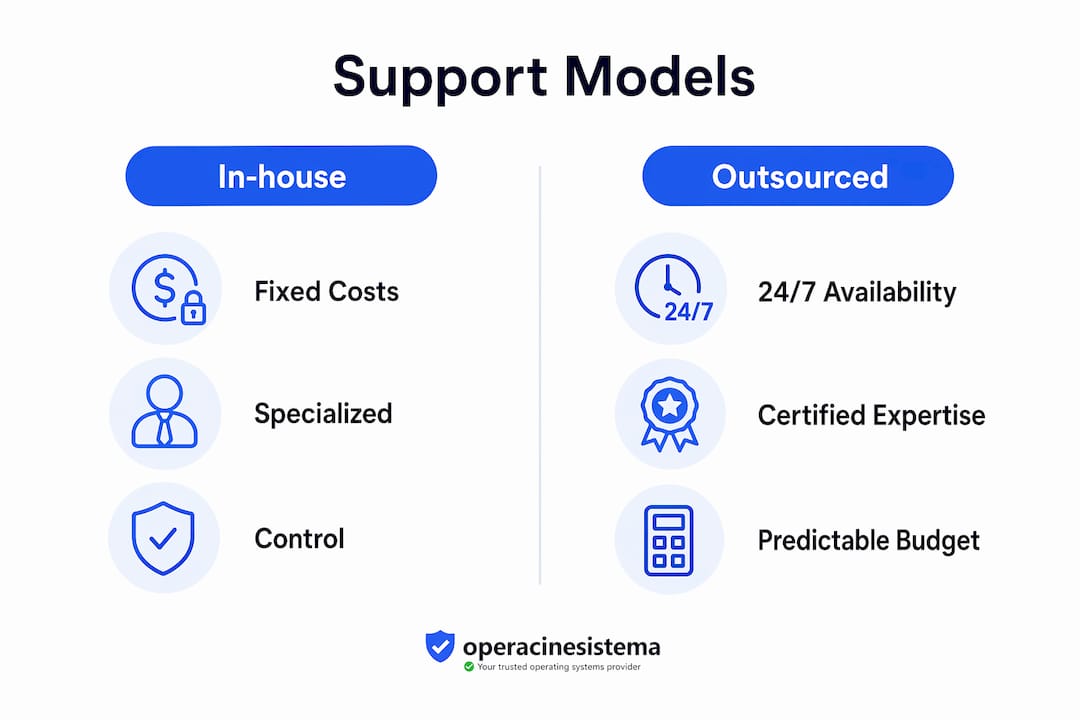
Outsourced IT support provides specialized expertise, 24/7 availability, and predictable budgeting, which are often more cost-effective than building an in-house team. For most small businesses with fewer than 50 employees, outsourcing wins on almost every dimension. The cost of one full-time IT employee, including salary, benefits, and training, typically exceeds the annual cost of a managed service contract that covers more hours and more specialties.
Outsourced IT support offers certified expertise in multiple specialties that small businesses cannot realistically build in-house. A single in-house hire might cover general troubleshooting but lack deep knowledge of network security, Microsoft licensing compliance, or cloud infrastructure. An outsourced provider brings a team with certifications across all of those areas.
| Facteur | In-house support | Outsourced support |
|---|---|---|
| Cost structure | High fixed costs: salary, benefits, training | Predictable monthly contract fee |
| Expertise depth | Limited to one or two generalists | Access to certified specialists across disciplines |
| Availability | Business hours only unless overtime is paid | 24/7 coverage standard with most providers |
| Scalability | Slow and expensive to scale up or down | Scales with your contract, often within days |
| Business continuity | Vulnerable if the employee leaves or is sick | Provider absorbs staffing risk entirely |
The in-house model makes sense when your business has highly specialized software that requires deep institutional knowledge, or when data sensitivity rules out third-party access. For most small businesses running standard Microsoft environments, outsourcing is the smarter financial and operational choice.
Conseil de pro : Before signing an outsourced support contract, ask the provider for their average response time, their escalation process for critical outages, and proof of Microsoft certifications. These three questions separate serious providers from those who will leave you waiting during a crisis.
You can also review software purchase tips for businesses to understand how licensing decisions connect directly to your support options, since official licenses unlock vendor support channels that unlicensed software simply cannot access.
For a broader view of how long-term tech support shapes business resilience, the strategic case goes well beyond day-to-day troubleshooting.
Principaux enseignements
Software support is a financial and operational asset, not an optional expense. Businesses that treat it as an investment consistently outperform those that treat it as a cost to minimize.
| Point | Détails |
|---|---|
| Proactive support prevents downtime | Patch management and health monitoring stop failures before they disrupt your business. |
| Security depends on official software | Genuine licenses receive security updates; counterfeit or unlicensed software does not. |
| Support quality drives user retention | Fast, empathetic resolution reduces churn and converts users into loyal advocates. |
| Outsourcing beats in-house for most SMBs | Fixed contract costs, 24/7 coverage, and specialist expertise outperform a single in-house hire. |
| Every support dollar multiplies | Investing in quality support saves $3 to $5 in downstream costs per dollar spent. |
Why I think most small businesses are getting software support backwards
I have seen a consistent pattern across small businesses: they treat software support as something you call when things break, not something you invest in to prevent things from breaking. That reactive mindset is expensive. The businesses I have watched struggle most are the ones that skipped the $200 annual support contract and then spent $5,000 recovering from a ransomware attack that a single patch would have blocked.
The misconception is that support is a cost. Strong support models transform IT from a maintenance cost center into a strategic business enabler. That reframe changes everything. When you see support as infrastructure rather than overhead, you make different decisions. You buy genuine licenses because they come with update channels. You schedule maintenance windows because you understand what unplanned downtime actually costs.
There is also a quality signal that most buyers miss. When a software vendor invests heavily in support, it tells you something about how they view their product and their customers. Vendors who cut support corners are usually cutting corners elsewhere too. I always recommend asking about support quality before asking about price. The answer tells you more about the vendor than any feature list.
My honest advice for 2026: treat software support as a line item in your budget, not an afterthought. Decide whether in-house or outsourced fits your size and risk profile. Get official licenses for every piece of software your business depends on. And build a relationship with a support provider before you need them urgently, because the worst time to find a good plumber is when your pipes are already flooding.
— Danielius
Get your Microsoft licensing right with Operacinesistema
If this article has made one thing clear, it is that official software is the foundation of any reliable support setup. Without a genuine license, you lose access to Microsoft’s security updates, official support channels, and compliance protections.

Operacinesistema makes it straightforward to get licensed correctly. Whether you need a Windows 10 or Windows 11 Pro key for personal use or for your small business, you can find the right option without overpaying. Start with the Windows license checklist to confirm exactly what your setup requires. If you are unsure which license type fits your needs, the guide to OS licenses for individuals and SMBs covers OEM, Retail, and Volume options clearly. Secure your license today and make sure your system has the support foundation it deserves.
FAQ
Why does software support matter for small businesses?
Software support keeps your systems secure, updated, and running without unexpected failures. For small businesses, a single unplanned outage or security breach can cost more than an entire year of proactive support.
What is the difference between proactive and reactive software support?
Proactive support involves scheduled maintenance, patching, and monitoring to prevent problems before they occur. Reactive support responds after a failure has already disrupted your operations, which is almost always more expensive and disruptive.
Does using an official software license improve support quality?
Yes. Genuine licenses from vendors like Microsoft unlock access to official security updates, vendor support channels, and compliance protections. Counterfeit or unlicensed software receives none of these, leaving your system permanently exposed to known vulnerabilities.
Is outsourced IT support worth it for a business with fewer than 20 employees?
Outsourced support is typically the better choice at that size. The cost of one in-house IT hire exceeds most managed service contracts, and outsourced providers offer 24/7 coverage and specialist expertise that a single employee cannot match.
How does support quality affect software renewal decisions?
Support quality directly impacts renewal probability in SaaS and subscription software. Users who receive fast, helpful responses are significantly more likely to renew. Users who experience slow or unhelpful support look for alternatives at the next renewal date.





