
《2026年微软IT专业人员合规指南》
简而言之:
- Microsoft compliance involves continuous implementation of policies, controls, and governance across Microsoft platforms to meet regulation standards. It relies on four core technical pillars: identity management, device compliance, data governance, and threat protection, supported by tools like Entra ID, Intune, Purview, and Defender. Effective management emphasizes governance, phased implementation, automation, and continuous monitoring to maintain audit readiness and reduce organizational risk.
Microsoft compliance is defined as the systematic implementation of policies, technical controls, and governance frameworks across Microsoft platforms to satisfy regulatory requirements such as SOC 2, HIPAA, and CMMC. For compliance officers and IT professionals, this is not a one-time project. It is an ongoing operational discipline that spans identity management, device security, data protection, and audit readiness. Organizations running Microsoft 365, Azure, or hybrid environments face 30 to 100+ technical controls depending on their regulatory scope. This guide to Microsoft compliance breaks down every layer you need to manage, from core tools like Microsoft Purview Compliance Manager and Microsoft Intune to governance strategy and continuous monitoring.
What are the core components of microsoft compliance?
Microsoft compliance rests on four technical pillars: identity and access management, device compliance, data governance, and threat protection. Each pillar maps to specific Microsoft tools and regulatory control categories. Understanding how they connect is the foundation of any effective compliance program.
Identity and access management via entra ID
Microsoft Entra ID (formerly Azure Active Directory) is the control point for who accesses what across your environment. Conditional access policies, multi-factor authentication (MFA), and periodic access reviews are the three non-negotiable controls here. Without MFA enforced across all privileged accounts, no regulatory framework will consider your identity posture adequate. Entra ID also supports Privileged Identity Management (PIM), which limits standing admin access and creates time-bound role assignments. This directly addresses audit requirements under HIPAA and CMMC.

Device compliance via microsoft intune
Microsoft Intune enforces device health policies across Windows, macOS, iOS, and Android endpoints. A device compliance policy in Intune defines minimum requirements: OS version, encryption status, firewall state, and antivirus presence. Devices that fail these checks are blocked from accessing corporate resources through conditional access integration with Entra ID. This creates a closed loop between identity and device posture. For organizations under CMMC Level 2 or higher, Intune-based device compliance is a mandatory control category.
Data classification and governance via microsoft purview
Microsoft Purview handles data classification, sensitivity labeling, retention policies, and data loss prevention (DLP). You use Purview to define what data is sensitive, where it lives, and who can access or share it. Sensitivity labels apply encryption and access restrictions directly to files and emails. DLP policies block or warn users when they attempt to share regulated data outside approved channels. For HIPAA-covered entities, Purview’s audit logs and retention policies are critical evidence items during external audits.
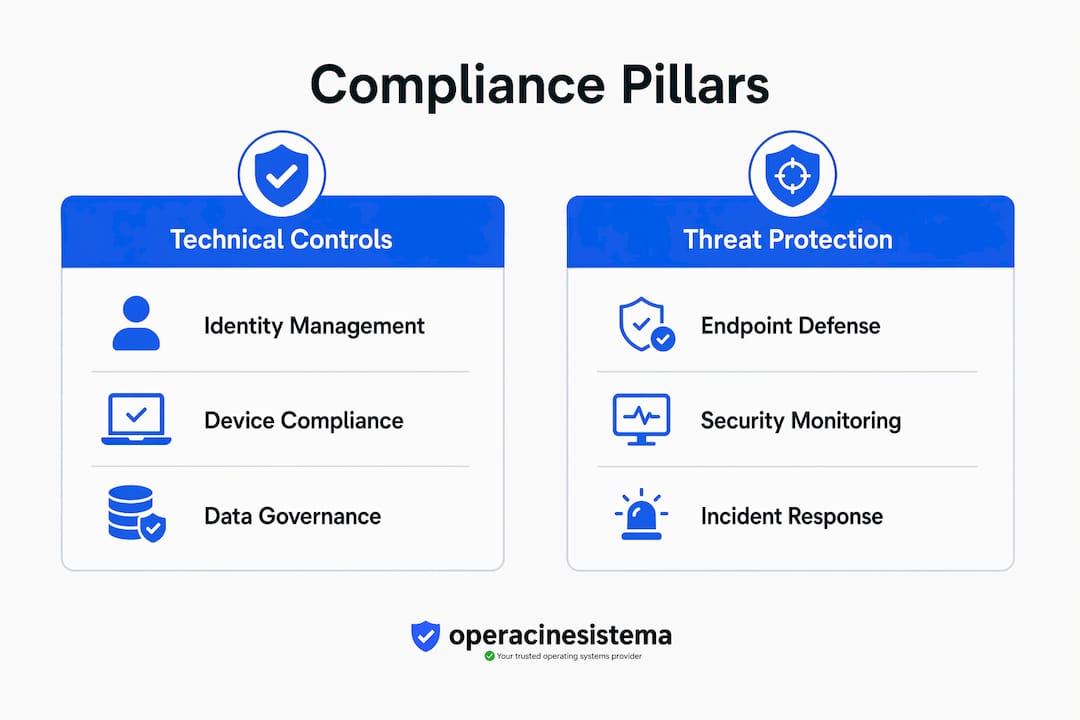
Threat protection via defender and sentinel
Microsoft Defender for Endpoint provides endpoint detection and response (EDR) capabilities, while Microsoft Sentinel delivers security information and event management (SIEM) at scale. Together, they generate the security event logs and incident records that auditors expect to see. Sentinel’s workbooks and analytics rules can be mapped directly to NIST 800-53 or CIS Controls, making it a practical tool for compliance reporting. The combination of Defender and Sentinel closes the threat visibility gap that purely policy-based compliance programs miss.
Regulatory Framework Control Comparison
| Control Category | SOC 2 | HIPAA | CMMC Level 2 |
|---|---|---|---|
| MFA / Conditional Access | Required | Required | Required |
| Device Compliance Policies | 推荐 | Required | Required |
| Data Classification / DLP | Required | Required | 推荐 |
| Audit Logging / SIEM | Required | Required | Required |
| Encryption at Rest / Transit | Required | Required | Required |
专业提示 Start your control inventory by exporting your Compliance Manager assessment and cross-referencing it against your regulatory framework’s control list. Gaps become visible immediately.
How can organizations implement microsoft compliance effectively?
Effective compliance management starts with governance, not technology. Many organizations make the mistake of deploying Intune or Purview before they have documented who owns each control, who reviews it, and what the remediation process looks like when a control fails. That gap creates defensibility problems during audits even when the technical controls are functioning correctly. A governance-first approach establishes documented accountability before any technical configuration begins.
Here is a structured implementation sequence that works in practice:
- Define ownership. Assign a named control owner for each compliance domain: identity, device, data, and threat. This person is accountable for configuration, monitoring, and evidence collection.
- Map controls to frameworks. Use Microsoft Compliance Manager’s built-in assessment templates for SOC 2, HIPAA, or CMMC. Map your controls to these templates rather than treating the compliance score as a standalone metric.
- Configure technical controls in phases. Start with identity (Entra ID MFA and conditional access), then move to device compliance (Intune), then data governance (Purview). Attempting all three simultaneously creates configuration conflicts and overwhelms your team.
- Establish a quarterly review cadence. Review security and compliance policies at least quarterly or after any major organizational change such as an acquisition, a new product line, or a significant headcount shift.
- Engage an independent audit function. An independent audit function reporting to the board is a regulatory expectation, not a best practice suggestion. Internal teams cannot credibly assess their own controls without independent verification.
- Integrate regulatory intelligence. Tools like MetricStream or ServiceNow GRC can feed regulatory change alerts directly into your compliance workflow, so your control library stays current without manual monitoring.
专业提示 Run your first compliance automation pilot on a single business unit or one regulatory framework. Staged rollout builds organizational buy-in and surfaces integration issues before they affect your entire environment.
The governance layer also includes your policy documentation. Every technical control needs a corresponding written policy that explains its purpose, scope, and exception process. Auditors look for this alignment. A perfectly configured Intune policy with no supporting written policy is a finding waiting to happen.
Aligning your compliance cycles with business planning cycles also matters. If your organization runs quarterly business reviews, attach your compliance policy review to the same schedule. This keeps compliance visible at the leadership level and prevents it from becoming an IT-only concern.
What tools enable continuous microsoft compliance monitoring?
Continuous compliance monitoring is the shift from periodic audits to real-time control assessment. AI-powered compliance tools now provide real-time visibility and predictive risk management, replacing the manual periodic checkup model that most organizations still rely on. This shift is significant. A quarterly audit snapshot can miss a control failure that occurred and was remediated between review cycles, leaving you with a false sense of security.
Microsoft Purview Compliance Manager is the central hub for this work. Used correctly, it does far more than display a compliance score. It assigns improvement actions to specific owners, tracks completion status, and generates evidence documentation. The key is treating it as a live workflow tool, not a reporting dashboard.
Manual vs. Continuous Compliance Workflows
| Workflow Element | Manual Approach | Continuous Approach |
|---|---|---|
| Control Assessment | Quarterly or annual review | Real-time automated monitoring |
| Evidence Collection | Manual screenshots and exports | Automated log aggregation |
| Gap Identification | Post-audit findings | Predictive risk alerts |
| Task Assignment | Email-based coordination | Workflow-integrated assignments |
| Audit Readiness | Prepared before each audit | Always audit-ready |
Continuous compliance programs require structured workflows, centralized control management, and automated evidence tracking to reduce audit effort. This is where platforms like Singleclic’s cloud compliance services add value by layering managed monitoring on top of your Microsoft environment.
The practical steps for operationalizing continuous monitoring include:
- Automate evidence collection. Configure Purview audit logs, Defender alerts, and Intune compliance reports to feed into a centralized repository automatically.
- Set control health thresholds. Define what a “passing” control looks like in measurable terms: 100% MFA enrollment, zero non-compliant devices in production, no DLP policy exceptions older than 30 days.
- Build escalation workflows. When a control falls below its threshold, an automated ticket should route to the control owner with a defined remediation deadline.
- Schedule monthly compliance health reviews. These are shorter than quarterly policy reviews and focus on control status, not policy changes.
专业提示 Connect Microsoft Sentinel’s compliance workbooks to your Compliance Manager assessments. This gives you a single pane of glass for both security events and compliance control status, which auditors find compelling.
What are the most common microsoft compliance pitfalls?
The most frequent compliance failures are not technical. They are organizational. Understanding where programs break down helps you avoid the same traps.
Treating compliance as a point-in-time event. Compliance is not a project with a finish line. Organizations that prepare intensively for an audit and then relax until the next one accumulate control drift. Treating compliance as extraordinary effort rather than routine operational hygiene increases risk and audit exposure.
Misusing Microsoft Compliance Manager as a static scorecard. The compliance score in Compliance Manager is only meaningful if your organizational controls are properly mapped to the assessment templates. Most organizations fail by reading the score without doing the mapping work. A high score with poor mapping is a liability, not an asset.
Skipping governance documentation. Technical controls without documented ownership and process are not defensible. If an auditor asks who is responsible for reviewing Intune compliance policies and no one can answer, that is a finding regardless of how well the policy is configured.
Automating everything at once. Attempting to automate all frameworks simultaneously creates integration conflicts and overwhelms both your team and your tooling. Phased implementation, starting with your highest-risk framework, produces better results and faster wins.
Ignoring configuration drift. Microsoft 365 environments change constantly. New features roll out, users request exceptions, and administrators make one-off changes. Without a regular configuration review, your technical controls drift away from their documented state. This is why the quarterly review cadence is a minimum, not a target.
专业提示 Build compliance into your change management process. Every significant configuration change in Entra ID, Intune, or Purview should trigger a compliance impact review before it goes to production. This prevents drift before it starts.
The underlying theme across all these pitfalls is the same. Compliance works when it is embedded in how your organization operates every day. It fails when it is treated as a separate, periodic obligation.
要点总结
Effective Microsoft compliance requires governance-first design, continuous monitoring, and phased technical implementation across Entra ID, Intune, Purview, and Defender.
| 点 | 详细信息 |
|---|---|
| Governance before technology | Document control ownership and accountability before configuring any Microsoft technical tool. |
| Use Compliance Manager actively | Map organizational controls to framework templates; never rely on the score alone as a compliance indicator. |
| Enforce quarterly reviews | Review all security and compliance policies at least quarterly or after any major organizational change. |
| Adopt continuous monitoring | Replace periodic audits with automated evidence collection and real-time control health dashboards. |
| Phase your automation rollout | Start with one framework or business unit to build momentum and avoid integration conflicts. |
What i’ve learned about microsoft compliance after years in the field
Most compliance programs I’ve seen fail at the same point: the gap between the technical configuration and the governance layer. Organizations spend months getting Intune policies right, then walk into an audit with no written policy to back them up. The auditor doesn’t care how elegant your conditional access rules are if you can’t show documented ownership and a review history.
The shift toward AI-driven compliance monitoring is real and accelerating. Tools that once required a dedicated analyst to run quarterly reports now surface predictive risk alerts in real time. That’s genuinely useful. But I’ve watched organizations adopt these tools and then stop thinking critically about their control design. The tool becomes a crutch. The compliance score becomes the goal instead of actual risk reduction.
My honest advice: start smaller than you think you need to. Pick your highest-risk regulatory framework, map it properly in Compliance Manager, get your quarterly review cadence locked in, and make sure your independent audit function has real teeth. Then expand. The organizations that try to automate everything across every framework in year one almost always end up with a fragile program that looks good on paper and falls apart under scrutiny.
Compliance also shapes your security posture in ways that go beyond regulatory checkboxes. When you enforce MFA, manage device health through Intune, and classify your data in Purview, you are also reducing your actual attack surface. The IT security checklist approach works because it forces you to look at your environment systematically, not just reactively.
Build compliance as operational hygiene. Make it boring. Boring compliance programs are the ones that pass audits.
— Danielius
How Operacinesistema supports your microsoft licensing compliance
Compliance doesn’t stop at policies and controls. It starts with having licensed, genuine software running across your environment. Unlicensed or counterfeit Windows installations create immediate compliance gaps that no Purview policy can fix.

Operacinesistema provides genuine Windows 10 and Windows 11 Pro licenses, including OEM and retail options, with instant digital delivery and full documentation. If you’re building a compliant Microsoft environment, your Windows license checklist is the right starting point. For IT professionals managing multiple endpoints, understanding Windows license types ensures every device in your fleet meets legal and audit requirements. Explore the full Microsoft 365 resources available through Operacinesistema to keep your compliance foundation solid.
FAQ
What is microsoft compliance manager?
Microsoft Compliance Manager is a control-mapping and assessment tool within Microsoft Purview that tracks your organization’s compliance posture against regulatory frameworks like SOC 2, HIPAA, and CMMC. It assigns improvement actions, tracks completion, and generates evidence documentation for audits.
How many controls does microsoft compliance require?
The number depends on your regulatory framework. Standard regulated enterprises manage 30 to 100+ controls across Entra ID, Intune, and Purview, with more complex frameworks like CMMC Level 2 requiring the higher end of that range.
How often should we review our microsoft compliance policies?
Organizations should review security and compliance policies at least quarterly. Reviews should also occur after major changes such as mergers, new product launches, or significant infrastructure updates.
What is the biggest mistake in microsoft compliance programs?
The most common mistake is treating Compliance Manager as a static scorecard without properly mapping organizational controls to its assessment templates. A high compliance score with poor control mapping gives a false picture of your actual risk posture.
Do we need an independent audit for microsoft compliance?
Yes. An independent audit function reporting to the board is a regulatory expectation across most major frameworks. Internal teams cannot credibly self-assess their own controls, and regulators view independent oversight as a core component of an effective compliance management system.





