Why Digital Software Authentication Matters in 2026
Tóm tắt:
- Digital software authentication verifies user, device, or software identities to prevent unauthorized access. It is vital for protecting data, ensuring trust, and complying with security regulations. Organizations must adopt multi-factor and phishing-resistant methods to strengthen digital security and defend against cyberattacks.
Digital software authentication is the process of verifying the identity of users, devices, or software before granting access to systems and sensitive data. The importance of digital software authentication has never been greater: cyberattacks grow more targeted each year, and a single breach now costs organizations an average of $4.45 million per incident. Whether you manage a business network or protect your personal accounts, authentication is the first and most critical line of defense. Understanding how it works, and why it matters, puts you in control of your digital security.
Why is digital software authentication important for security?
Digital software authentication is the formal industry term for what most people call “login security,” but it covers far more than passwords. It governs how systems confirm that the person, device, or software requesting access is exactly who or what it claims to be. Without that confirmation, every door in your digital environment stays unlocked.
The digital authentication benefits extend across three layers: identity, data, and trust. Authentication protects your identity by blocking unauthorized users from accessing accounts. It protects your data by ensuring only verified parties can read or modify sensitive files. It builds trust by proving to customers, partners, and regulators that your systems operate with verified controls in place.
Software security is now a business-critical requirement, not an optional feature. Organizations that treat authentication as a checkbox rather than a foundation expose themselves to regulatory penalties, reputational damage, and financial loss. The $4.45 million average breach cost reflects direct costs like forensics, notification, and legal fees, plus indirect costs like lost customers and damaged brand equity.

Mẹo hay: If your organization still relies on passwords alone, you are not meeting the baseline security expectations of most compliance frameworks, including SOC 2, ISO 27001, and HIPAA.
How does authentication protect individuals and organizations?
Strong digital identity verification stops attacks before they start. The most direct benefit is access control: only authenticated users reach protected resources. That single control eliminates the majority of opportunistic attacks that rely on stolen or guessed credentials.
Here is what authentication actively prevents:
- Unauthorized account access caused by credential stuffing, brute force, or phishing
- Identity theft where attackers impersonate users to steal funds or data
- Sự cố rò rỉ dữ liệu triggered by compromised employee or customer accounts
- Regulatory violations that result from inadequate access controls under frameworks like GDPR, HIPAA, and PCI DSS
- Supply chain attacks where unverified software or users inject malicious code into trusted pipelines
Multi-factor authentication blocks up to 99.9% of automated account compromise attacks. That figure is not theoretical. It reflects real-world attack data showing that the vast majority of credential attacks fail the moment a second verification factor is required. Requiring a second factor means a stolen password alone is worthless to an attacker.
Authentication also supports regulatory compliance. Frameworks like HIPAA require access controls and audit trails. PCI DSS mandates MFA for all administrative access. GDPR requires organizations to demonstrate that personal data is protected. Authentication is the technical mechanism that makes those requirements achievable. Organizations that verify software vendors as part of their procurement process reduce third-party risk alongside internal access risk.
What are the common and emerging authentication methods?
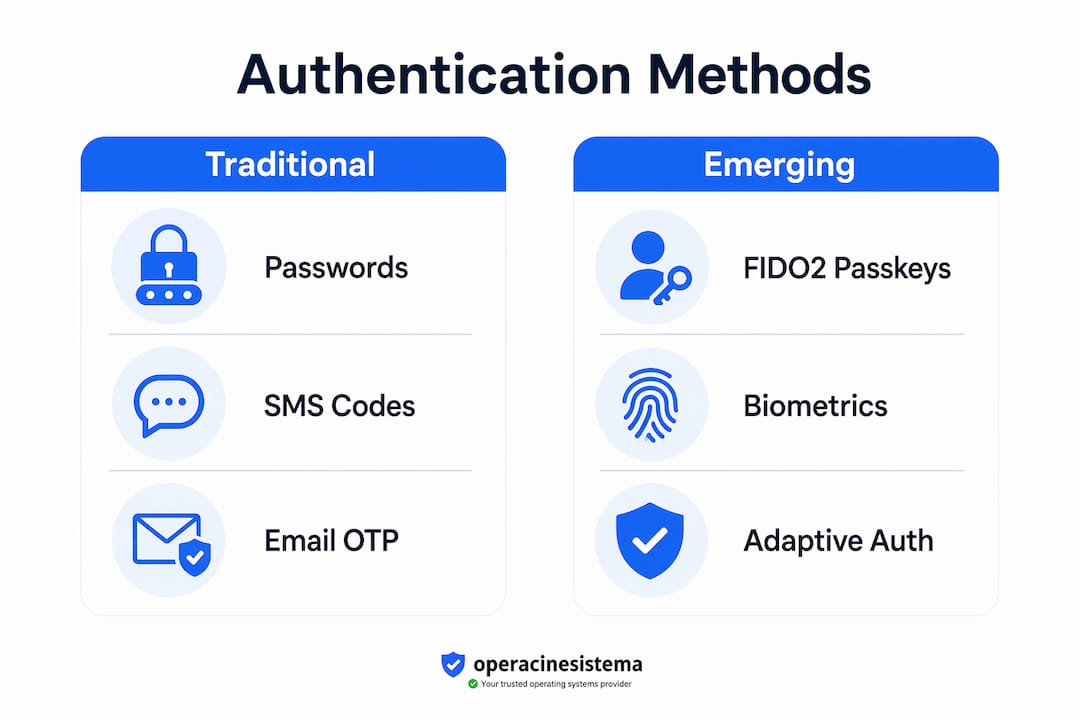
Authentication methods range from basic passwords to cryptographic keys, and the gap in security between them is significant. Knowing which method fits which situation is one of the most practical skills in modern security management.
| Phương pháp | Mức độ bảo mật | Phishing resistant | Usability |
|---|---|---|---|
| Password only | Thấp | Không | Cao |
| SMS one-time code | Medium | Không | Medium |
| App-based TOTP | Medium | Không | Medium |
| FIDO2 passkey | Cao | Có | Cao |
| Hardware security key | Rất cao | Có | Medium |
| Adaptive/context-based | Cao | Partial | Cao |
Traditional methods and their limits
Passwords are the oldest authentication method and the most frequently compromised. SMS codes and email one-time passwords add a second factor, but all traditional MFA methods, including SMS, email codes, and TOTP apps, remain susceptible to phishing. An attacker who tricks a user into entering their code on a fake site captures that code in real time.
FIDO2 passkeys and phishing-resistant authentication
FIDO2 passkeys represent the current standard for phishing-resistant authentication. Instead of a shared secret like a password, FIDO2 uses a cryptographic key pair. The private key never leaves the user’s device. The server only holds the public key. Even if an attacker intercepts the authentication exchange, they cannot reuse it. FIDO2-certified credentials offer phishing-resistant cryptographic authentication that no SMS or TOTP method can match.
Adaptive and zero-trust authentication
Adaptive authentication evaluates context before granting access: device health, location, time of access, and behavior patterns. If a login attempt looks unusual, the system demands additional verification. This approach fits zero-trust security models, where no user or device is trusted by default, regardless of network location. Zero-trust treats every access request as potentially hostile until verified.
Mẹo hay: Deploy FIDO2 passkeys for any account that holds sensitive data. For systems that do not yet support FIDO2, use an authenticator app over SMS. Never rely on SMS alone for high-value accounts.
How does authentication secure software integrity and supply chains?
Software authentication extends beyond user logins. It also governs whether the software you run is genuinely what it claims to be. This is where code signing enters the picture.
Code signing is the practice of attaching a digital signature to software artifacts, including executables, scripts, and packages. That signature proves two things: the software came from a specific publisher, and it has not been modified since it was signed. Code signing authenticates software origin and integrity, reducing the risk of malicious updates and supply chain attacks.
The risk, however, does not disappear with a valid signature. A digital signature proves origin and integrity but not safety. If an attacker compromises the signing key or the release pipeline, they can produce a validly signed package that contains malicious code. The signature looks legitimate. The software is not.
Practical steps for organizations implementing code signing:
- ✅ Store signing keys in hardware security modules (HSMs), not on developer workstations
- ✅ Apply least privilege to all signing processes so only authorized pipelines can trigger a signature
- ✅ Audit signing events and alert on unexpected signing activity
- ✅ Combine code signing with software bill of materials (SBOM) practices to track component provenance
- ✅ Rotate signing keys on a defined schedule and revoke compromised keys immediately
Mẹo hay: Treat code signing as a supply chain security control, not a compliance checkbox. A signed artifact is only trustworthy if the key management and pipeline controls behind it are equally strong.
The strategic value of code signing grows as software supply chains become more complex. Modern applications pull from dozens of open-source libraries and third-party services. Each dependency is a potential entry point for a tampered package. Authentication at the artifact level, combined with provenance verification, closes that gap.
What are the best practices for implementing digital authentication?
Strong authentication does not happen by accident. It requires deliberate design, ongoing management, and user education. The following numbered steps give you a practical framework for implementation.
-
Adopt a layered security model. No single authentication method is sufficient on its own. Combine strong MFA with network controls, endpoint security, and monitoring. Each layer catches what the previous one misses.
-
Apply the least privilege principle. Grant users and systems only the access they need for their specific role. An attacker who compromises a low-privilege account should not be able to reach your most sensitive data.
-
Deploy phishing-resistant MFA where supported. Start with FIDO2 passkeys for critical systems. Where passkeys are not yet supported, use authenticator apps. Remove SMS as a fallback for high-value accounts.
-
Manage the full credential lifecycle. Provision accounts with strong authentication from day one. Deprovision accounts immediately when employees leave or roles change. Audit dormant accounts quarterly and disable them.
-
Build recovery options that do not weaken security. Account recovery is a common attack vector. Avoid security questions, which are easily researched. Use verified identity recovery processes tied to a second trusted device or identity document.
-
Educate users continuously. Phishing attacks succeed because users make mistakes under pressure. Regular training on recognizing phishing attempts, reporting suspicious activity, and managing credentials reduces human error significantly.
-
Align with recognized security frameworks. Software validation and compliance frameworks like NIST SP 800-63, ISO 27001, and SOC 2 provide tested authentication requirements. Aligning with these frameworks also satisfies most regulatory auditors.
The most overlooked best practice is testing. Organizations regularly deploy authentication controls and never verify that they work as intended. Penetration testing and red team exercises that specifically target authentication flows reveal gaps that configuration reviews miss.
What does the future of digital authentication look like?
The security industry is moving away from static, trust-by-default models toward continuous verification. The trust-by-default era is ending, replaced by a “verification-over-trust” approach where users and systems verify software and identities against trusted, independent data sources rather than accepting signatures at face value.
Key trends shaping authentication in 2026 and beyond:
- Continuous authentication replaces one-time login checks with ongoing behavioral and contextual signals throughout a session
- Biometric factors including fingerprint and facial recognition are becoming standard on consumer and enterprise devices, reducing reliance on passwords
- Cryptographic identity through standards like FIDO2 and WebAuthn is expanding from browsers to mobile apps, desktop software, and IoT devices
- Independent artifact verification is gaining adoption, where organizations verify software releases against signed transparency logs rather than trusting the publisher’s signature alone
- AI-driven threat detection identifies anomalous authentication patterns in real time, flagging compromised sessions before damage occurs
The average time to remediate critical vulnerabilities dropped from 112 days in 2017 to 37 days in 2024. That improvement reflects better tooling and organizational maturity. The same trajectory applies to authentication: organizations that invest now in phishing-resistant methods and continuous verification will be significantly better positioned as attack sophistication increases.
Privacy remains a genuine tension point. Biometric authentication is highly secure, but it raises questions about data storage, consent, and what happens when biometric data is compromised. Unlike a password, you cannot change your fingerprint. Organizations adopting biometric authentication must pair it with strong data minimization and on-device processing wherever possible.
Điểm chính
Digital software authentication is the single most effective technical control for preventing unauthorized access, and organizations that skip phishing-resistant MFA accept avoidable, quantifiable risk.
| Điểm | Chi tiết |
|---|---|
| MFA blocks most attacks | Phishing-resistant MFA stops up to 99.9% of automated credential attacks. |
| Breach costs are real | A single data breach costs organizations an average of $4.45 million per incident. |
| Code signing has limits | A valid digital signature does not guarantee software safety if signing keys or pipelines are compromised. |
| FIDO2 is the current standard | FIDO2 passkeys provide cryptographic, phishing-resistant authentication that SMS and TOTP cannot match. |
| Verification replaces trust | The industry is shifting from trusting signatures by default to independently verifying software artifacts. |
What I have learned from watching authentication evolve
At Jewels by ARES, we operate at the intersection of craftsmanship and trust. Every piece we create carries a guarantee of authenticity. That same principle applies to digital security, and I have watched organizations learn it the hard way.
The most common mistake I see is treating authentication as a one-time setup task. Organizations deploy MFA, check the compliance box, and move on. Then an attacker bypasses it through a poorly secured recovery flow or a legacy system that was never updated. Authentication is not a product you install. It is a practice you maintain.
The second misconception is that strong security hurts user experience. FIDO2 passkeys are actually faster and easier than typing a password and then retrieving an SMS code. The friction argument against phishing-resistant MFA is outdated. Modern passkeys work with a fingerprint or face scan in under two seconds.
What I find most underappreciated is the supply chain angle. Most organizations focus on protecting user logins and ignore the software they deploy. A tampered package with a valid signature can sit in a production environment for months before anyone notices. Combining software authenticity verification with strong code signing controls and SBOM practices is the approach that actually closes that gap.
The organizations that get this right share one trait: they treat authentication as a living system, not a static control. They test it, update it, and educate their people about it continuously. That is the standard worth holding yourself to.
— Jewels by ARES
Authenticity you can see and trust
At Jewels by ARES, authenticity is not just a security principle. It is the foundation of everything we make. Every bracelet in our collection is handcrafted with ethically sourced materials and finished with the same care and attention to detail that strong authentication brings to digital systems.

Just as you verify the software you trust with your data, you deserve jewelry you can trust with your story. Our diamond string bracelets are crafted for those who value genuine quality and understated elegance. Each piece ships worldwide in gift-ready packaging, making it the right choice for a milestone moment, a personal talisman, or a meaningful gift. When authenticity matters, the details make all the difference.
Câu hỏi thường gặp
What is digital software authentication?
Digital software authentication is the process of verifying the identity of a user, device, or software before granting access to a system or resource. It is the technical foundation of access control and data protection in modern security.
Why does multi-factor authentication matter so much?
MFA blocks up to 99.9% of automated account compromise attacks by requiring more than a password alone. A stolen password is useless to an attacker if a second verified factor is required to complete login.
What makes FIDO2 passkeys more secure than SMS codes?
FIDO2 passkeys use cryptographic key pairs where the private key never leaves the user’s device, making them immune to phishing. SMS codes can be intercepted or redirected, and all traditional MFA methods remain susceptible to phishing attacks.
What is code signing and why does it matter?
Code signing attaches a digital signature to software to prove its origin and confirm it has not been tampered with. It is a critical control for securing software supply chains and preventing malicious updates from reaching end users.
How should organizations start improving their authentication security?
Start by deploying phishing-resistant MFA on all critical systems, applying the least privilege principle to all accounts, and auditing dormant credentials. Align your controls with recognized frameworks like NIST SP 800-63 or ISO 27001 to meet both security and compliance requirements.