
Workflow for License Management: A 2026 Business Guide
TL;DR:
- A license management workflow organizes, tracks, and audits software licenses to ensure compliance and control costs.
- Treating license management as a continuous process helps businesses avoid overpaying, missed renewals, and audit penalties.
A workflow for license management is the process that organizes, tracks, assigns, renews, and audits software licenses within a business to maintain compliance and control costs. Without a defined process, businesses overpay for unused licenses, miss renewal deadlines, and expose themselves to audit penalties. The industry term for this discipline is Software License Management (SLM), and it follows a 7-stage lifecycle from procurement through renewal governance. Best practice frameworks call for centralized inventory, usage monitoring, and renewal processes that start 90 days before contract expiration. When you treat SLM as a continuous operational process rather than a one-time task, you cut waste, stay audit-ready, and negotiate from a position of strength.
What are the key steps in a license management workflow?
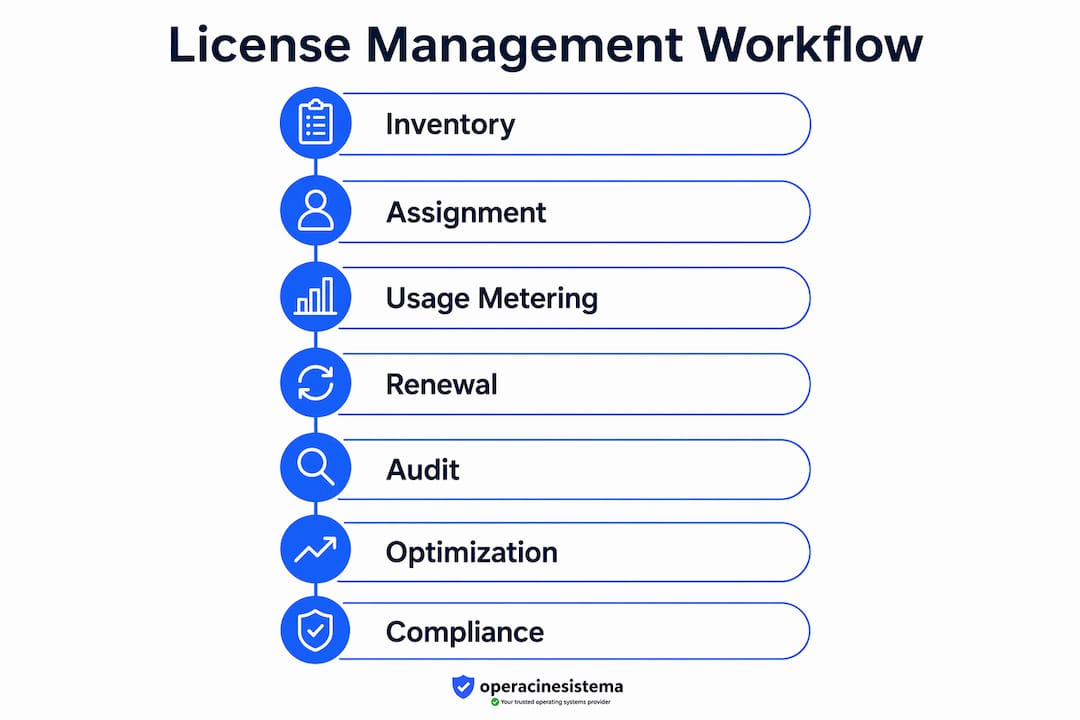
An effective license management process follows seven core steps. Each step builds on the previous one, so skipping any stage creates gaps that compound over time.
-
Build a comprehensive inventory. Catalog every software license your business owns. Include license type, seat count, contract terms, and vendor contact. This is your foundation. Without it, every other step is guesswork.
-
Centralize license data. Store all contract and license information in a single system or dashboard. Centralizing contract data eliminates duplicate licenses and gives you the visibility needed for vendor negotiations. Scattered spreadsheets across departments create blind spots.
-
Map licenses to installations. Match each license to the device or user it covers. This step reveals over-licensing and under-licensing simultaneously. You cannot fix what you cannot see.
-
Assign ownership. Every license needs a named owner, either a department head or a specific IT contact. Ownership creates accountability. When no one owns a license, no one renews it or flags when it goes unused.
-
Monitor usage continuously. Track how often each license is actually used, not just whether it is installed. Usage-based metering identifies unused licenses far more accurately than install detection alone. This is where real cost savings come from.
-
Conduct periodic audits. Schedule formal reconciliations at least quarterly. Compare your license inventory against actual installations and active users. Audits catch drift before it becomes a compliance problem.
-
Manage renewals proactively. Start the renewal process 90 days before any contract expires. This window gives you time to evaluate usage, negotiate terms, and avoid auto-renewal traps that lock you into licenses you no longer need.
The table below summarizes each step and its primary purpose.
| Step | Purpose |
|---|---|
| Comprehensive inventory | Establish a complete record of all owned licenses |
| Centralized data | Eliminate duplicates and improve visibility |
| License-to-installation mapping | Identify over-licensing and under-licensing |
| Ownership assignment | Create accountability for each license |
| Usage monitoring | Detect unused licenses and reduce waste |
| Periodic audits | Maintain compliance and catch data drift |
| Renewal management | Avoid penalties and negotiate better terms |
Profesyonel ipucu: Set calendar alerts at the 90-day, 60-day, and 30-day marks before every contract expiration. This three-stage reminder system prevents last-minute renewals and gives you real negotiating leverage.
For a ready-to-use reference, the KOBİ uyumluluk kontrol listesi covers the audit and renewal steps in detail.
How to manage bulk license assignments and mitigate risks
Bulk license assignment is the process of applying licenses to many users or devices at once, typically through CSV imports or group-based policies. It saves time during onboarding and system migrations. But it also carries real risk if you skip the safeguards.
The most common mistake managers make is running a bulk assignment without a backup. Always back up your current license state before executing any bulk change. A backup gives you a rollback point if the assignment fails or creates conflicts. Without it, you are one bad import away from a service outage.
Warning: Never run a bulk license assignment in a production environment without first testing on a pilot group. A failed bulk assignment can revoke access for hundreds of users simultaneously, halting business operations until the issue is resolved.
When you are ready to roll out at scale, follow these best practices:
- Use pilot groups first. Staged rollouts with pilot groups reduce the risk of widespread service disruption. Test with 5–10 users before applying changes to the full organization.
- Validate your CSV data before import. Check for duplicate entries, missing fields, and incorrect license codes. A single formatting error can corrupt the entire batch.
- Require approval workflows. Every bulk assignment request should pass through a formal approval step. This creates an audit trail and prevents unauthorized changes.
- Log every change. Maintain detailed audit logs that record who made the change, when, and what was affected. These logs are your defense in a vendor audit.
- Plan your rollback. Define the exact steps to reverse the assignment before you start. A rollback plan that exists only in someone’s head is not a plan.
Profesyonel ipucu: Run bulk assignments during off-peak hours, such as early morning on a weekend. If something goes wrong, fewer users are affected and your IT team has more time to respond without business pressure.
What tools and integrations optimize license management workflows?
License management software centralizes the functions that manual processes cannot scale. The right tool handles inventory, usage tracking, automated alerts, and reporting in one place. But the real power comes from integrating that tool with the other systems your business already runs.

Connecting your license management system to your HR platform is the single most impactful integration you can make. Integrating with HR onboarding and offboarding prevents shadow IT and stops licenses from sitting assigned to employees who have already left. When HR marks an employee as terminated, the integration automatically triggers a license revocation. That one automation alone can recover a significant number of paid seats every year.
The table below outlines the key feature categories to evaluate when selecting a license management tool.
| Feature category | What it does | Why it matters |
|---|---|---|
| Centralized inventory | Stores all license records in one place | Eliminates duplicate purchases and data gaps |
| Usage tracking and metering | Monitors active use, not just installations | Identifies reclaimable licenses accurately |
| Automated alerts | Notifies owners before renewals and expirations | Prevents missed deadlines and auto-renewals |
| HR and ITSM integration | Syncs with onboarding, offboarding, and ticketing | Keeps license data current without manual updates |
| Reporting and audit exports | Generates compliance reports on demand | Reduces preparation time for vendor audits |
Integration with IT Service Management (ITSM) platforms routes license requests through formal ticketing workflows. This means every request is logged, approved, and traceable. Finance integration maps license costs to specific cost centers, giving department heads visibility into what they are actually spending.
Embedding license checklists into project management tools like Jira creates a standardized request and approval process. Every new license request follows the same path, reducing errors and ensuring nothing falls through the cracks.
Profesyonel ipucu: Treat your license management tool as a living system, not a setup-and-forget database. Schedule a monthly review of the integration sync logs to catch failed updates before they create compliance gaps.
For a deeper look at how to structure these integrations, the guide on optimizing license workflows covers real-time tracking strategies that apply across most enterprise platforms.
You can also apply broader workflow principles from this custom software workflow guide to structure your approval and revocation processes more effectively.
How to monitor, audit, and continuously optimize license usage
Monitoring is where most businesses leave money on the table. The standard approach, checking whether software is installed, tells you almost nothing about actual value. A license installed on a machine that no one has opened in six months is wasted spend.
Usage-based metering measures real activity, such as login frequency, feature usage, and session duration. This data is what separates a license worth keeping from one worth reclaiming. When you identify a license that has not been actively used in 90 days, you have a strong case to reclaim it, reassign it, or negotiate a smaller seat count at renewal.
Setting your monitoring frequency
Daily automated scans catch new installations and unauthorized software before they become compliance problems. Weekly reconciliations compare your license inventory against active users and flag discrepancies. Quarterly formal audits review the full picture, including contract terms, usage trends, and upcoming renewals. Annual reviews drive your negotiation strategy for the following year.
The key is automation. Manual monitoring at this frequency is not realistic for most teams. Set your license management system to run discovery scans automatically and push alerts when usage drops below a defined threshold. That threshold is your trigger to act, not to wait.
Preparing for vendor audits
Vendor audits are not random. Software publishers typically audit customers who show rapid growth, have complex licensing structures, or are approaching renewal. Staying audit-ready means your records are always current, not just clean when an audit notice arrives.
Keep detailed records of every license purchase, assignment change, and reclamation. A single contract dashboard that stores this history gives you instant access to the documentation a vendor auditor will request. Businesses that walk into an audit with complete records consistently negotiate better outcomes than those scrambling to reconstruct history.
Reclaiming unused licenses before a renewal conversation also strengthens your negotiating position. You are not asking for a discount. You are presenting data that shows exactly what you use and what you do not. That is a fundamentally different conversation.
For practical guidance on managing software renewals and cutting costs at contract time, the renewal management guide covers the negotiation tactics that work best when you have solid usage data behind you.
Bu remote device management workflow guide also offers relevant integration strategies for teams managing licenses across distributed or remote device environments.
Önemli Çıkarımlar
A structured workflow for license management, built on centralized data, usage metering, and integrated automation, is the most reliable way to maintain compliance and eliminate wasted software spend.
| Nokta | Detaylar |
|---|---|
| Follow the 7-stage lifecycle | Start with inventory and end with proactive renewal governance 90 days before expiration. |
| Centralize all license data | A single dashboard eliminates duplicates and gives you the records needed for vendor negotiations. |
| Use usage metering, not just install detection | Metering real activity identifies reclaimable licenses and drives accurate cost reclamation. |
| Integrate with HR, ITSM, and finance | Automated sync with these systems keeps license data current and prevents shadow IT. |
| Treat SLM as a continuous loop | Ongoing monitoring and quarterly audits outperform one-time annual reviews every time. |
What I have learned from years of watching license management go wrong
Most businesses do not have a license management problem. They have a discipline problem. The tools exist. The frameworks exist. What fails is the commitment to treat SLM as an ongoing operational process rather than a fire drill before an audit.
The most common pattern I see is this: a business runs a cleanup project, gets everything organized, and then lets the data go stale for 18 months. By the time the next audit arrives, the inventory is useless. The fix is not a better tool. It is a cultural shift that makes license management part of the regular operational rhythm, the same way accounts payable or payroll is.
Cross-departmental buy-in is non-negotiable. IT cannot manage licenses in isolation when HR controls onboarding and finance controls budget approvals. The businesses that do this well have a shared process, not a siloed IT project. They have a named owner in each department, a shared dashboard, and a standing monthly review.
Bulk assignment automation is genuinely powerful, but it requires more governance, not less. Automation removes the manual effort. It does not remove the need for approval workflows, audit logs, and rollback plans. The teams that skip those controls because “the system handles it” are the ones who call me after a failed bulk import locks out 300 users on a Monday morning.
The best license management programs I have seen share one trait: they are boring. No crises, no scrambles, no surprise audit bills. Just a steady process that runs in the background and surfaces the right information at the right time. That is the goal.
— Jewels by ARES
Organized processes deserve beautiful rewards
Running a tight license management operation takes real discipline. When your systems are in order and your team is firing on all cylinders, you deserve something that reflects that care and intention.

At Jewels by ARES, we craft handcrafted bracelets that carry meaning, from diamond string bracelets built for understated luxury to red string and cord pieces rooted in centuries of symbolism. Whether you are rewarding yourself for a well-run quarter or looking for a meaningful gift for a colleague, every piece ships worldwide in elegant, gift-ready packaging. Explore the full collection at Jewels by ARES and find the bracelet that fits your story.
SSS
What is a workflow for license management?
A workflow for license management is a structured process that covers the full lifecycle of software licenses, from procurement and assignment through usage monitoring, auditing, and renewal. It replaces ad hoc tracking with a repeatable system that keeps businesses compliant and in control of costs.
How often should you audit your software licenses?
Formal audits should run at least quarterly, with automated daily or weekly discovery scans running in the background. Quarterly reconciliations catch data drift before it becomes a compliance or budget problem.
What is the safest way to handle bulk license assignments?
Always back up your current license state before any bulk change, test on a pilot group first, and require a formal approval step before the full rollout. Staged rollouts with pilot groups are the standard best practice for avoiding service disruptions.
Why is usage metering better than install detection?
Install detection only tells you whether software is on a machine. Usage metering tells you whether anyone is actually using it. Metering real activity is the only reliable way to identify licenses worth reclaiming and build an accurate picture of your actual software needs.
How does integrating HR with license management help compliance?
When HR systems sync with your license management platform, employee terminations automatically trigger license revocations. This prevents former employees from retaining access and stops you from paying for seats that no longer serve an active user.





