
How to activate Windows 10 for free legally and safely
สรุปสั้น:
- Legitimate free activation requires owning a digital license from official upgrades or purchases.
- If eligible, activate Windows 10 by reinstalling and using the digital license linked to your Microsoft account.
- Avoid unofficial hacks or keys; buy verified licenses for security and full functionality.
That nagging “Activate Windows” watermark in the corner of your screen is one of the most frustrating things about setting up a new PC. You search online and find dozens of promises: free keys, CMD tricks, KMS activators. But most of them are either illegal, risky, or flat-out fake. The good news? There are real, Microsoft-endorsed paths to activate Windows 10 for free, and we’re going to walk you through every one of them. No hacks. No shady downloads. Just the legitimate options, clearly explained.
สารบัญ
- Understand what ‘free activation’ really means
- Check your eligibility for digital license activation
- Step-by-step: Activate Windows 10 for free (legitimately)
- What if you can’t activate for free? Safe alternatives and extended options
- Expert perspective: The real cost of ‘free’ Windows activation in 2026
- Take the next step: Activate Windows 10 securely and legally
- คำถามที่พบบ่อย
ประเด็นสำคัญ
| จุด | รายละเอียด |
|---|---|
| Digital license is key | Only users with an existing digital license or entitlement can activate Windows 10 for free, and all other free options are unsafe or illegal. |
| Check eligibility first | Confirm your device’s digital license status in Windows Settings or with your Microsoft account before attempting activation. |
| Safe options if ineligible | If you can’t activate for free, stick with official or discounted sources for peace of mind and ongoing support. |
| Beware of risky hacks | Using hacks or public key generators risks malware, loss of data, and legal trouble—avoid at all costs. |
Understand what ‘free activation’ really means
Let’s get one thing straight first. “Free activation” does not mean downloading a crack tool or running a CMD script from a random forum. It means you already own a qualifying license, and you’re simply claiming what’s yours.
True free activation comes from one source: a ใบอนุญาตดิจิทัล (also called a digital entitlement). This is a license tied to your device’s hardware or your Microsoft account, created when you originally purchased or upgraded Windows legally. If you once ran genuine Windows 7 or 8.1 and upgraded to Windows 10, that upgrade created a digital license for your device. That license can still activate Windows 10 today, during a clean reinstall, as long as the hardware hasn’t changed significantly.
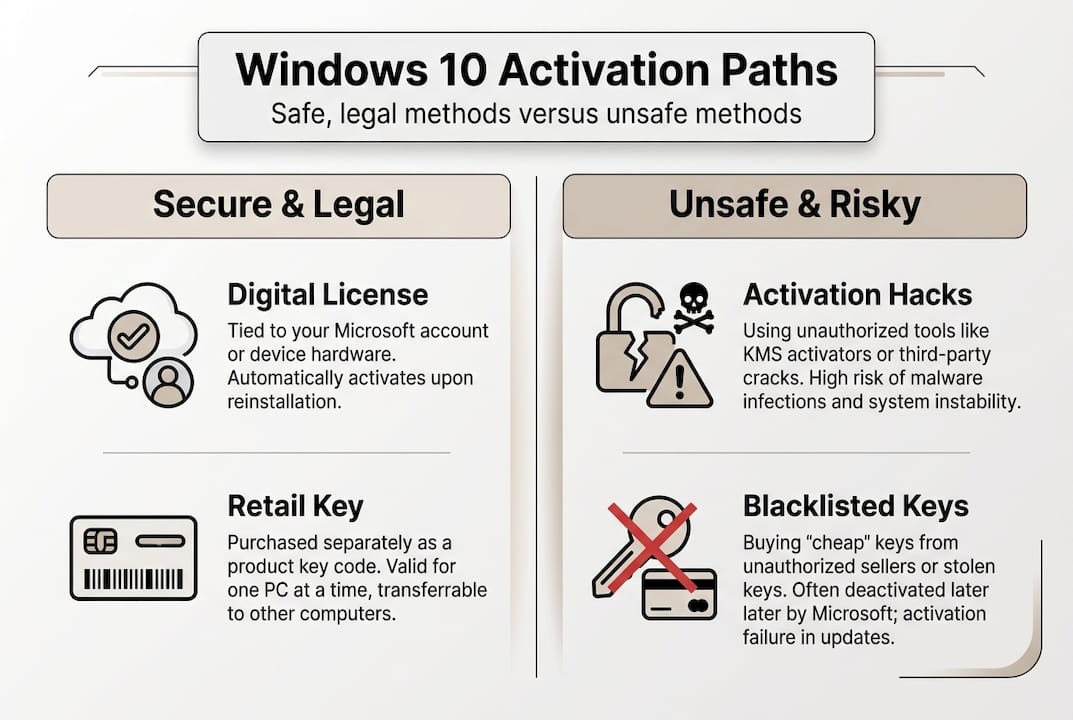
Here’s a quick comparison of what counts as legitimate versus what doesn’t:
| วิธีการ | Legitimate? | Risk level |
|---|---|---|
| Digital license from Windows 7/8.1 upgrade | ✅ ใช่ | None |
| Retail Windows 10 product key (paid) | ✅ ใช่ | None |
| OEM key (pre-installed by manufacturer) | ✅ ใช่ | ต่ำ |
| KMS activator tool (consumer use) | ❌ ไม่ | สูง |
| Free product keys from websites | ❌ ไม่ | สูงมาก |
| CMD “slmgr” hacks without a valid key | ❌ ไม่ | สูง |
What about the old Windows 7 or 8.1 free upgrade path? That officially ended. The free upgrade window closed in 2016, and any remaining loopholes were shut down by September 2023. So if you haven’t already upgraded, that door is closed.
KMS tools deserve a special warning. These were designed for enterprise IT environments, not for individual consumers. Using them on a personal PC is against Microsoft’s terms, and many KMS tools bundled for “free” online carry malware. Legitimate free activation methods never require third-party software.
🛑 สำคัญ: Microsoft’s product activation system is built to distinguish genuine licenses from unauthorized ones. CMD scripts and KMS tools are not Microsoft-endorsed for consumer use. They can leave your system vulnerable, block future updates, or get flagged entirely.
The risks of activation hacks go far beyond a simple warning message. You could be exposing your files, passwords, and personal data to malware disguised as an activator.
Check your eligibility for digital license activation
With a clear understanding of free activation, find out if you actually qualify by following these steps.
Not everyone has a digital license waiting for them. But many people do and don’t even realize it. Here’s how to check.
Step-by-step: How to check your activation status
- Click the เริ่มต้น menu and open การตั้งค่า (the gear icon).
- ไปที่ Update & Security, then click การเปิดใช้งาน.
- Look at the activation status. If it says “Windows is activated with a digital license” or “Windows is activated with a digital license linked to your Microsoft account,” you’re good to go.
- If it says “Windows is not activated,” note the error code shown. This helps you troubleshoot or contact Microsoft Support.
- You can also check license type using command line by opening Command Prompt as Administrator and typing: “slmgr /xpr
to see expiry status, orslmgr /dli` for license details.
Understanding your license type matters. Here’s a quick breakdown:
| ประเภทใบอนุญาต | Tied to | โอนสิทธิ์ได้หรือไม่? | Common source |
|---|---|---|---|
| OEM | Device hardware | ❌ ไม่ | Pre-installed by manufacturer |
| ค้าปลีก | Microsoft account | ✅ ใช่ | Purchased separately |
| Volume/MAK | Organization | ❌ No (personal use) | Business or school |
Users who upgraded from genuine Windows 7 or 8.1, or who bought a licensed Windows 10, have a digital license that allows free reinstallation and reactivation under certain conditions. The key condition is that your hardware must be substantially the same as when the license was first issued.

Pro Tip: Link your digital license to your Microsoft account before you make any hardware changes. Go to การตั้งค่า > การอัปเดตและความปลอดภัย > การเปิดใช้งาน and sign in with your Microsoft account. This gives you a safety net if you ever swap your motherboard or do a full rebuild. It also makes secure activation guidance much easier to follow if you ever need to reactivate.
Step-by-step: Activate Windows 10 for free (legitimately)
If your device qualifies, here’s how to complete activation step by step.
Reactivating through a digital license is actually straightforward when you follow the right process.
For reactivation after a clean reinstall:
- Download the official Windows 10 installation media from Microsoft’s website. Use the Media Creation Tool.
- During setup, when asked to enter a product key, click “I don’t have a product key.” Windows will activate automatically after installation if your device has a digital license.
- Make sure you’re connected to the internet. Activation happens online by matching your hardware ID to Microsoft’s servers.
- After installation, go to Settings > Update & Security > Activation to confirm the activation status.
- If activation fails, click “Troubleshoot” on the Activation page. This tool can fix most common issues automatically.
Common obstacles and how to fix them:
- Wrong edition installed: If your license was for Windows 10 Home and you installed Pro (or vice versa), activation will fail. Reinstall the correct edition.
- Internet issues: Activation requires a live internet connection. Check your network before retrying.
- Hardware change detected: If you replaced your motherboard, Windows may not recognize your device. Use the activation troubleshooter and sign in with your Microsoft account.
- Error code 0xC004F213: This usually means no digital license was found for your hardware. A genuine activation walkthrough can guide you through next steps.
Pro Tip: Before contacting Microsoft Support, note down your Windows edition, whether it’s 32-bit or 64-bit, your error code, and whether you have a retail or OEM key. This speeds up the support process significantly. Reinstalling without a key-how-to-re-install-windows-10-without-a-p) is fully supported by Microsoft when a valid digital license exists.
What if you can’t activate for free? Safe alternatives and extended options
But what if your device isn’t eligible for a digital license or your activation fails? Here’s what you can do next.
Not everyone will qualify. If your PC never ran a genuine licensed Windows before, or the upgrade path wasn’t used in time, you simply won’t have a digital license. So what are your options?
What unactivated Windows 10 actually looks like:
- ✅ You can still use most apps and software
- ✅ You receive essential security patches (until October 14, 2025)
- ❌ Personalization features are locked (wallpaper changes, color themes, lock screen)
- ❌ The “Activate Windows” watermark stays on your desktop
- ❌ Some settings pages are restricted
After October 2025, even security updates stop. Using Windows without activation past that point is a real risk to your data and privacy.
Safe alternatives worth considering:
- 🎁 Discounted licenses from verified resellers: Platforms like ours offer safe product key options at much lower prices than the Microsoft Store, while still being 100% genuine.
- 🔥 Microsoft Rewards: In some regions, you can earn points toward Microsoft products, though this is a slow path.
- 📚 Educational programs: Educational institutions may provide Windows access through Microsoft agreements, but these apply to school-owned devices, not your personal PC.
🛑 Never use key generators or piracy sites. They distribute keys that are already blacklisted, stolen from volume license agreements, or laced with malware. Your account, files, and banking data are all at risk. There is no safe version of this.
The bottom line is that if free isn’t an option for you, the next best move is a verified, affordable legitimate license.
Expert perspective: The real cost of ‘free’ Windows activation in 2026
Here’s the uncomfortable truth we don’t always say out loud: the people who chase “free” activation hacks usually spend more time, and take on far more risk, than the people who just buy a legitimate license.
Think about what’s actually at stake. A cracked Windows install can block future feature updates, leave you unprotected against vulnerabilities, and silently host malware that watches everything you type. We’ve seen users lose access to their Microsoft accounts, their OneDrive files, and even their banking apps because of compromised systems traced back to activation tools.
Licensing isn’t just a formality. It’s the foundation of a secure, fully functional OS. A retail license gives you flexibility: you can transfer it, reinstall freely, and get full support. An OEM key ties you to your hardware but still keeps you protected and updated.
The legitimate free options we’ve outlined in this article are the only paths worth taking. If none of those apply to you, the cost of a genuine key from a trusted reseller is small compared to the cost of recovering from a malware infection or data breach. Your time and your data are worth more than a free key from a forum.
Take the next step: Activate Windows 10 securely and legally
Ready to make your activation fully legal and hassle-free? Here’s where to find trusted help.
If you’ve worked through this guide and confirmed that you don’t qualify for a free digital license, the smartest move is to get a genuine key from a source you can trust. No watermarks, no malware risk, no blocked updates.

We specialize in secure Windows 10 licensing with instant email delivery, verified authenticity, and real customer support. Every key we sell is 100% genuine. You can also explore our full guide on how to buy and activate Windows 10 legally, step by step. Whether you need Home or Pro, OEM or retail, we’ve got you covered at prices that make legitimate licensing an easy choice.
คำถามที่พบบ่อย
Can I still upgrade to Windows 10 for free from Windows 7 or 8.1 in 2026?
No. Microsoft ended the free upgrade path in 2016, and all remaining loopholes were closed by September 2023. That option is no longer available.
Is it safe to use a free Windows 10 product key found online?
No. Keys from unofficial sources are often stolen, already used, or blacklisted. Microsoft’s activation system only recognizes genuine digital entitlements, and using a fake key can expose you to malware and legal risk.
What happens if I use Windows 10 without activating it?
You can still use most features, but personalization is locked and a watermark stays on your screen. Unactivated Windows 10 receives security updates until October 14, 2025, after which your system becomes vulnerable.
Does a digital license transfer if I change my hardware?
It depends on the license type. A retail license linked to your Microsoft account-how-to-re-install-windows-10-without-a-p) can be transferred to new hardware, but an OEM license is permanently tied to the original device it came with.





