Types of software licenses: find the best fit for your needs
Picking the right software license sounds simple until you’re staring at a wall of confusing terms, gray market warnings, and pricing tiers that seem designed to trip you up. For individuals and small business owners, the stakes are real: a wrong choice can mean security gaps, failed activations, or even legal trouble. Whether you’re buying a Windows 11 key for your home PC or setting up licenses for a five-person team, understanding what you’re actually purchasing matters. This guide walks you through every major license type, from perpetual to subscription to open source, so you can make a confident, compliant, and cost-smart decision.
Índice
- How to evaluate software licenses: Key factors to consider
- Perpetual licenses: One-time purchase, lifetime usage
- Subscription licenses: Flexibility, ongoing updates, and support
- Open source and specialty licenses: What every user must know
- Choosing your best-fit license: Comparison and recommendations
- What most guides miss about software licensing decisions
- Take the next step: Secure your Microsoft OS license
- Frequently asked questions
Principais conclusões
| Ponto | Detalhes |
|---|---|
| Evaluate license types | Check cost, compliance needs, update requirements, and support when choosing a license. |
| Prefer genuine sources | Only purchase from authorized vendors to avoid activation issues and security risks. |
| Subscription suits SMBs | Small businesses often benefit from subscription plans due to updates, support, and scalability. |
| Understand open source risks | Open source can save money but brings extra compliance and security responsibilities. |
| Avoid gray market licenses | Non-genuine licenses may seem cheaper but lead to bigger headaches down the road. |
How to evaluate software licenses: Key factors to consider
Before you spend a single dollar, you need a clear framework. A license is simply the legal permission to use a piece of software under specific conditions. Compliance means your usage matches those conditions exactly. Genuine software means the product comes from an authorized source, not a reseller operating in a legal gray zone.
Here are the must-consider criteria before any purchase:
- ✅ Cost: One-time payment vs. recurring subscription
- ✅ Upgrade rights: Does the license cover future OS versions?
- ✅ Compliance and legal risk: Is the license transferable? Is the seller authorized?
- ✅ Support: Does it include technical help and security patches?
- ✅ Security updates: Will your system stay protected long-term?
Before you buy, use a software purchase checklist to verify each factor. For businesses, an SMB compliance checklist adds another layer of protection.
The risk of skipping this step is serious. According to types of software licenses explained, license conflicts are one of the most overlooked compliance hazards. In fact, 68% of codebases contain license conflicts, and 86% carry open source vulnerabilities. That data applies broadly, but the lesson is universal: license problems are common and costly.
🛑 Warning: Gray market licenses often appear legitimate but can be revoked, blocked, or simply non-functional. Always verify the seller’s authorization status before purchasing.
Pro Tip: Search the seller’s name alongside “Microsoft Authorized Reseller” before you buy any Windows OS or activation key. A few minutes of research can save you hours of headaches.
With these criteria in hand, let’s look at the actual license types you’ll encounter.
Perpetual licenses: One-time purchase, lifetime usage
With evaluation criteria in mind, let’s look at the traditional model. A perpetual license means you pay once and own the right to use that software version forever. For Microsoft Windows, this comes in two main forms: Varejo (also called Full Packaged Product) and OEM (Original Equipment Manufacturer).
Retail licenses are tied to you, the buyer, and can be transferred to a new device. OEM licenses are tied to the original hardware and cannot move. You can learn more in this retail license guide.
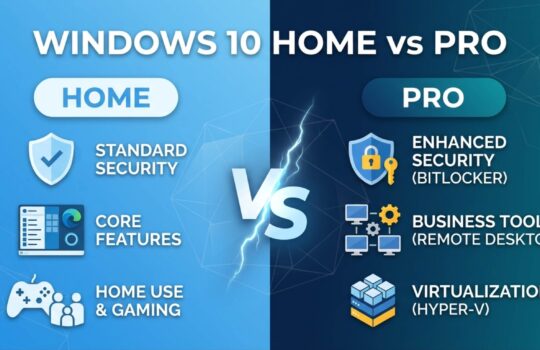
Here’s how Windows 11 Home and Pro compare:
| Recurso | Windows 11 Home | Windows 11 Pro |
|---|---|---|
| Price (one-time) | $139.99 | $199.99 |
| BitLocker encryption | ❌ | ✅ |
| Área de trabalho remota | ❌ | ✅ |
| Domain join | ❌ | ✅ |
| Best for | Home users | Small businesses |
Pros of perpetual licenses:
- 💰 No recurring fees
- 🔒 Works offline after activation
- 📦 Predictable, one-time cost
- ✅ Full ownership of that version
Cons:
- 🔄 No free upgrade to the next major OS version
- 🖥️ OEM licenses don’t transfer to new hardware
- ⏳ Support lifecycle ends eventually
Pro Tip: If you run a small business, go with Windows 11 Pro. Features like BitLocker disk encryption and Remote Desktop aren’t just nice to have; they’re essential for protecting client data and enabling flexible work. Check this guide on OS licenses for individuals for a deeper breakdown.
Perpetual licenses are best for individuals, freelancers, or simple single-device setups where you want a clean, one-time cost and no ongoing commitment. For proprietary licenses like Windows, this model remains the most straightforward entry point.
Subscription licenses: Flexibility, ongoing updates, and support
While perpetual licenses offer simplicity, subscriptions meet modern needs for security and flexibility. A subscription license grants access to software for as long as you keep paying. Stop paying, lose access. It sounds risky, but for businesses, the benefits usually outweigh that concern.
Microsoft 365 is the flagship example. Licenças de assinatura require recurring payments for access, updates, and support, but you always have the latest version, the latest security patches, and centralized admin tools.

Microsoft 365 Business plans come in three tiers:
| Plan | Key features | Per user/month |
|---|---|---|
| Business Basic | Web apps, Teams, 1TB OneDrive | ~$6 |
| Business Standard | Desktop apps + email hosting | ~$12.50 |
| Business Premium | Advanced threat protection, Intune | ~$22 |
Here’s how to activate and manage a Microsoft 365 license:
- Purchase through an authorized reseller or Microsoft directly
- Sign in to your Microsoft account and go to the admin center
- Assign licenses to individual users by email address
- Download and install apps on up to 5 devices per user
- Monitor usage and renewals from the admin dashboard
For a secure purchase process, follow this Windows license buying guide and review genuine license safety practices before you commit.
💼 “Ongoing updates and support are essential for business security and regulatory compliance. A subscription model removes the burden of manual patch management entirely.”
Subscriptions make the most sense for growing teams, remote workers, and any business that needs centralized control, real-time security, and scalable user management.
Open source and specialty licenses: What every user must know
Not all licenses are paid. Open source software is distributed with its source code, and users can modify and redistribute it under specific terms. But “free” doesn’t mean “no strings attached.”
Key features of open source licensing:
- 🔓 Free access to source code
- 📋 Licensing obligations vary by license type (GPL, MIT, Apache, etc.)
- ⚠️ Legal and patent traps exist, especially in commercial use
- 🔄 Copyleft licenses (like GPL) require you to release your modifications under the same terms
Here’s the part most users miss. Copyleft OSS (GPL) contamination affects 34% of codebases and requires full source disclosure if you distribute the software. That’s a serious legal obligation for any business building products on top of open source components.
⚠️ “License conflicts doubled year over year due to automated code generation. Developers are introducing license obligations they don’t even know exist.”
And the broader picture is just as concerning: 86% of codebases contain open source vulnerabilities, with 68% carrying active license conflicts. For a full breakdown of how this affects Microsoft product compliance, see our Microsoft license compliance guide.
For software license overviews, open source is a smart fit when you’re building internal tools, experimenting, or using well-maintained projects with permissive licenses like MIT. But for your Windows OS or business-critical software? Stick with official, genuine licenses. The compliance risk simply isn’t worth it.
Choosing your best-fit license: Comparison and recommendations
After covering all major license types, here’s how to make your licensing decision with confidence. Match your profile to the right license type:
| User profile | Recommended license | Why |
|---|---|---|
| Home user | Windows 11 Home (perpetual) | Simple, affordable, one-time cost |
| Freelancer/solo pro | Windows 11 Pro (perpetual) | BitLocker, Remote Desktop, no subscription |
| Small business (1-10 users) | Microsoft 365 Business Standard | Apps, email, Teams, always updated |
| Growing team (10+ users) | Microsoft 365 Business Premium | Advanced security, Intune device management |
| Developer/tester | Open source or dev licenses | Flexible, cost-effective for internal use |
Here’s how to make a compliant purchase, step by step:
- Identify your use case: personal, business, or development
- Choose between perpetual or subscription based on budget and update needs
- Verify the seller is an authorized Microsoft reseller
- Check the license terms for transferability and device limits
- Keep your proof of purchase and activation key in a safe place
For businesses in particular, Windows licenses for SMBs offers tailored guidance on staying compliant in 2026. The Microsoft 365 licensing overview recommends Windows 11 Pro or Microsoft 365 Business subscriptions over perpetual licenses for ongoing security and updates, especially for teams that can’t afford downtime.
Pro Tip: 🛑 Never buy from gray market sources. Even if the price looks great, you risk losing security updates, getting your key blocked, and facing compliance audits with no valid proof of license.
What most guides miss about software licensing decisions
Here’s the uncomfortable truth: most people focus on the upfront price and ignore the total cost of ownership. A $20 gray market key feels like a win until your activation gets revoked six months later, your system stops receiving security updates, and you spend three hours troubleshooting instead of working.
We’ve seen it happen repeatedly. Non-genuine licenses don’t just put your software at risk. They put your data, your clients, and your business reputation at risk too. A compliance audit with no valid license documentation can result in fines that dwarf the cost of buying official software from the start.
Official Microsoft licenses, whether Windows 11 Pro or a Microsoft 365 subscription, come with real support, real update pipelines, and real peace of mind. Learn more about the official software benefits for small businesses.
💡 “When your business depends on it, buy once, cry once. Cheap licenses are expensive lessons.”
The smarter move is to treat software licensing as an investment in stability, not a cost to minimize. Compliance today prevents much bigger problems tomorrow.
Take the next step: Secure your Microsoft OS license
You now have a clear map of every major license type and how to choose the right one. The next step is acting on that knowledge.

For individuals, explore our Windows 11 Pro key options with instant email delivery and full activation support. For small businesses, browse Microsoft OS licenses tailored to your team size and compliance needs. Not sure where to start? Our license buying guide walks you through every step, from choosing the right version to activating it safely. Every license we sell is genuine, verified, and backed by real customer support. 🔥
Frequently asked questions
What is the difference between a perpetual and a subscription license?
A perpetual license is bought once and used forever on a specific version, while a subscription license requires ongoing payments for continued access and updates. Subscriptions keep you current; perpetual licenses lock in a version.
Which Microsoft Windows license is best for a small business?
Windows 11 Pro or Microsoft 365 Business subscriptions are ideal for small businesses because they include advanced security features like BitLocker, Remote Desktop, and ongoing threat protection updates.
Are open source licenses safe for business use?
Open source licenses can reduce costs but may introduce compliance risks and vulnerabilities if not managed carefully. 86% of codebases contain open source vulnerabilities, so thorough vetting is essential before business deployment.
How can I confirm if my Windows or Office license is genuine?
Use Microsoft’s official verification tools and purchase only from authorized resellers to confirm authenticity. A genuine license will activate without errors and receive all security updates without interruption.
What are the risks of gray market or non-genuine licenses?
Gray market licenses can lead to blocked activations, loss of security updates, and legal non-compliance issues. If your business is audited and you can’t prove a valid license, the financial and reputational consequences can be severe.