
Niezbędny przewodnik po licencjonowaniu oprogramowania: zachowaj legalność i bezpieczeństwo
TL;DR:
- Many people mistakenly believe buying software is like purchasing a physical product, assuming ownership upon payment.
- In reality, software licenses grant usage rights—similar to renting an apartment—without transferring ownership, subject to strict legal and usage restrictions.
Most people assume that buying software works the same as buying a book or a tool. You pay, you own it, end of story. That assumption is wrong, and it’s the reason so many individuals and small businesses end up running illegal copies without ever realizing it. Software licensing is the legal permission that defines exactly how you can use a product like Windows, and the rules matter a lot. This guide breaks down everything you need to know, from basic definitions to real risks and practical steps, so you can stay protected, stay legal, and spend your money wisely.
Spis treści
- What is software licensing?
- Common terms and restrictions in software licenses
- Types of Microsoft software licenses: perpetual, subscription, and more
- How Microsoft licensing is managed: assignment and administration
- Why software licensing matters: real risks and smart strategies
- The uncomfortable truth: software licensing is simpler—and riskier—than it looks
- Secure your Microsoft licenses the right way
- Często zadawane pytania
Kluczowe wnioski
| Punkt | Szczegóły |
|---|---|
| License to use, not own | Buying or downloading software gives you legal rights to use it—not ownership—under specific terms. |
| Follow license terms | Ignoring or bending usage restrictions can lead to legal and security issues that are easy to avoid. |
| Choose the right license type | Compare perpetual and subscription licenses to select what fits your needs, budget, and user count. |
| Stay organized and compliant | Assign and manage your licenses carefully—especially for Microsoft 365—using the admin center to avoid problems. |
| Buy from trusted sources | Always purchase software licenses from reputable providers to ensure legal use and security. |
What is software licensing?
Now that we’ve debunked common misunderstandings, let’s break down what software licensing really means.
Software licensing is not a complex legal mystery. At its core, it’s a set of rules that determines how you are allowed to use a piece of software. When you click “I agree” during installation, you’re entering a legal contract, whether you read it or not.
“Software licensing is the legal permission that sets the terms under which you may use a software product; typically you receive a license to ‘use’ the software, not to ‘own’ it.” — Microsoft Software License Terms
That distinction, use versus own, is critical. Think of it like renting an apartment. You pay for it. You live in it. But you can’t knock down walls, sublet it without permission, or hand the keys to someone else indefinitely. Software works the same way.
What does a typical software license give you?
- ✅ The right to install and run the software on a specified number of devices
- ✅ Access to updates and security patches (depending on the license type)
- ✅ Technical support channels from the manufacturer or authorized reseller
- ✅ Legal protection when you’re operating within the agreed terms
What does it NOT give you?
- ❌ Ownership of the underlying code
- ❌ The right to copy and distribute the software freely
- ❌ Permission to reverse engineer or modify the software
- ❌ The ability to transfer the license without specific authorization
Understanding these types of software licenses is the foundation for everything else. Once you know you’re renting usage rights rather than buying property, every other licensing rule starts to make sense.
This is especially important for small business owners managing multiple computers. If you buy one Windows license and install it on four machines, you are technically operating three unlicensed copies. Microsoft’s audit teams do catch this, and the consequences range from fines to forced upgrades at full retail price. Start with the basics, and the rest gets much easier.

Common terms and restrictions in software licenses
Building on the definition, it’s vital to know what software licenses allow and forbid in everyday use.
Software license agreements (often called End User License Agreements, or EULAs) are long. Most people skip them. That’s understandable, but it’s also risky. Hidden inside that legal language are restrictions that directly affect how you use your Windows installation every day.
Licensing terms commonly restrict actions like reverse engineering and sharing the software outside the allowed scope. Here’s a plain-language summary of what that means for you.
Key restrictions you need to know
| Restriction | What it means in practice | Risk if ignored |
|---|---|---|
| No reverse engineering | You cannot disassemble or decode the software’s code | Legal action from Microsoft |
| No unauthorized sharing | You cannot give your license key to friends or colleagues | License invalidation, blocked key |
| No reselling (most cases) | Retail licenses have strict rules on transfers | Possible lawsuit or key deactivation |
| Device limits | OEM licenses are typically tied to one machine | Installation blocked on new hardware |
| Commercial use rules | Some licenses only permit personal use | Audit penalties for businesses |
| No workarounds | You cannot bypass activation or use crack tools | Permanent deactivation, security risks |
Understanding this table alone can save a small business owner from a very expensive mistake.
Steps to stay compliant with your Microsoft license:
- Read the summary section of your license agreement before installing. You don’t have to read every line, but find the “permitted uses” section.
- Note how many devices your license covers. Write it down somewhere obvious.
- Keep a record of your product key and the device it’s tied to.
- Never share your activation key, not even with trusted colleagues, unless your license type explicitly allows it.
- If you’re unsure whether a use case is allowed, check your Windows licensing compliance status before proceeding.
Pro Tip: Screenshot or save a digital copy of your license confirmation email. If Microsoft ever questions your license status, having that record is your first line of defense. Treat it the way you’d treat a receipt for expensive equipment.
🛑 Breaking license terms doesn’t just expose you to legal risk. It also puts your security at risk. When people use cracked software or invalid keys, they often unknowingly install malware alongside it. That’s a double problem: illegal software that also corrupts your data or steals your credentials.
Types of Microsoft software licenses: perpetual, subscription, and more
Understanding the rules is easier if you know the choices available when buying or assigning Microsoft licenses.
Not all Microsoft licenses work the same way. The type of license you buy determines how long you have access, how many users or devices can use it, and what happens when you need to upgrade or expand. Here’s a practical breakdown.
The three main license types
1. Perpetual licenses
A perpetual license is a one-time purchase that gives you the right to use that specific version of the software indefinitely. Windows 10 Pro and Windows 11 Pro sold as standalone products are classic examples. You pay once, and you keep using that version forever, even if you never upgrade.
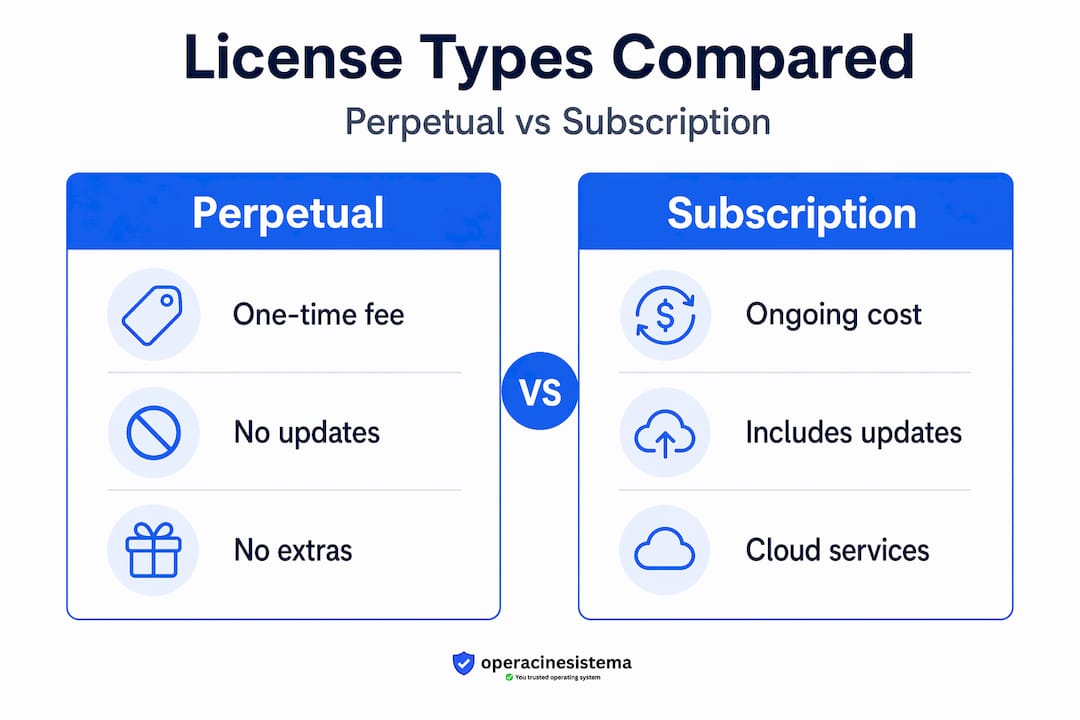
This is the most straightforward option for individuals and small businesses that need stable, predictable software costs. No ongoing fees, no subscription renewals to worry about.
2. Subscription licenses
Subscription licenses require ongoing payments for continued access. Subskrypcje Microsoft 365 are paid on a recurring basis, and licensing is managed by buying the needed number of licenses and assigning them to specific users. Stop paying, and access stops too.
The upside is that subscriptions always include the latest version, plus cloud services and enterprise management tools that perpetual licenses don’t provide.
3. Channel and program-specific licenses (CSP and more)
For small and medium businesses, Microsoft offers specialized buying programs. Windows Enterprise E3 in CSP is subscription-based and sold via Cloud Solution Provider partners, designed specifically for organizations that need enterprise-level features without massive upfront costs. These programs give SMBs access to volume pricing, centralized management, and flexibility that standard retail licenses don’t offer.
License comparison table
| Cecha | Perpetual license | Subskrypcja | CSP / Volume |
|---|---|---|---|
| Payment model | One-time | Monthly or annual | Monthly or annual |
| Software version | Fixed version | Always latest | Always latest |
| Number of users | Usually 1 | Per user assigned | Skalowalność |
| Includes cloud services | Od | Tak | Tak |
| Najlepsze dla | Individuals, small setups | Growing teams | SMBs, IT resellers |
| Przenaszalność | Ograniczony | Niezbywalne | Managed via portal |
Key questions to ask when choosing the right license:
- How many devices or users need access?
- Do you need Microsoft 365 apps like Word and Excel, or just the operating system?
- Is predictable cost more important than always having the latest features?
- Are you planning to grow your team in the next year?
For most individuals and micro-businesses, a perpetual OEM or retail Windows license is the most cost-effective option. For businesses with five or more employees using Microsoft 365 options, a subscription model makes more financial and operational sense.
How Microsoft licensing is managed: assignment and administration
So, once you’ve picked a license, how does it actually get managed day-to-day? Here’s what individuals and businesses need to know.
Buying a license is only step one. Actually managing that license, assigning it, tracking it, and keeping it valid, is where many small businesses struggle.
For Microsoft 365 users:
Licenses must be assigned to specific users, and management happens through the Microsoft 365 admin center. This is a web portal where an administrator (usually you or your IT person) controls who has access to what.
Microsoft volume licensing agreements are managed through Microsoft’s dedicated licensing management pages, with specific administrator roles controlling access and assignments. Note that the older Volume Licensing Service Center (VLSC) has been retired, replaced by the Microsoft 365 admin center and related portals. If your business still relies on the old VLSC system, it’s time to migrate.
Step-by-step: buying, assigning, and managing Microsoft licenses
- Purchase your licenses from an authorized source, whether that’s directly from Microsoft, a certified reseller, or a trusted platform. Verify that the source is legitimate before completing any transaction.
- Access the admin center na admin.microsoft.com (for Microsoft 365) or the relevant management portal for your product type.
- Add user accounts for every employee or person who needs access. Each person needs their own account.
- Assign licenses to individual users. Assign only what each person actually needs to avoid paying for unused seats.
- Confirm activation on each device. Have each user sign in and verify that their software is active and showing a valid license status.
- Track license usage monthly. Remove licenses from users who have left the organization immediately. Unused assigned licenses still cost money.
- Audit annually. Compare your license count against active users at least once a year to catch any discrepancies early.
Pro Tip: Set a calendar reminder to audit your Microsoft 365 licenses every quarter. License audits take about 30 minutes and can save businesses hundreds of dollars annually by identifying unused seats. The more on Microsoft 365 administration page covers this in more detail.
For standalone Windows licenses, tracking is simpler but still important. Keep a spreadsheet with the device name, license key, date of purchase, and the source. This becomes invaluable if a device is replaced or repaired.
You should also review software licensing best practices regularly, especially as your business grows. What works for two computers may not work well for ten. And if you’re running a Lithuanian or regional SMB, the secure OS licensing for SMBs guide covers country-specific considerations worth knowing.
Why software licensing matters: real risks and smart strategies
But why does all this matter so much? Here’s how getting it right, or wrong, impacts you, and practical steps for security and savings.
People sometimes treat software licensing as a bureaucratic formality. It isn’t. Getting it wrong has real, measurable consequences for your money, your security, and your business reputation.
The legal and financial risks
The software is licensed, not sold, and rights are only those expressly granted. Operating outside those rights, even accidentally, can trigger Microsoft’s compliance process. For businesses, this can mean:
- 🛑 Unexpected audit demands, requiring you to prove license ownership for every device
- 🛑 Fines or mandatory license purchases at full retail price for every unlicensed device
- 🛑 Reputational damage if compliance issues become public, especially for companies in regulated industries
- 🛑 Contract violations if your business uses software for purposes the license doesn’t permit
The security risks of counterfeit and fake licenses
This is where the stakes get even higher. Counterfeit keys and unlicensed software don’t just put you at legal risk. They actively compromise your security.
- ❌ Fake activation keys are often distributed alongside malware embedded in the installer
- ❌ Systems running pirated Windows don’t receive official security updates, leaving them wide open to ransomware and data theft
- ❌ Cracked software may disable Windows Defender or other built-in protection layers
- ❌ Blocked keys leave your device stuck in reduced functionality mode, affecting productivity immediately
For small businesses, a single ransomware attack triggered by an unlicensed tool can cost far more than years of legitimate licensing would have.
Smart strategies for staying legal and affordable
- ✅ Buy from verified, authorized resellers who provide genuine keys with documentation
- ✅ Always activate through official Microsoft channels after purchase
- ✅ Match the license type to your actual use: personal users don’t need enterprise licenses
- ✅ Use avoiding Microsoft licensing risks resources to audit your current setup
- ✅ For security-focused buying advice, Microsoft licensing and security explains how to choose confidently
Pro Tip: 🔥 Genuine OEM Windows licenses are among the most affordable legal options for individuals and small businesses. They’re tied to a single device, but if you’re not planning to move the license to another machine, they deliver full legal protection at a fraction of retail price. Just make sure you’re buying from a trusted source.
The people who end up in trouble almost never intended to break the rules. They bought a cheap key from an unknown marketplace, assumed it was fine, and never checked. That one shortcut can cost weeks of productivity and thousands in remediation. It’s never worth it.
The uncomfortable truth: software licensing is simpler—and riskier—than it looks
Here’s our honest take, drawn from working in this space every day.
Most articles about software licensing treat it like a technical subject for lawyers and IT managers. It isn’t. The fundamentals fit on a single page. You don’t own the software. You’re renting usage rights. You agreed to rules when you installed it. Break those rules and face the consequences.
The real reason people get into trouble isn’t because software licensing is confusing. It’s because they skip the basics to save a little money or time. Someone buys a suspiciously cheap key from an unknown seller. A business owner installs one license across multiple machines because “it seemed fine.” An employee shares their account credentials to give a freelancer access. Each of these is a small shortcut that carries a large risk.
Think of software licenses exactly like rental agreements. If you rent a car and let three other people drive it without telling the rental company, you’re liable for everything that happens. Software works the same way. The license defines who can use it, where, and how. Anything outside that is a violation, even if it feels harmless.
The most dangerous belief in small business is that “we’re too small to get audited.” Microsoft does audit small businesses. The audits are often triggered by complaints, by competitor tips, or by activation data Microsoft already collects. Being small doesn’t make you invisible.
The good news is that staying compliant is genuinely affordable in 2026. Legitimate Windows 10 and Windows 11 Pro licenses from authorized resellers cost far less than people assume. There’s no need to gamble with fake keys when real ones are accessible at honest prices. Review licensing best practices to build a system that keeps you clean without breaking your budget.
The mindset shift is this: stop seeing the license as a hurdle and start seeing it as protection. A genuine license is proof of ownership rights, access to security updates, and a legal shield if questions ever arise. A fake one is a ticking clock.
Secure your Microsoft licenses the right way
Ready to act securely and affordably? Here’s where to get legitimate Microsoft licenses hassle-free.
Knowing the rules is only useful if you act on them. If you’re currently running Windows on a device and you’re not 100% sure your key is genuine, now is the time to fix that. The risks of Windows 10 license pitfalls are real, and they don’t shrink by ignoring them.

Przy operacinesistema.lt, we specialize in genuine Microsoft operating system licenses, including both digital keys and physical USB versions for Windows 10 and Windows 11 Pro. Every license we sell is authentic, comes with full activation support, and includes a warranty. Whether you’re an individual setting up a personal machine or a small business equipping a team, our secure Windows 10 licensing guide walks you through every step. And if you’re ready to move to the latest version, our Windows 11 Pro licenses are available for instant digital delivery. Protect your devices, stay legal, and stop worrying. 🎁
Często zadawane pytania
Do I own the software when I buy a Microsoft license?
No. When you purchase a Microsoft license, you receive the right to use the software under defined terms, but the software is licensed, not sold, meaning ownership of the code stays with Microsoft.
Can I share or resell my Microsoft software license?
Generally no. Licensing terms restrict sharing and transferring licenses in most cases, and doing so without explicit permission violates your agreement and can result in the key being deactivated.
How do I know if my Microsoft license is genuine and compliant?
Buy only from authorized or verified resellers, activate through official Microsoft channels, and confirm that Windows Update works normally after activation, since genuine licenses always receive full update access.
What’s the difference between a perpetual and a subscription license?
A perpetual license is a one-time purchase that gives you ongoing access to that specific version, while a subscription is paid on a recurring basis and stops working if payments lapse.
Why is assigning licenses by user important in Microsoft 365?
Because licenses are managed by assigning them to specific users, meaning each person must have their own assigned license for both legal compliance and proper technical access to Microsoft 365 services.
Zalecane
- Dlaczego bezpieczne oprogramowanie chroni dane i pozwala uniknąć kosztownych zagrożeń?
- Types of software licenses: find the best fit for your needs
- Kup bezpieczne licencje systemu operacyjnego: przewodnik krok po kroku
- Lista kontrolna licencji na oprogramowanie 2026: przewodnik zgodności dla małych i średnich firm





