
How to activate Windows 10 Home for free: Legitimate guide
TL;DR:
- Free reliable activation works mainly on original hardware with digital licenses or BIOS-embedded keys.
- Skipping product key entry during reinstall and signing in with Microsoft account can activate Windows legally.
- Using unofficial tools or keys risks security, stability, and violates licensing agreements.
You boot up your PC and see that stubborn “Activate Windows” watermark sitting in the corner of your screen. It’s frustrating, especially when you know the software came pre-installed or you just did a clean reinstall. The good news is that there are real, legal ways to activate Windows 10 Home at zero cost, and you don’t need shady tools, cracked key generators, or anything that could get your PC flagged or compromised. This guide covers only safe, official activation methods, walks you through every step, and explains exactly what to do when things go wrong.
Satura rādītājs
- Understand how Windows 10 Home activation works
- Check your eligibility for free activation
- Step-by-step: Activate Windows 10 Home for free (legitimate workflow)
- Troubleshooting and common pitfalls
- The truth about free activation: What works and what doesn’t
- Secure your Windows 10 license the right way
- Biežāk uzdotie jautājumi
Galvenie secinājumi
| Punkts | Sīkāka informācija |
|---|---|
| Automatic activation possible | Many OEM PCs activate Windows 10 Home for free when connected to the internet if the Digital Product Key remains valid. |
| Check eligibility first | Verify your hardware and license status before attempting activation steps to save time and avoid errors. |
| Stick to legitimate methods | Only use Microsoft-endorsed workflows for free activation to ensure security and compliance. |
| Troubleshoot with edition in mind | Double-check that you installed Windows 10 Home, not a different edition, to prevent activation problems. |
| Avoid risky activation hacks | Untrusted tools and unofficial product keys expose your PC to risks and often fail to provide lasting activation. |
Understand how Windows 10 Home activation works
Before you try to fix an activation problem, it helps to know what’s actually happening in the background. Windows activation is Microsoft’s way of verifying that your copy of the operating system is genuine and that it hasn’t been used on more machines than the license allows. Without activation, Windows 10 Home still runs, but you get limited personalization options, a visible watermark on the desktop, and repeated prompts to activate.
There are three main types of licenses you’ll run into:
- Digital license (also called digital entitlement): Tied to your hardware or Microsoft account. No product key needed. This is the most modern form.
- Retail product key: A 25-character key you buy from a store or online. You enter it once and it’s tied to that device.
- OEM activation (including DPK): A Digital Product Key stored directly in your PC’s BIOS or UEFI firmware by the manufacturer.
The OEM scenario is critical to understand. Windows 10 activates automatically on many manufacturer-built PCs because the Digital Product Key (DPK) is embedded in the system’s BIOS. That means the moment you connect to the internet, Windows reads that embedded key and activates itself, no manual input required. If you reinstall Windows 10 on the same machine, that DPK is still there and will trigger activation again automatically.
Here’s a quick breakdown to make this clearer:
| Licences tips | Where it’s stored | Survives reinstall? | Survives new hardware? |
|---|---|---|---|
| Digital license (hardware-linked) | Microsoft’s servers | ✅ Jā | ❌ Nē |
| Digital license (account-linked) | Microsoft konts | ✅ Jā | ✅ Jā |
| OEM key (DPK in BIOS) | PC firmware | ✅ Jā | ❌ Nē |
| Retail key | You enter it manually | ✅ Jā | ✅ Yes (limited) |
Why does a fresh install sometimes not need a product key? Because Windows setup is smart enough to read the DPK from the firmware or check Microsoft’s activation servers for a digital license linked to your hardware ID. If a valid match is found, activation happens silently in the background.
Common situations where people suddenly need to re-activate include:
- Buying a used PC where the previous owner never activated properly
- Doing a clean reinstall without backing up the license
- Replacing the motherboard, which changes the hardware ID
- Upgrading from Windows 7 or Windows 8.1 (free upgrade period has ended, but previously activated devices may still qualify)
- Reinstalling after a hard drive failure or SSD swap
Understanding these scenarios is the foundation. If you know which bucket you fall into, you’ll know which method to use. For a broader look at what free legal Windows 10 activation really means and what options are on the table, it’s worth reviewing all your choices before diving into steps.
Key insight: Activation isn’t just about unlocking features. An unactivated copy of Windows leaves your system more vulnerable to limited update access and flags your PC as potentially running unauthorized software, which can matter if you use it for work or business.
Check your eligibility for free activation
Not everyone qualifies for free activation, but more people do than you’d think. The most important step is checking your current activation status before you do anything else. Here’s how to do it:
- Noklikšķiniet uz Sākt button and open Iestatījumi (the gear icon).
- Dodieties uz Atjaunināšana un drošība.
- Noklikšķiniet uz Aktivizēšana in the left sidebar.
- Read the status message displayed on screen.
Ja redzat “Windows is activated with a digital license” vai “Windows is activated with a digital license linked to your Microsoft account,” you’re already good. No further action is needed.
Ja redzat “Windows is not activated” or an error code, keep reading.
Now, let’s talk about who qualifies for free activation without purchasing a new key. Checking your digital license status in Settings is the first step in the least-cost legitimate path.
Here’s a comparison of common scenarios and what your options look like:
| Scenario | Free activation possible? | Metode |
|---|---|---|
| Original OEM PC (never reinstalled) | ✅ Jā | Automatic via DPK in BIOS |
| Reinstall on same hardware (OEM) | ✅ Jā | Automatic via DPK |
| Reinstall on same hardware (retail key) | ✅ Jā | Skip key entry during setup |
| Digital license linked to Microsoft account | ✅ Jā | Sign in with Microsoft account |
| Used/secondhand PC (previous license unclear) | ❌ Likely no | Purchase a new key |
| New hardware with no license | ❌ Nē | Purchase a new key |
| Upgraded from Windows 7/8.1 on same PC | ✅ Possibly | Activation troubleshooter |
The key takeaway from this table? If you’re reinstalling on the same hardware where Windows was previously activated, you have a strong chance of getting activated for free. New hardware or secondhand devices without a clear license history are different situations entirely.
Pro Tip: If you linked your Windows 10 license to your Microsoft account before reinstalling, sign in with that same account after reinstalling. Windows will recognize your digital license and activate automatically. This is one of the most overlooked free activation strategies, and it works even after hardware tweaks that aren’t too major.
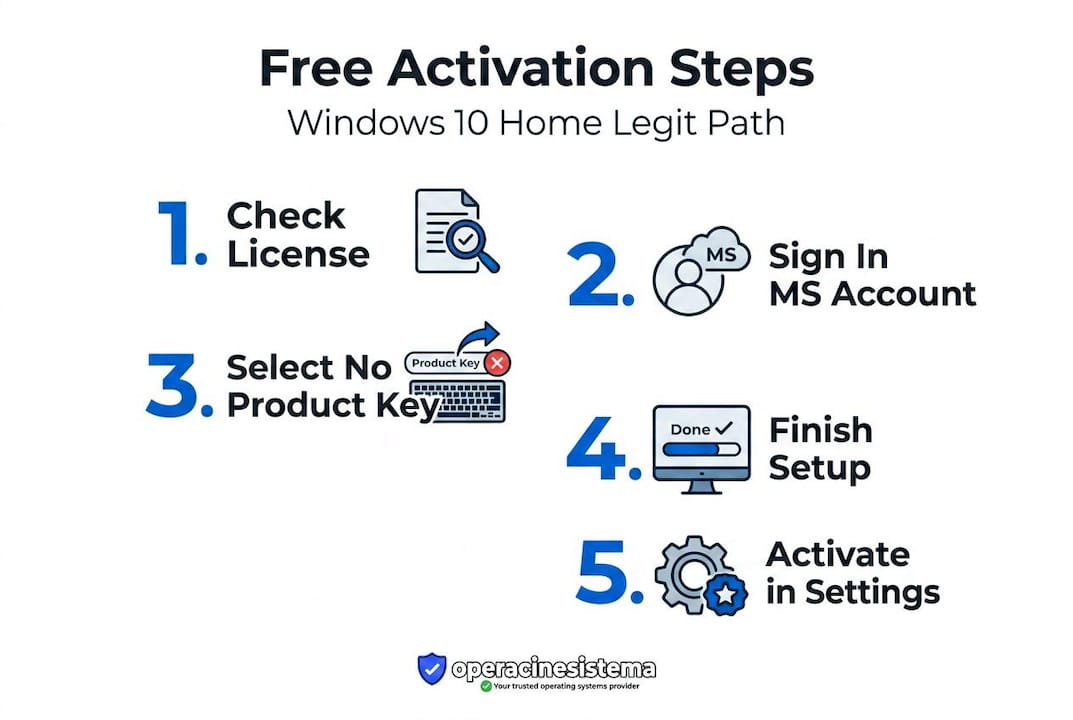
When you’re going through setup and Windows prompts you to enter a product key, look for the option that says “I don’t have a product key” vai “Skip.” This tells Windows to proceed without a key and attempt automatic activation later. Don’t panic and enter a random key. Skipping and letting the system check for a digital license is the right move if you’re on original hardware.
If you want to understand exactly what a legitimate Windows 10 activation key looks like versus unofficial alternatives, you’ll find that context helpful when making decisions about purchased keys too.
For users who are unsure whether their situation qualifies, a detailed free activation key guide covers edge cases and lesser-known eligibility scenarios in more depth.
Step-by-step: Activate Windows 10 Home for free (legitimate workflow)
Alright, you’ve confirmed your device should qualify. Here’s exactly how to activate Windows 10 Home without spending anything, using only built-in Microsoft processes.
Scenario A: Activating on the same hardware (after reinstall)
- Boot into the fresh Windows 10 installation. During setup, when asked for a product key, click “I don’t have a product key.” This skips manual entry.
- Select “Windows 10 Home” when prompted to choose an edition. This must match your original license edition. Choosing the wrong edition is a common mistake.
- Complete the setup process and connect to the internet as soon as possible.
- Wait for automatic activation. Windows will contact Microsoft’s servers, match your hardware ID or DPK, and activate your license. This can take a few minutes.
- Verify activation. Dodieties uz Settings > Update & Security > Activation. You should see “Windows is activated.”
If reinstalling on the same hardware, proceed through Windows 10 setup and choose not to enter a product key when prompted. Let the system handle it automatically.
Scenario B: Activating via your Microsoft account
- Dodieties uz Settings > Update & Security > Activation.
- Noklikšķiniet uz “Add an account” or sign in with your Microsoft account.
- Use the same account that was linked to your digital license before.
- Windows will verify your identity and apply the license.
Scenario C: Using the Activation troubleshooter
- Dodieties uz Settings > Update & Security > Activation.
- If you see “Windows is not activated,” scroll down and click “Troubleshoot.”
- Select the option that best describes your situation, such as “I recently changed hardware on this device.”
- Follow the prompts. In many cases, this resolves the issue without any manual key entry.
Common triggers for free, automatic activation:
- ✅ Same physical machine where Windows 10 was previously activated
- ✅ DPK stored in BIOS from original manufacturer setup
- ✅ Digital license linked to a Microsoft account you can sign into
- ✅ Previous upgrade from Windows 7 or 8.1 on the same device
🛑 Pro Tip: Avoid any tool, script, or website that promises to activate Windows for free through unofficial means. This includes KMS activators, loader tools, or key generators. These tools are not just illegal and they often contain malware. They can expose your device to real risks ranging from data theft to system corruption. The few minutes of “convenience” aren’t worth it.
Also, make sure Windows Update is enabled after activation. Activated Windows 10 Home receives regular security patches, which are critical for keeping your system safe. Unactivated or improperly activated systems sometimes miss these updates, leaving you exposed.
To make sure you’re following a genuinely safe path throughout this process, reviewing a guide on how to activate Windows 10 safely gives you the full picture of what legitimate activation looks like from start to finish.
Troubleshooting and common pitfalls
Even after following all the correct steps, sometimes Windows activation doesn’t go as expected. Here’s how to diagnose and solve common issues.
🔴 Problem 1: Edition mismatch
This is one of the most common and easily avoided mistakes. Installing the wrong edition, like choosing Windows 10 Pro when your license is for Windows 10 Home, will cause activation to fail even though your license itself is perfectly valid. Always double-check the edition during setup. If you’re unsure which edition you had, you can look at your original purchase receipt, the sticker on an older PC, or check the license details in your Microsoft account portal.
🔴 Problem 2: Motherboard replacement
Replacing your motherboard is like giving your PC a new identity as far as Microsoft is concerned. The hardware ID changes, and your digital license may no longer match. In this case:
- Run the Activation troubleshooter and select “I changed hardware on this device recently.”
- Sign in with your Microsoft account. If the license was linked to your account, you may be able to reactivate.
- If these steps don’t work, you’ll likely need to contact Microsoft support or purchase a new license.
🔴 Problem 3: Activation errors with error codes
Common codes like 0x803F7001 or 0xC004F213 indicate a digital license wasn’t found. This usually means:
- The hardware changed significantly
- The edition doesn’t match the license
- Your device never had a valid digital license to begin with
🔴 Problem 4: Using keys from unofficial sources
This one comes up repeatedly. You search online and find a website listing “free Windows 10 product keys.” Some might work temporarily. Most don’t. And the ones that do? They’re often stolen volume licensing keys that Microsoft will eventually block. Using them puts you in a cycle of repeated activation failures and potential security risks.
⚠️ Warning: Free product keys found on random websites or social media are almost always stolen, recycled, or simply fake. Even if they activate Windows initially, Microsoft can revoke them without notice, leaving your system unactivated again. Worse, some of these sites are fronts for malware downloads.
For a full breakdown of what makes unofficial keys so risky, the article on the risks of free product keys goes into the specific threats and how to spot red flags before you make a mistake.
What to do when everything fails:
- Try signing in with your Microsoft account (if you haven’t already)
- Run the Activation troubleshooter
- Contact Microsoft support via support.microsoft.com and explain your situation honestly
- If you recently changed hardware, have your proof of purchase ready
- Consider buying a low-cost, genuine license from a trusted reseller if none of the free options apply to your situation
The troubleshooter inside Windows is surprisingly effective. It asks straightforward questions about your situation and often applies fixes automatically. Don’t skip it. It resolves a large percentage of post-reinstall activation failures without requiring any manual intervention.
The truth about free activation: What works and what doesn’t
Here’s something most activation guides skip entirely. They walk you through the steps, show you the menus, and send you on your way. What they don’t tell you is that legitimate free activation only works in a narrow set of real-world circumstances.
If your PC came from a major manufacturer, was never heavily modified, and you’re reinstalling Windows 10 on the exact same hardware, your chances of free automatic activation are excellent. That’s the ideal scenario, and it works exactly as Microsoft designed it to work.
But here’s the uncomfortable reality: a significant portion of users asking how to activate Windows 10 for free are in situations where free activation genuinely doesn’t apply. They’re setting up a used PC with a wiped drive and no license history. They’re building a custom desktop from scratch. They swapped the motherboard last month. In those cases, there is no legitimate free path. The honest answer is that a new license is required.
This is where so many users get led astray. They find guides that promise “free activation” using unofficial tools or tricks, and those guides seem helpful at first glance. But KMS activators, loader programs, and batch scripts that bypass Microsoft’s verification aren’t free activation. They’re circumventing the licensing system, and the consequences are real. Your system becomes unstable over time, security updates get interrupted, and if you ever use the device for business, you’re running on illegal software. That exposure isn’t worth saving a relatively modest amount on a genuine license.
Microsoft’s digital license approach, when it applies, is genuinely robust. It ties activation to your hardware fingerprint and your Microsoft account, making reinstalls painless and reducing the need to manage physical product keys. It’s a well-designed system. But it only protects you when you stay within its boundaries.
We’ve seen users spend hours troubleshooting fake activation tools, dealing with malware infections, and eventually buying a license anyway after wasting time. The shortcut costs more in the end. For genuine peace of mind, checking whether legitimate free activation applies to your exact situation first saves a lot of headaches.
The honest recommendation: if the free route works for you, great. Use it. If it doesn’t, a low-cost official license from a trusted reseller is a better investment than the ongoing frustration and risk of unofficial tools. It’s a one-time cost for a system that works reliably, stays updated, and doesn’t put your data at risk.
Secure your Windows 10 license the right way
Not every situation qualifies for free activation, and that’s okay. If the steps above didn’t resolve your situation, the most practical next move is getting a genuine license from a source you can trust.

vietnē operacinesistema.lt, we specialize in authorized Windows 10 and Windows 11 digital licenses delivered fast, with full support. If you want to understand exactly what type of license fits your device, the step-by-step Windows license guide breaks down your options clearly. Not sure about the difference between OEM and retail? The overview of software license types makes it simple. And for users who want a complete, up-to-date path to legally licensed Windows 10 in 2026, the secure Windows 10 licensing guide has everything in one place. 🔥
Biežāk uzdotie jautājumi
What is a Digital Product Key in BIOS and how does it help activation?
A Digital Product Key is an embedded code stored in your PC’s BIOS or UEFI firmware by the original manufacturer, and it allows Windows 10 Home to activate automatically when your device connects to the internet, with no manual input required.
Can I activate Windows 10 Home without a product key if reinstalling?
Yes, if your PC has a valid digital license tied to its hardware ID or your Microsoft account, Windows 10 should detect and apply it automatically after reinstalling on the same machine.
What should I do if Windows 10 activation fails after reinstall?
First, verify you installed the correct edition, since installing the wrong edition causes activation to fail even with a valid license, then run the built-in Activation troubleshooter and sign in with your previous Microsoft account.
Is it safe to use free product key generators or activation tools from the web?
No. These tools are illegal, frequently bundled with malware, and any activation they provide is temporary at best since Microsoft can revoke stolen or invalid keys at any time without warning.
Does changing hardware affect my Windows 10 digital license?
Yes, significant hardware changes like replacing the motherboard alter your device’s hardware ID, which can break the digital license link and require reactivation through your Microsoft account or a new license purchase.





