
Il ruolo della distribuzione del software nei flussi di lavoro IT nel 2026
In breve:
- Software distribution is a critical process that manages application deployment, updates, and licensing across organizational devices. It involves multiple methods, security practices, and platform dependencies that impact operational efficiency and compliance. A strategic, owned, and secure distribution infrastructure grants organizations a competitive advantage in the rapidly evolving IT landscape.
Software distribution is the systematic process of delivering applications, updates, and licenses to organizational devices through centralized, managed channels. For IT professionals and decision-makers, understanding the role of software distribution means understanding how your organization stays operational, secure, and compliant at scale. Tools like Microsoft Intune, Microsoft Endpoint Configuration Manager (MECM), and Helm have made this process more automated than ever. Yet the decisions you make about distribution methods, security frameworks, and platform dependency still carry real risk. This guide breaks down what matters most in 2026.
What is the role of software distribution in IT operations?
Software distribution is the backbone of every managed IT environment. It controls how applications reach endpoints, how updates get applied, and how licenses stay compliant across hundreds or thousands of devices. Without a structured distribution strategy, IT teams face version drift, security gaps, and audit failures.

Software distribution platforms do far more than move files. They orchestrate packaging, delivery, deployment, licensing, updates, and monitoring across the full software lifecycle. This includes air-gapped networks, hybrid cloud environments, and on-premise infrastructure. That scope is why treating distribution as a simple file transfer is one of the most costly mistakes an IT team can make.
The importance of software distribution shows up most clearly during incidents. When a critical patch needs to reach 2,000 endpoints in four hours, your distribution infrastructure either performs or it doesn’t. Organizations without centralized delivery models face manual remediation, inconsistent patch states, and compliance exposure. Those with mature distribution pipelines push updates with a single policy change.
What are the key software distribution methods?
Seven primary distribution methods shape IT workflows, cash flow, and compliance obligations in 2026. Each carries different tradeoffs in operational complexity, maintenance burden, and cost.
| Distribution Method | Location | Maintenance Owner | Cost Model | Scalability |
|---|---|---|---|---|
| On-Premise | Internal servers | Organization | High upfront | Limited by hardware |
| Cloud-Based | Vendor infrastructure | Vendor | Subscription | High |
| SaaS | Vendor-hosted | Vendor | Per-user/month | Very high |
| Hybrid | Mixed | Shared | Variable | Flexible |
| Partner-Led | Partner network | Partner | Revenue share | Moderato |
| Marketplace | Platform (e.g., AWS, Azure) | Platform + vendor | Usage-based | High |
| Open-Source | Self-hosted or cloud | Organization | Low direct cost | Variable |
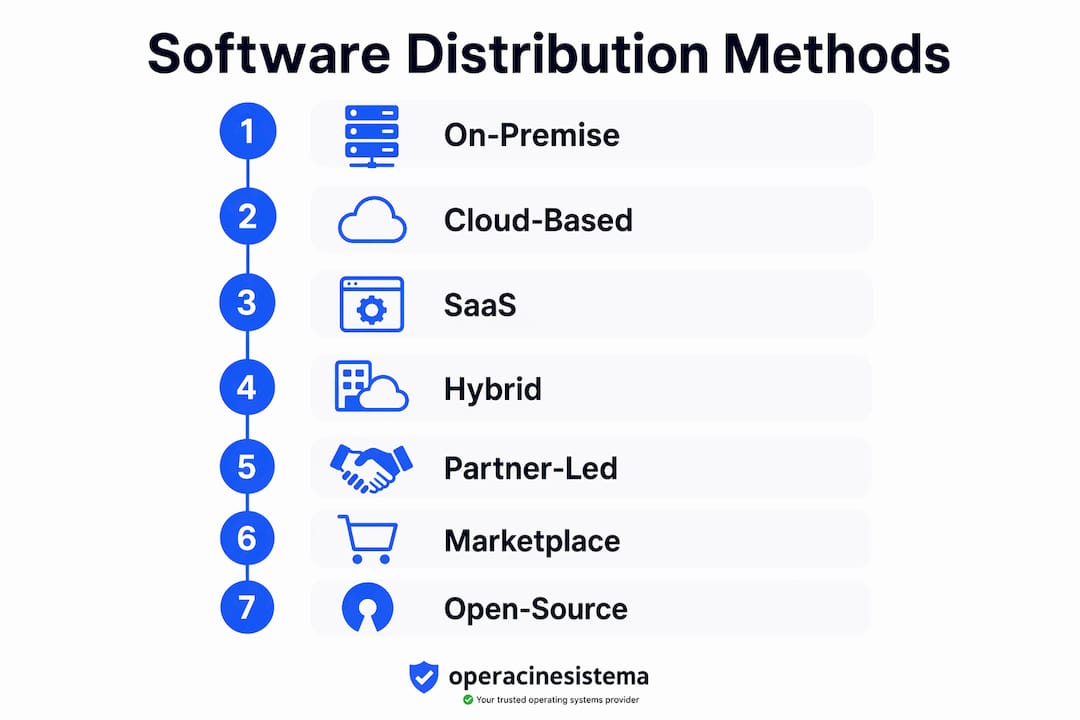
On-premise distribution places the full security and uptime burden on your organization. SaaS and cloud models delegate infrastructure responsibility to the vendor, which reduces your operational load but increases dependency. Hybrid models give you flexibility but require co-management discipline to avoid configuration gaps.
Your choice of distribution model directly shapes your IT strategy. A healthcare organization with strict data residency requirements will favor on-premise or private cloud. A fast-growing SaaS company will lean on marketplace distribution through Azure Marketplace or AWS Marketplace to reach customers at scale. Neither is universally correct. The right model depends on your compliance obligations, team capacity, and growth trajectory.
Un consiglio da professionista: Before selecting a distribution model, map your compliance requirements first. HIPAA, SOC 2, and GDPR each impose different constraints on where software and data can reside. Your distribution architecture must satisfy those constraints before you optimize for cost or speed.
How does software distribution enhance security and compliance?
Software distribution security protects the entire software lifecycle from development through deployment, preventing tampering and unauthorized code insertion. This discipline is formally called software supply chain security, and it covers every stage where code changes hands.
Vulnerabilities exist across multiple layers: source code, third-party dependencies, container images, and build pipelines. A compromise at any one of these points can deliver malicious code to every endpoint in your organization. The SolarWinds attack demonstrated exactly this risk. Attackers inserted malicious code into a build pipeline, and the resulting update was distributed to thousands of organizations through trusted channels.
Securing distribution channels is now a top-three business priority in 2026 for maintaining customer trust and operational continuity. That ranking reflects how much the threat landscape has shifted toward supply chain attacks rather than direct endpoint compromise.
The Update Framework (TUF) addresses this directly. TUF uses a four-key hierarchy consisting of root, targets, snapshot, and timestamp keys to defend against rollback attacks, freeze attacks, and mix-and-match attacks. Each key type has a distinct role, and compromising one does not compromise the entire system. This layered defense is why TUF has been adopted by projects like Python, Rust, and the Linux Foundation.
Here are the core best practices for securing your software distribution channels:
- Sign all artifacts. Use cryptographic signatures on every package, container image, and update file before distribution.
- Audit third-party dependencies. Tools like Endor Labs and Snyk scan dependency trees for known vulnerabilities before they reach production.
- Secure your build pipeline. Treat your CI/CD system as a high-value target. Restrict access, log all changes, and use ephemeral build environments.
- Implement role of software updates as a security control. Automate patch delivery so critical fixes reach endpoints within defined SLA windows, not whenever someone remembers to push them.
- Monitor distribution channels continuously. Detect anomalies in package metadata, file sizes, and signing certificates before they reach end users.
Compliance frameworks including SOC 2 Type II, ISO 27001, and NIST SP 800-161 all require documented controls around software delivery. Organizations that lack centralized distribution cannot demonstrate those controls during audits. That gap creates real liability.
Un consiglio da professionista: Treat your software signing keys like your most sensitive credentials. Rotate them on a defined schedule, store them in hardware security modules (HSMs), and document your key management procedures. Auditors will ask for this documentation.
For a broader view of supply chain risk controls, the 2026 IT security practices guide from Operacinesistema covers mandatory measures that align directly with distribution security requirements.
What are the common challenges in software distribution?
Managing software distribution across a real enterprise environment is harder than any vendor demo suggests. The challenges cluster around three areas: device diversity, automation control, and platform dependency.
Device diversity is the first obstacle. Modern organizations run Windows 10, Windows 11, macOS, Linux, and mobile operating systems simultaneously. Each platform requires different packaging formats, deployment agents, and update mechanisms. A policy that works perfectly on Windows 11 Pro endpoints may fail silently on older Windows 10 machines with legacy configurations.
Balancing automation with control is the second challenge. Automated, centralized delivery methods reduce error and improve efficiency through policy-based orchestration across device fleets. But full automation without governance creates its own risks. A misconfigured policy can push a broken update to every managed device before anyone notices. Co-management strategies that pair Microsoft Intune with MECM give you cloud-scale automation alongside granular on-premise control. That combination is the current best practice for enterprise Windows environments.
Here are five deployment strategies that reduce errors and improve reliability:
- Stage your rollouts. Deploy updates to a pilot group of 5–10% of devices first. Monitor for failures before expanding to the full fleet.
- Use policy-based orchestration. Managed software delivery enables multi-action deployments with reduced human error across heterogeneous device fleets.
- Maintain a software catalog. Document every application in your environment, its version, its owner, and its update cadence. You cannot manage what you have not cataloged.
- Test rollback procedures. Every deployment should have a tested rollback path. Assume failures will happen and plan accordingly.
- Automate compliance reporting. Connect your distribution platform to your ITSM tool so that deployment status feeds directly into compliance dashboards.
Platform dependency is the third challenge and the most underappreciated. Relying on distribution channels not controlled by your organization creates structural liabilities that surface during market consolidations, vendor pricing changes, or platform policy shifts. When a marketplace changes its terms or a vendor discontinues a distribution tier, organizations without alternative channels face immediate operational disruption.
Un consiglio da professionista: Never treat a single distribution platform as your only delivery channel. Maintain at least one alternative path for critical software, even if you rarely use it. The cost of that redundancy is trivial compared to the cost of an unplanned outage.
For practical guidance on software purchase policies that align with distribution strategies, Operacinesistema has a dedicated 2026 guide covering what IT teams need to verify before committing to a vendor.
How does software distribution create competitive advantage?
Distribution networks serve as a company’s last competitive moat in a software environment where AI has commoditized development. When any team can build a functional product with AI assistance, the differentiator shifts from what you build to how reliably you deliver it and to whom.
This is the core argument of what GTMnow calls the Distribution Era: AI commoditizes features, making distribution networks and brand trust the real competitive advantage. For software vendors, this means your delivery infrastructure compounds value over time through relationships, integrations, and incentives that competitors cannot easily replicate.
For IT decision-makers inside organizations, this principle applies differently but just as directly. Your ability to deploy software faster, more securely, and with less manual effort than your competitors is an operational advantage. Organizations that push security patches in hours rather than days reduce their exposure window. Those that automate license compliance spend less on audit remediation.
| Distribution Control | Benefit | Dependency Risk |
|---|---|---|
| Owned delivery infrastructure | Full control over SLAs and security | High upfront investment |
| Partner ecosystem | Extended reach, shared cost | Partner terms can change |
| Marketplace presence | Fast customer acquisition | Platform policy exposure |
| Open-source channels | Community trust, low cost | Maintenance burden on your team |
Partner ecosystems and curated marketplaces like Azure Marketplace and AWS Marketplace increase what distribution strategists call structural inclusion probability. Being present in the customer’s purchase decision path, whether through a reseller network or a marketplace listing, reinforces your position in ways that direct sales alone cannot. The role of AI in software development is accelerating this shift by lowering the cost of building features while raising the value of distribution relationships.
Watch out: Organizations that rent their distribution infrastructure from a single platform without building owned channels are one vendor policy change away from a serious operational problem. Distribution independence is not optional for long-term stability.
Workflow automation tools that integrate with your distribution pipeline, such as those reviewed for SMBs, can reduce the manual overhead of managing multi-channel delivery without requiring a dedicated platform engineering team.
Punti di forza
Effective software distribution requires owned infrastructure, layered security, and deliberate method selection to protect operations and maintain compliance at scale.
| Punto | Dettagli |
|---|---|
| Distribution method selection | Match your model to compliance requirements before optimizing for cost or speed. |
| Security is non-negotiable | Secure the full lifecycle including dependencies, build pipelines, and signing keys. |
| Automation needs governance | Pair tools like Intune and MECM to balance cloud automation with on-premise control. |
| Platform dependency is a liability | Maintain alternative delivery channels to avoid single-vendor operational risk. |
| Distribution as competitive advantage | Owned distribution infrastructure compounds value over time in ways features alone cannot. |
Why distribution strategy is the IT decision you cannot defer
I have watched organizations treat software distribution as a solved problem right up until it became a crisis. The pattern is consistent. A team invests in a capable platform, gets comfortable with the automation, and stops questioning the architecture underneath it. Then a vendor changes its pricing model, a build pipeline gets compromised, or a compliance audit reveals that patch deployment records do not match what the policy said was happening.
The honest lesson from working through those situations is that distribution strategy requires the same ongoing attention as security strategy. It is not a one-time infrastructure decision. The methods that worked well in 2022 may create real exposure in 2026, particularly as AI accelerates the pace of software change and supply chain attacks become more targeted.
What I find most underappreciated is the compliance dimension. IT leaders focus heavily on deployment speed and automation efficiency, which are legitimate priorities. But the compliance consequences of inadequate distribution controls are where the real financial risk lives. A failed SOC 2 audit or a GDPR enforcement action tied to unpatched software costs far more than the investment in a proper distribution architecture would have.
My recommendation for IT decision-makers right now: audit your distribution dependency map before you need to. Know which channels you own, which you rent, and what happens to your operations if any rented channel becomes unavailable. That audit takes a day. Recovering from an unplanned channel loss takes months.
— Danielius
Start with the right license before you distribute anything
Before any software reaches your endpoints, the license behind it needs to be legitimate. Distributing software on invalid or fake licenses exposes your organization to compliance failures, blocked activations, and audit liability.

Operacinesistema provides genuine Microsoft Windows licenses, including OEM, Retail, and Volume options, with instant digital delivery and full compliance documentation. Whether you are deploying Windows 10 Pro across a fleet of SMB devices or setting up Windows 11 Pro for a new team, you need a license that holds up under scrutiny. Use the Lista di controllo delle licenze di Windows to verify you have the right license type before you push your next deployment. You can also review the full breakdown of license types explained to match your distribution strategy to the correct licensing model. ✅
FAQ
What is software distribution in IT?
Software distribution is the centralized process of delivering applications, updates, and licenses to organizational devices through managed channels. It covers packaging, deployment, licensing, and monitoring across the full software lifecycle.
What are the main software distribution methods?
The seven primary methods are on-premise, cloud-based, SaaS, hybrid, partner-led, marketplace, and open-source. Each differs in maintenance ownership, cost structure, and scalability.
Why does software distribution security matter?
Software distribution security prevents tampering and unauthorized code insertion across the entire delivery pipeline. Vulnerabilities in dependencies, container images, and build systems can compromise every endpoint if distribution channels are not secured.
How do intune and MECM work together for distribution?
Microsoft Intune handles cloud-based policy enforcement and mobile device management, while MECM manages complex on-premise deployments. Co-managing both gives IT teams automation at scale with granular control over legacy environments.
What is the biggest risk in software distribution?
Platform dependency is the most underappreciated risk. Relying on a single distribution channel not controlled by your organization creates structural liability that surfaces during vendor policy changes, market consolidations, or platform outages.





