
What Is Home Use Licensing? a Clear 2026 Guide
संक्षेप में:
- Home use licensing grants individuals non-commercial software rights based on purpose, not location, with restrictions varying by vendor. Violating these terms by engaging in paid work or client projects typically requires upgrading to a commercial license to remain compliant. Carefully reviewing the vendor’s EULA and managing licenses properly prevents legal risks and ensures lawful software use in personal or freelance contexts.
Home use licensing is defined as a software license that grants an individual the right to use a specific program for personal or non-commercial purposes, with restrictions on business activities, redistribution, and modification. The term “home use license” is widely used in everyday conversation, but the formal industry term is a personal-use end-user license agreement (EULA). Understanding home use licensing matters whether you are a student running MATLAB on a personal laptop or a freelancer deciding whether your JetBrains subscription covers client work. The line between permitted and prohibited use is drawn by the EULA, not by where your computer sits.
What is home use licensing and how does it work?
A home use license is a personal-use EULA tied to a specific user or device, prohibiting redistribution and restricting the software to non-commercial activities. This means the vendor is granting you rights based on who you are और what you plan to do, not simply where your device is located. That distinction matters more than most people realize.
Most personal software licenses define three core parameters:
- User scope: One named individual. You cannot share the license with a colleague or family member unless the EULA explicitly allows it.
- Device scope: Typically one or two devices. Some vendors allow installation on a home PC and a laptop simultaneously; others do not.
- Purpose scope: Personal, non-commercial use. This is the clause that causes the most confusion, and we will break it down in detail below.
The license does not expire based on location. If you take your laptop to a coffee shop or your office, the license travels with you. What changes the compliance picture is the purpose of your work, not the physical address of your machine.
प्रो टिप: Before installing any software under a home use license, open the EULA and search for the words “commercial,” “compensation,” and “business.” Those three clauses define your real boundaries faster than reading the entire document.

What restrictions and permissions are typical in home use licenses?
Personal software licenses are non-transferable, tied to a single user or device, and prohibit redistribution or modification. That is the baseline. But the specific restrictions vary enough between vendors that you need to treat each EULA as its own document.
Here is what most home use licenses prohibit:
- ✅ Permitted: Personal projects, hobby work, learning, open-source contributions, non-paid creative work
- Prohibited: Work intended for pay, client deliverables, grant-funded research, ad-supported content, resale of outputs
- Prohibited: Redistribution of the software itself, sublicensing, or transferring the license to another user
- Prohibited: Modifying the software’s source code unless the license explicitly grants that right
The “commercial use” restriction is the one that catches people off guard. Common personal licenses disallow use connected to payment, client deliverables, sales, or grant-funded development unless the vendor explicitly permits it. This means that if you are a graphic designer using a home-licensed design tool to produce work for a paying client, you are likely in violation, even if you only use the software at home.
The difference between personal use and work use is not about your job title. It is about whether money, grants, or commercial advancement are involved in the output. A freelancer building a personal portfolio piece is in a gray zone. A freelancer billing a client for that same piece is clearly in commercial territory.
प्रो टिप: When uncertain, map your planned activity to the license’s permitted purposes. If payment or commercial factors apply, assume you need a commercial license unless the EULA explicitly states otherwise. Vendors like MathWorks make this rule explicit; others leave it implied.
How do home use licenses compare to commercial and business licenses?
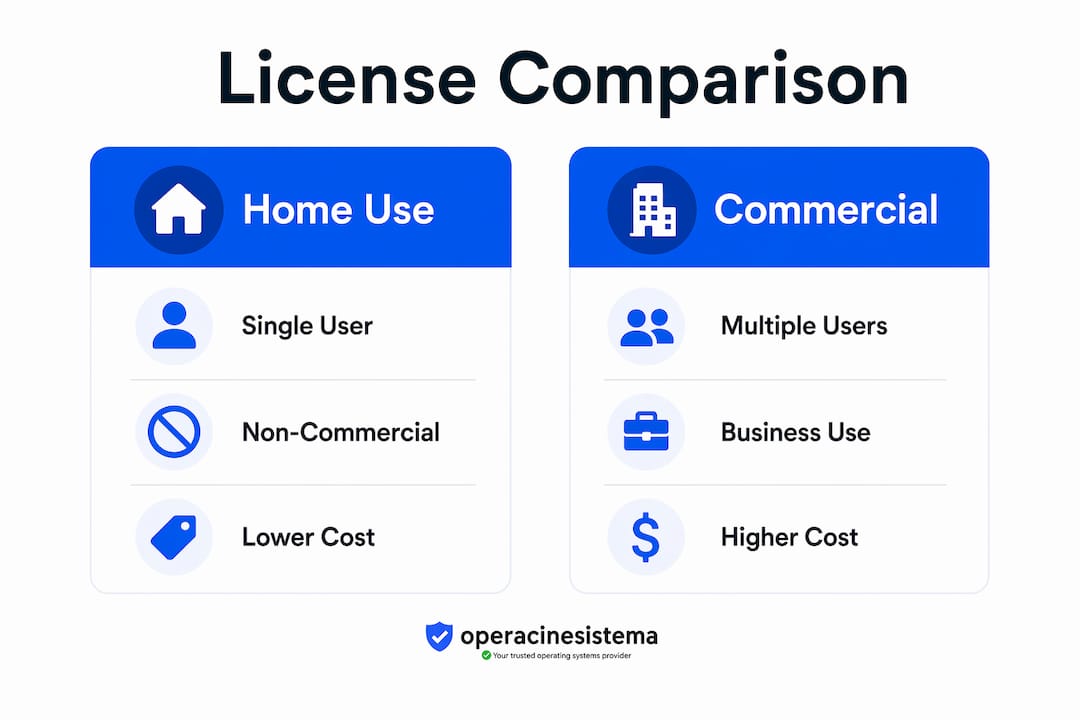
Home use licenses and commercial licenses solve different problems for different users. Understanding the gap between them helps you avoid both overpaying and under-licensing.
Here is a direct comparison across the most relevant dimensions:
| विशेषता | Home use license | Commercial license | Volume license |
|---|---|---|---|
| Permitted users | Single individual | Single or multiple employees | Multiple users across an organization |
| Business use allowed | No (in most cases) | हाँ | हाँ |
| Device limit | 1 to 2 devices | Varies by vendor | Network or site-wide |
| हस्तांतरणीयता | अहस्तांतरणीय | Often transferable within org | केंद्रीय रूप से प्रबंधित |
| Price point | Low or free | उच्चतर | Negotiated per seat |
| Support level | Basic or community | Priority or dedicated | Enterprise-grade |
The price gap between home and commercial licenses is real, and it exists for a reason. Commercial licenses fund vendor support infrastructure, legal indemnification, and the ability to use software in revenue-generating contexts. Buying a home license to avoid the commercial price is not just a compliance risk. It is a contractual violation that can result in license termination, back-billing, or legal action.
For small business owners, the सॉफ़्टवेयर लाइसेंस के प्रकार question is especially pressing. A solo operator working from home might genuinely qualify for a personal license on some tools and need a commercial license for others, depending on the vendor’s definitions. There is no universal rule. You need to check each product individually.
One more thing worth knowing: volume licenses, often called Microsoft Volume Licensing or similar programs, are designed for organizations deploying software across multiple machines. They are not a cheaper version of commercial licenses. They are a different product category entirely, built for centralized management and bulk deployment. If you are running a team of five or more, Windows license types like OEM, Retail, and Volume each carry distinct rights and restrictions worth understanding before you buy.
How major vendors handle home use licensing differently
The most important thing to understand about home use licensing examples from real vendors is that no two are identical. JetBrains, MathWorks (MATLAB), and Autodesk each take a distinct approach, and the differences are significant.
-
JetBrains personal licenses are one of the most permissive in the industry. JetBrains personal licenses allow use at work and at home without business use restrictions in the subscription agreement. You can use a JetBrains personal license to write code for your employer’s product, at your employer’s office, on your employer’s network. The license follows the person, not the purpose. This is the exception, not the rule.
-
MATLAB Home license from MathWorks sits at the opposite end of the spectrum. MATLAB’s Home license is for personal work that is not paid or grant-funded. Selling outputs, conducting sponsored research, or using MATLAB for any activity tied to financial compensation requires a commercial license. Even academic research funded by a grant falls outside the home license scope. This is a stricter definition than most users expect.
-
Autodesk Fusion for personal use sits in the middle. Autodesk allows non-commercial personal use under its free personal license tier, but the activation process has a specific compliance requirement worth knowing. Autodesk’s activation process requires account sign-in and a 30-minute delay after selecting “Download Now” before the license grant is complete. Using the software during that window means you are technically running unlicensed software, even if you have done everything else correctly.
The takeaway from these three examples is clear. The label “home use” does not guarantee prohibition on work-related usage. Permitted uses depend entirely on EULA terms, which vary by vendor. Reading the EULA is not optional. It is the only way to know what you actually own.
प्रो टिप: If you use multiple software tools professionally, keep a simple spreadsheet listing each tool, its license type, and the key commercial-use clause from its EULA. Review it once a year or whenever your work activities change. This takes 30 minutes and prevents costly compliance surprises.
How to legally activate and manage home use software licenses
Activation is where licensing compliance becomes practical. Getting the license right on paper means nothing if you activate incorrectly or use the software before the license grant is confirmed.
Follow these steps to stay compliant from day one:
- Create your vendor account first. Most home use licenses are tied to a user account, not a physical device. Set up your account before downloading anything. This is true for Autodesk, JetBrains, and most subscription-based tools.
- Wait for license confirmation. Activation timing and entitlement delays are critical to avoid accidental license violations. Autodesk explicitly warns users to allow 30 minutes after initiating download before signing in and using the software. Do not skip this step.
- Check device limits before installing on a second machine. Some licenses allow two devices; others allow one. Installing on a third device without checking is a common and easily avoidable violation.
- Keep your activation email or license key in a safe place. For Windows and similar operating system licenses, the product key is your proof of ownership. Losing it can complicate reinstallation and support claims.
- Review your license annually. If your work activities change, your license requirements may change too. A hobby project that becomes a paid service changes your compliance status immediately.
One thing many users overlook: home use licenses in subscription models are tied to your account identity, not your hardware. This means if you cancel your subscription, the license is revoked, even if the software is still installed on your machine. Secure Windows activation works differently for perpetual licenses, where the key remains valid after purchase. Knowing which model you are using prevents unpleasant surprises when a subscription lapses.
For small business owners managing multiple machines, the SMB compliance checklist from Operacinesistema is a practical starting point for auditing your current license portfolio.
मुख्य बातें
Home use licensing grants personal-use rights under strict EULA terms, and the permitted scope varies by vendor, making it critical to verify commercial-use clauses before using any software for paid or business-related work.
| बिंदु | विवरण |
|---|---|
| Definition is purpose-based | Home use licenses restrict commercial activity, not physical location of use. |
| Vendor terms vary widely | JetBrains permits business use; MATLAB and Autodesk impose strict non-commercial limits. |
| Activation timing matters | Autodesk requires a 30-minute wait after download before the license grant is valid. |
| Commercial use triggers upgrade | Any paid, grant-funded, or client-facing work typically requires a commercial license. |
| EULA is the authority | Search for “commercial,” “compensation,” and “business” in any EULA to find your real limits. |
Why most people misread their home use license
I have seen this pattern repeat itself dozens of times. Someone buys a home use license, uses the software for a personal project, and then gradually starts applying it to paid work. They never re-read the EULA. They assume “home use” means “use at home,” and since they are working from home, they figure they are covered. They are not.
The biggest misconception in home use licensing is that location determines compliance. It does not. Purpose determines compliance. A JetBrains personal license used at a corporate office is compliant. A MATLAB Home license used at your kitchen table for a paid consulting project is not. The physical address of your computer is irrelevant.
What I recommend to anyone managing software for a small business or freelance practice is this: treat every license as a contract, because that is exactly what it is. When you click “I agree,” you are entering a binding agreement. Vendors like MathWorks have the right to audit usage, and violations can result in back-billing at commercial rates plus penalties.
The good news is that compliance is not complicated once you understand the framework. Read the EULA once. Note the commercial-use clause. If your work activities change, check again. If you are unsure, contact the vendor directly. Most vendors would rather clarify than litigate, and a quick email to their licensing team costs you nothing.
One more thing: do not assume that a free or discounted license is risk-free. Autodesk’s personal-use tier for Fusion is free, but using it before the license grant is confirmed still constitutes unlicensed use. Free does not mean unregulated.
— Danielius
Get the right license from a trusted source
If this article has made one thing clear, it is that the wrong license creates real risk. Whether you need a personal license for a home project or a retail license for your small business, buying from a verified source protects you from fake keys, blocked activations, and compliance headaches.

Operacinesistema offers genuine Windows 10 and Windows 11 Pro licenses with instant email delivery and full activation support. Every key is verified and backed by a warranty. If you are unsure which license type fits your situation, the Windows license types guide covers OEM, Retail, and Volume options side by side so you can make a confident, informed choice. Browse available license keys and get your software activated today.
अक्सर पूछे जाने वाले प्रश्न
What is the difference between a home use license and a personal license?
The two terms are often used interchangeably, but “personal license” is the more precise industry term. Both refer to a software license granted for non-commercial, individual use under a specific EULA.
Can I use a home use license for freelance work?
In most cases, no. Personal licenses disallow use connected to payment or client deliverables, which means freelance work typically requires a commercial license. Check your specific EULA to confirm.
Does a home use license allow installation on multiple devices?
Most home use licenses allow one or two devices for a single named user. Installing on additional devices without checking the EULA is a common compliance violation.
Can I use a home use license at my office?
It depends on the vendor. JetBrains personal licenses explicitly allow use at work and at home. Most other vendors restrict use to non-commercial purposes regardless of location.
What happens if I violate a home use license?
Vendors can terminate your license, demand back-payment at commercial rates, or pursue legal action. Reviewing the EULA before use is the simplest way to avoid these outcomes.





