How to activate your Windows OS securely in 2026
Seeing the ‘Activate Windows’ watermark on your screen is more than annoying. It signals that you’re missing out on full system features, security updates, and personalization options. Many users in Lithuania struggle with activation because they’re unsure which method works legally and correctly. This guide walks you through every step to activate Windows 10 or 11 officially, troubleshoot common errors, and understand your license rights so you can unlock your operating system’s complete potential.
Índice
- Why Activation Matters
- Prerequisites And Licensing Requirements
- Step-By-Step Activation Process
- Understanding License Types And Their Activation Implications
- Common Mistakes And Troubleshooting
- Expected Results And Outcomes
- Activate Your Windows With Confidence Today
- Preguntas frecuentes
Principales conclusiones
| Punto | Detalles |
|---|---|
| Activation unlocks everything | Windows activation confirms legitimacy and enables full features, personalization, and security updates. |
| Prerequisites matter | Valid license, stable internet, and administrator access are essential before attempting activation. |
| Two activation paths | Enter a 25-character product key manually or let Windows detect your digital license automatically. |
| License type affects transfers | Retail licenses move to new hardware, but OEM licenses stay locked to original devices. |
| Built-in troubleshooter helps | The Activation Troubleshooter resolves over 60% of common errors automatically. |
Why activation matters
Activation isn’t just a formality. It’s the process that confirms your software legitimacy to Microsoft and unlocks your system’s full capabilities. Without activation, you’ll face constant reminders and lose access to personalization options like changing your wallpaper or themes.
Activated Windows receives critical security patches and system updates that protect your data from vulnerabilities. Microsoft prioritizes genuine users for these updates, ensuring your PC stays secure against emerging threats. You also gain access to advanced settings and features that remain hidden or locked in non-activated installations.
Non-activated Windows disables some personalization but retains basic functionality and security updates temporarily. However, the persistent notifications and feature limitations create frustration and reduce your productivity. Here’s what you miss without activation:
- Full desktop personalization including wallpapers and colors
- Access to Windows Update for all feature releases
- Ability to use certain advanced system settings
- Removal of the activation watermark from your screen
Activation protects your investment by ensuring you’re running legitimate software with full Microsoft support and update access for the life of your license.
Understanding windows activation importance helps you prioritize this step. Think of activation as unlocking a car you’ve already purchased. You own it, but you need the right key to access everything it offers.
Prerequisites and licensing requirements
Before starting activation, gather everything you need to avoid interruptions. You must have a valid Windows 10 or 11 product key or a digital license already linked to your device. Without one of these, activation will fail immediately.

A stable internet connection verifies keys with Microsoft servers during the process. Unstable connections cause timeouts and error messages that delay activation. Make sure you’re connected reliably before you begin.
Administrator access is required because activation changes system-level settings. If you’re using a standard user account, you’ll need to switch to an administrator account or get credentials from your system admin. Check your license type as well:
- Retail licenses purchased separately from a device
- OEM licenses pre-installed on new computers
- Volume licenses for business and enterprise deployments
- Digital licenses linked to your Microsoft account
Pro Tip: Linking your Microsoft account to digital licenses allows seamless reactivation after major hardware changes like replacing your motherboard without re-entering product keys.
Knowing whether you have a retail or OEM license affects how you handle future reinstallations and hardware upgrades. Retail licenses offer flexibility to move between devices, while OEM licenses lock to the original hardware. This distinction becomes critical when you plan system changes. Learn more about windows 11 activation keys and requirements to clarify which license type you need.
Verify these prerequisites before proceeding to save time and frustration. Missing even one element means activation will stall or fail, forcing you to restart the entire process. Double-check your product key for accuracy and ensure your internet connection remains active throughout. Review activate windows prerequisites for complete details.
Step-by-step activation process
Activation happens through your system settings in just a few minutes. Start by opening Settings and navigating to Update & Security, then click Activation to see your current license status. This screen shows whether Windows is already activated or waiting for a key.
If you have a digital license, Windows may detect it automatically without any input from you. Users activate by entering a 25-character key or letting the system find a linked digital license tied to their Microsoft account. Follow these steps for manual activation:
- Click ‘Change product key’ on the Activation page.
- Enter your 25-character product key exactly as provided, including dashes.
- Click Next and wait for Windows to verify the key with Microsoft servers.
- Confirm activation success when the ‘Windows is activated’ message appears.
- Restart your computer if prompted to finalize changes.
- Return to Settings > Update & Security > Activation to verify status.
If activation fails, use the Activation Troubleshooter by clicking ‘Troubleshoot’ on the same Activation page. This tool diagnoses common issues and applies fixes automatically. It’s particularly useful after hardware changes or when switching from an old device.
Pro Tip: Link your Microsoft account before activating if you haven’t already. This creates a digital license backup that simplifies reactivation if you replace hardware or reinstall Windows later.
For digital licenses, the process is even simpler. Sign in with the Microsoft account that holds your license, and Windows will recognize it instantly. You won’t need to type any keys or run troubleshooters unless something goes wrong. Explore finding and using product key for windows 11 if you’ve misplaced your key or need help locating it.
The entire windows 10 activation step-by-step procedure mirrors Windows 11 closely, so these instructions apply to both versions. The interface may look slightly different, but the core steps remain identical. Once activated, you’ll notice the watermark disappears and all personalization options unlock immediately. Check detailed windows 11 activation key instructions for version-specific guidance.
Understanding license types and their activation implications
Windows licenses come in different forms, and each type affects how you activate and transfer your software. OEM licenses link to device hardware and cannot move to new computers, while retail licenses allow activation on different devices as long as you deactivate the old one first.
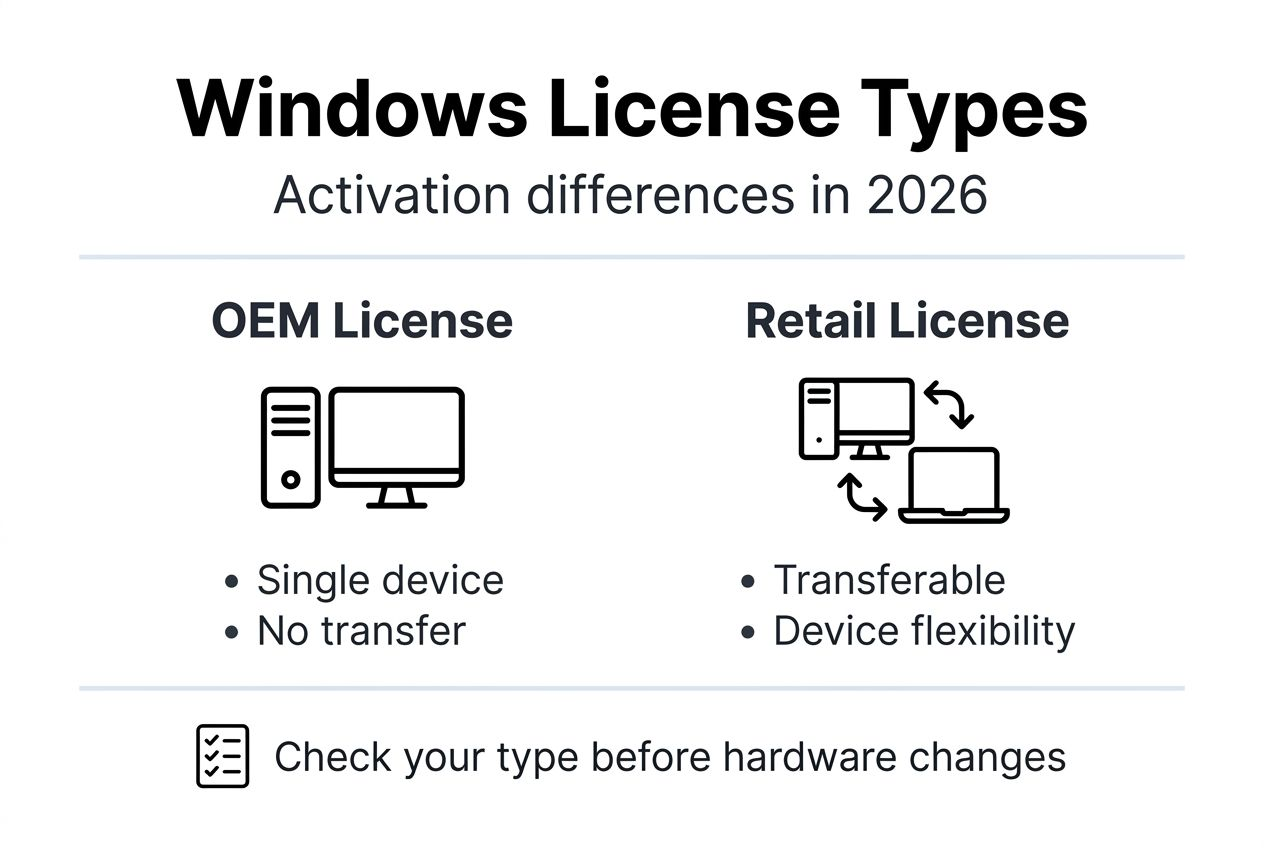
OEM licenses arrive pre-installed on new PCs from manufacturers like Dell, HP, or Lenovo. They’re tied permanently to that specific hardware through the motherboard. If you replace major components like the motherboard, the OEM license becomes invalid and won’t reactivate.
Retail licenses offer more flexibility because you purchase them separately from any device. You can transfer a retail license to a new computer by first removing it from the old one. This makes retail licenses ideal if you upgrade hardware frequently or build custom PCs.
Knowing your license type prevents activation headaches down the road. If you’re unsure which type you have, check your purchase receipt or the sticker on your device. Here’s a quick comparison:
| Característica | OEM License | Licencia de venta al por menor |
|---|---|---|
| Transfer to new device | Not allowed | Allowed (one device at a time) |
| Coste | Baja | Higher |
| Activation after motherboard change | Fails permanently | Reactivates with troubleshooter |
| Ayuda | Device manufacturer | Microsoft directly |
| Pre-installed status | Always pre-installed | Purchased separately |
Understanding these differences guides your reinstallation strategy. If you have an OEM license and plan a major hardware upgrade, you’ll need to purchase a new license for the rebuilt system. Retail users can simply reactivate their existing license on the new hardware.
Volume licenses used by businesses follow different rules entirely. They’re designed for multiple devices within an organization and require specific activation servers. Most individual users and small businesses won’t encounter volume licenses unless they’re buying in bulk. Review windows license types explained for comprehensive details on all license categories and their restrictions.
Common mistakes and troubleshooting
Activation errors frustrate users, but most issues have simple fixes.
Mistyped product keys cause failures more than any other mistake, so always double-check each character before clicking Next. Keys are case-sensitive and require exact spacing.
Using unauthorized volume license keys leads to immediate denial because these keys are restricted to enterprise environments with proper activation infrastructure. If you purchased a cheap key online, it might be a volume key that won’t work for personal use.
The Activation Troubleshooter resolves over 60% of common problems without manual intervention. Run it first before trying advanced solutions. Here are frequent errors and their fixes:
- Incorrect system date or time blocking verification: sync your clock with internet time servers
- Internet connection drops during activation: switch to wired ethernet or reset your router
- Hardware changes invalidating digital license: use Activation Troubleshooter and sign in with Microsoft account
- Wrong Windows edition for your product key: reinstall the correct edition matching your key
Pro Tip: Link your Microsoft account before making any hardware changes to avoid reactivation headaches. This creates a digital license tied to your account rather than just your hardware.
If the troubleshooter doesn’t fix your issue, verify that your product key matches your Windows edition. A Windows 10 Home key won’t activate Windows 10 Pro, and vice versa. You’ll need to either obtain the correct key or reinstall the matching Windows edition.
Some users encounter errors after replacing motherboards or upgrading major components. This happens because Windows considers these changes as a new device, especially with OEM licenses. Retail licenses handle this better through the troubleshooter’s hardware change option. Find detailed solutions at fixing windows activation errors.
Never attempt to use pirated activation tools or key generators. These methods violate Microsoft’s terms, expose your system to malware, and result in deactivation during future updates. Stick to legitimate keys from authorized sellers to ensure long-term activation stability. Explore official windows activation troubleshooting tips for Microsoft’s recommended fixes.
Expected results and outcomes
Successful activation brings immediate visible changes to your system. Activation completes under 5 minutes when you have a valid key and stable internet, with confirmation appearing on your screen right away.
The ‘Activate Windows’ watermark vanishes from your desktop within seconds of successful activation. All notification prompts about activation stop completely, letting you work without interruptions. Your system unlocks every feature that was previously restricted:
- Full desktop personalization including themes, colors, and backgrounds
- Access to all Windows Update features and security patches
- Ability to modify advanced system settings previously grayed out
- Removal of activation reminders from the Action Center
Security updates now install automatically according to your update settings. This ensures your PC stays protected against the latest threats without requiring manual intervention. Feature updates also become available as Microsoft releases them throughout the year.
If you linked your Microsoft account during activation, your digital license syncs to the cloud. This means you can reactivate Windows easily after hardware changes without re-entering your product key. The system recognizes your account and applies the license automatically.
You’ll see ‘Windows is activated with a digital license’ or ‘Windows is activated with a digital license linked to your Microsoft account’ on the Activation page. This confirms everything worked correctly and your license is genuine. Visit windows activation timeframe and confirmation to see what the process looks like in real time.
Activate your Windows with confidence today
You’ve learned the complete activation process from prerequisites through troubleshooting. Now it’s time to ensure you’re using genuine licenses that activate smoothly and stay valid long-term. Purchasing from authorized sellers protects you from counterfeit keys and activation failures.

Operacinesistema.lt offers authentic Windows 10 and 11 licenses optimized for Lithuanian users and small businesses. Every license comes with instant delivery and full support to help you activate successfully. You can check your windows licence key validity before purchase to avoid any issues.
Our selection includes both retail and OEM options to match your specific needs. Whether you’re building a new PC or upgrading an existing system, you’ll find secure microsoft os licenses for lithuanian smbs that meet Microsoft’s standards. Need immediate activation? Explore our windows 11 pro digital key purchase options for fast, legitimate licensing solutions.
Frequently asked questions
How do I know if my Windows is already activated?
Open Settings and navigate to Update & Security, then click Activation to view your current status. Look for ‘Windows is activated’ to confirm successful activation. You can also check if the activation watermark appears on your desktop. Visit this check activation status guide for detailed instructions.
¿Puedo transferir mi licencia de Windows a un ordenador nuevo?
Retail licenses allow transfer to new hardware as long as you deactivate the old device first. OEM licenses are permanently tied to the original device and cannot be transferred legally. Check your purchase documentation to determine which license type you own.
What should I do if activation says the product key is invalid?
Double-check for typos when entering the 25-character key, ensuring each character matches exactly. Verify that your key matches your installed Windows edition, as Home keys won’t activate Pro versions. Use the Activation Troubleshooter for automated diagnostic fixes. Find more solutions at fix windows activation errors.
Is linking a Microsoft account necessary for activation?
Linking your Microsoft account simplifies reactivation after hardware changes by creating a cloud-based digital license. It’s recommended for flexibility but not strictly required for initial activation. You can activate with just a product key, but linking provides better protection for future changes.
How long does Windows activation typically take?
Activation generally completes within 1 to 5 minutes when you have stable internet and a valid key. Delays occur if your connection is unstable or if troubleshooting is needed for errors. Most users see confirmation immediately after entering their product key correctly.
Recomendado
- Por qué activar Windows en 2026: 40% Más seguridad y claridad jurídica
- Lista de comprobación de seguridad del sistema operativo Microsoft 2026: Reduzca el malware en 50%
- Cómo actualizar los sistemas operativos para Secure Windows Pro
- Guía de instalación del sistema operativo: Configuración segura de Windows