
Optimierung der Microsoft-Softwarelizenzierung: Trends und bewährte Verfahren für 2026
TL;DR:
- Microsoft License Mobility rights now include CSP subscriptions, enabling flexible deployment in shared environments.
- Accurate documentation of license types and deployment environments is crucial to avoid costly compliance penalties.
- Regular license reviews and understanding the differences between CSP, OEM, and retail licenses help optimize costs and ensure compliance.
Most IT managers and small business owners think their Microsoft licensing is fine until a compliance audit proves otherwise. What many don’t realize is that Microsoft rolled out significant licensing changes starting April 1, 2026, specifically introducing License Mobility rights for Windows Server and SQL Server CSP subscriptions. These changes affect how you deploy, manage, and purchase licenses across cloud and shared environments. If your team hasn’t reviewed its licensing setup in the last six months, there’s a real chance you’re already behind.
Inhaltsübersicht
- The Microsoft software licensing landscape in 2026
- Top trends changing Microsoft OS license purchasing
- Comparing software license types: CSP, OEM, and retail
- Compliance, risk, and the new License Mobility rights
- Why software licensing agility matters more than ever in 2026
- Take the next step: Secure and compliant Microsoft licensing solutions
- Häufig gestellte Fragen
Wichtigste Erkenntnisse
| Punkt | Einzelheiten |
|---|---|
| License Mobility expansion | Microsoft CSP subscriptions now include License Mobility rights, matching SA benefits for shared environments. |
| Prioritize compliance | Failing to adapt to 2026 licensing changes can lead to costly audits and penalties. |
| Choose strategic licenses | Understanding the differences between CSP, OEM, and retail licenses helps SMBs optimize cost, flexibility, and risk. |
| Embrace license agility | Ongoing education and adapting licensing strategies protects against future risk in the fast-changing Microsoft landscape. |
The Microsoft software licensing landscape in 2026
2026 is not a quiet year for Microsoft licensing. The rules are shifting, the compliance bar is rising, and businesses that treat licensing as a “set it and forget it” task are running into trouble.
Let’s start with two terms you need to know.
License Mobility is the right to move a software license from one server or environment to another, particularly across shared or cloud-hosted infrastructure. Without it, your license is locked to specific hardware or a specific deployment. That used to be a problem for businesses using cloud providers or managed hosting services.
Software Assurance (SA) is Microsoft’s maintenance and benefits program. Historically, you needed SA to get License Mobility rights. That meant paying extra for SA on top of your base license, which added cost and complexity.
Here’s what changed in April 2026: CSP subscriptions now mirror Software Assurance rights for License Mobility. If you’re on a qualifying Cloud Solution Provider subscription for Windows Server or SQL Server, you now get those mobility rights without needing a separate SA agreement. That’s a meaningful shift, and it changes how you should be structuring your purchasing strategy.
“License Mobility rights for CSP subscriptions now mirror Software Assurance rights as of April 2026, allowing businesses to deploy in shared cloud environments with the same flexibility previously reserved for SA customers.”
This matters for your compliance posture too. The impact of unlicensed software goes beyond fines. It affects your ability to receive security updates, qualify for Microsoft support, and maintain the trust of enterprise clients who may audit your own compliance. For small businesses especially, a single compliance gap can be expensive to fix after the fact.
Here are the major trend areas shaping Microsoft licensing in 2026:
- CSP subscription flexibility is expanding, with License Mobility rights now included at the subscription level
- Shared environment rights are more clearly defined, reducing ambiguity for hybrid and multi-tenant setups
- Digital compliance audits are increasing in frequency, especially for businesses operating in regulated industries
- Cost optimization through bundled subscriptions is becoming a realistic option for small and mid-sized businesses
- Online activation tracking is tightening, with Microsoft’s systems better able to detect overdeployment or unauthorized key sharing
If your business hasn’t revisited its licensing structure since before 2026, this landscape review is your starting point.
Top trends changing Microsoft OS license purchasing
The 2026 licensing landscape is pushing businesses to rethink not just what they buy, but how they buy it and how they manage it over time. Here are the biggest changes shaping purchasing behavior right now.

1. CSP subscriptions now unlock License Mobility by default
This is the single biggest shift for businesses using cloud or hosted environments. CSP subscriptions now allow for deployment options that previously required a Software Assurance agreement. If your team manages workloads across multiple cloud providers or uses managed service providers, this change directly expands your options without increasing cost.
2. Digital-key activation is the new standard
Physical media is largely gone for enterprise deployments. Digital key activation through Microsoft’s online infrastructure is now the norm. This means your compliance trail needs to be digital too. Keep records of purchase confirmations, activation emails, and license assignment logs. Microsoft’s audit processes are built around this digital paper trail, and gaps in it look suspicious even if your licensing is technically sound.
3. Online compliance audits are more common and more detailed
Microsoft and its partners are conducting audits more frequently in 2026, often triggered by deployment data or partner reports. These aren’t just count-the-seats audits anymore. They check deployment environments, virtualization rights, and whether your license type actually covers your use case.
4. Bundling and long-term subscriptions reduce per-unit costs
For small businesses managing multiple machines, bundled CSP subscriptions are proving more cost-effective than buying individual retail licenses. The math changes significantly when you factor in that bundled options now include License Mobility rights, reducing the need for additional SA spend.
5. Knowing the difference between license types is a compliance requirement, not just a purchasing question
Buying the wrong license type, say, an OEM license for a device you want to migrate later, creates compliance problems down the line. Following software licensing best practices from the start saves you from expensive corrections later.
Pro Tip: Sign up for Microsoft Partner Center announcements and set a monthly calendar reminder to review them. Microsoft frequently updates its licensing terms, and the April 2026 changes weren’t widely covered outside of official channels. Your business shouldn’t be learning about these changes from an auditor.
The purchasing landscape is no longer just about price per seat. It’s about flexibility, compliance, and making sure the license type you choose today doesn’t create a problem in 12 months when your infrastructure evolves.
Comparing software license types: CSP, OEM, and retail
Before you can optimize your licensing spend, you need to understand what you’re actually buying. Three license types dominate the Microsoft OS market in 2026: CSP, OEM, and retail. Each has a distinct purpose, and using the wrong one is one of the most common compliance mistakes businesses make.
CSP (Cloud Solution Provider) licenses are subscription-based licenses purchased through a Microsoft-authorized partner. They’re tied to a user or organization, not a device. As of April 2026, License Mobility applies to CSP subscriptions in a manner equivalent to Software Assurance, making them the most flexible option for businesses using cloud or hybrid environments.
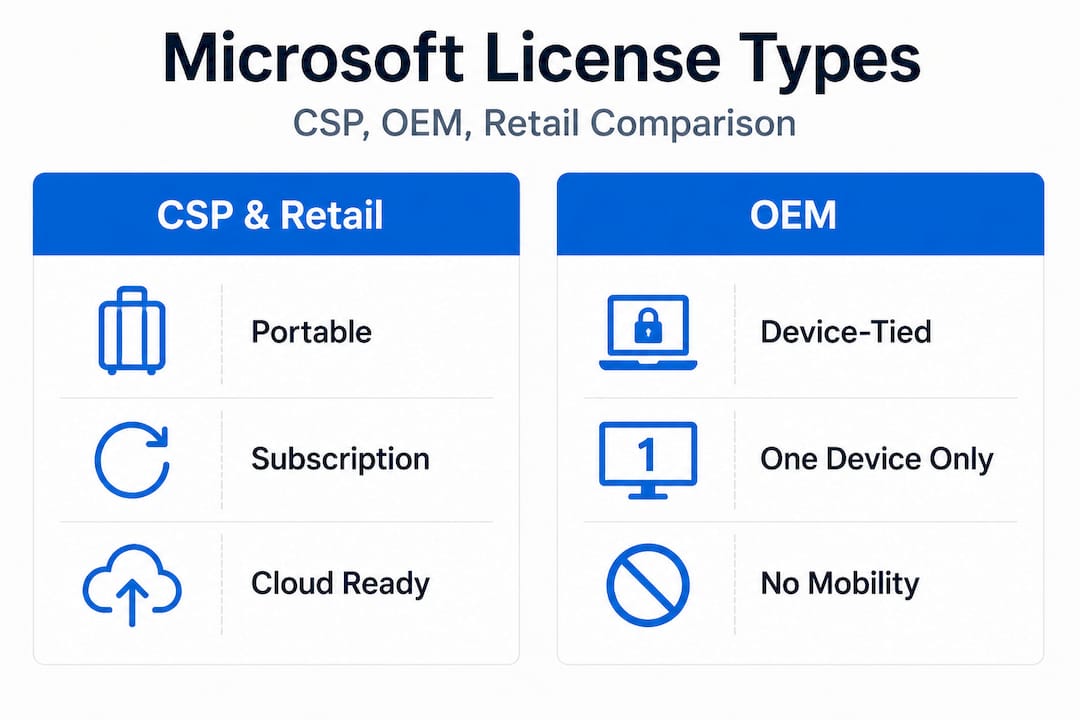
OEM-Lizenzen (Original Equipment Manufacturer) come pre-installed on hardware. They’re tied to the specific device they ship with and cannot be transferred to a new machine. They’re cost-effective for standard desktop deployments where you’re not planning to move or repurpose hardware.
Einzelhandelslizenzen are the most portable. You buy them outright, and they can be transferred to a different device when needed. They cost more than OEM but offer more flexibility for users who upgrade machines regularly.
Here’s a side-by-side comparison to help you evaluate your options:
| Merkmal | CSP subscription | OEM license | Retail license |
|---|---|---|---|
| Tied to device | Von | Ja | Von |
| Übertragbar | Yes (user-based) | Von | Ja |
| License Mobility rights | Yes (as of April 2026) | Von | Von |
| Upfront cost | Low (monthly/annual) | Niedrig | Higher |
| Best for | Cloud, hybrid, multi-user | Fixed hardware builds | Flexible single users |
| Compliance audit risk | Low (with documentation) | Mittel | Niedrig |
| Software Assurance needed | No (built-in for CSP) | N/A | N/A |
Understanding the differences between types of software licenses is not optional if you’re managing more than a handful of machines. Getting this wrong doesn’t just waste money. It creates a compliance gap that can surface during an audit at the worst possible time.
For IT professionals managing mixed environments, a hybrid approach often works best: OEM licenses for fixed workstations, retail for mobile workers, and CSP for anything touching shared infrastructure or cloud. The key is documenting which license applies to which deployment clearly and consistently.
Before choosing your license type, ask these questions:
- ✅ Will this machine be repurposed or reassigned within the next two years?
- ✅ Is this deployment in a cloud, virtual, or shared hosting environment?
- ✅ Do you need the flexibility to move the license between devices?
- ✅ Are you managing licenses for multiple users or a single assigned device?
- ✅ Do you need consistent licensing documentation for client audits?
Maintaining software authenticity for small businesses is about more than buying a genuine key. It’s about buying the right type of license for the right use case and keeping the records to prove it.
Compliance, risk, and the new License Mobility rights
Choosing the right license type gets you halfway there. The other half is making sure your deployment, documentation, and renewal schedule hold up under scrutiny. In 2026, compliance isn’t just about having a license. It’s about having the right license, in the right environment, with the right paperwork.
Here’s a practical compliance checklist for 2026:
- 📋 Maintain a current software asset inventory with every license, its type, and its assigned device or user
- 📋 Keep digital records of all purchase confirmations and activation keys
- 📋 Document your deployment environments, especially anything involving cloud, virtual machines, or shared hosting
- 📋 Review your license agreements annually, or any time you change infrastructure
- 📋 Assign a specific team member or role as your internal licensing owner
The new License Mobility changes bring CSP parity with Software Assurance for shared environments. That’s good news for flexibility, but it also means auditors will expect you to demonstrate that your CSP subscriptions are properly assigned and that you’re not inadvertently exceeding their scope.
🛑 What happens if you’re out of compliance?
Here’s a realistic look at audit outcomes and what they cost:
| Audit outcome | Description | Typical consequence |
|---|---|---|
| Fully compliant | All licenses match deployment | No action required |
| Minor documentation gap | Missing records for valid licenses | Warning, 30-day correction window |
| License shortfall | Fewer licenses than deployed instances | Back-licensing fees, typically 1.5x retail cost |
| Major non-compliance | Wrong license type or environment misuse | Significant fines, potential legal action |
| Counterfeit license found | Fake or unauthorized key detected | Immediate deactivation, legal risk |
The cost of a license shortfall alone can exceed the cost of simply buying the correct licenses from the start. And if a counterfeit key is detected, you lose access immediately. There’s no grace period.
“Businesses that lack proper license documentation face an average remediation cost significantly higher than the original license price. Prevention through correct purchasing and consistent record-keeping is always cheaper than correction.”
Pro Tip: Schedule a quarterly internal audit of your software assets. Use a simple spreadsheet or a dedicated software asset management (SAM) tool. Log each license, its type, its purchase date, the device or user it’s assigned to, and its renewal date. This takes less than two hours per quarter for most small businesses and can save thousands in audit remediation costs.
If you want to avoid Microsoft licensing risks in 2026, start with documentation. It’s not exciting, but it’s the single most effective thing you can do. A complete Microsoft licensing checklist for 2026 gives you a structured starting point so nothing falls through the cracks.
Why software licensing agility matters more than ever in 2026
Here’s a perspective that most compliance articles skip: compliance is not a destination. It’s a practice.
The businesses that run into the most expensive licensing problems aren’t the ones that tried to cheat the system. They’re the ones that got compliant once, documented it, and then assumed they were done. Microsoft’s licensing terms change. Infrastructure evolves. Teams grow. New products get added to the stack. What was compliant 18 months ago may not be compliant today.
Most IT teams treat software licensing like annual tax filing. Once it’s done, they file it away and move on. But Microsoft’s licensing model doesn’t work that way anymore. The April 2026 CSP License Mobility changes are a perfect example. If your team hadn’t been actively tracking Microsoft partner announcements, you might have missed them entirely. And if you had already locked into a purchasing strategy built around Software Assurance for mobility rights, you may be overpaying right now without realizing it.
The hidden cost of licensing inertia is real. Businesses that don’t adapt to new licensing terms often pay for coverage they no longer need or miss out on lower-cost options that would fully meet their requirements. They also tend to under-license in areas where deployment has expanded, which is where audit risk accumulates.
What forward-thinking organizations do differently is build licensing agility into their operations. That means setting a calendar review cycle, not just for renewals, but for tracking changes to Microsoft’s terms. It means cross-training at least two people in the basics of your licensing structure so that knowledge doesn’t sit with one employee who may leave. And it means treating software licensing agility tips as an ongoing operational priority, not a one-time project.
🔥 The businesses winning on software cost in 2026 are the ones actively matching their license types to their current infrastructure, not the infrastructure they had three years ago. They review, adapt, and buy smart. That’s the advantage you’re building when you stay current.
One more thing worth saying clearly: buying genuine licenses from trusted sources matters just as much as choosing the right license type. A fake or unauthorized key doesn’t just risk deactivation. It creates a gap in your compliance documentation that is very difficult to close when an auditor comes asking. Authenticity and compliance go together.
Take the next step: Secure and compliant Microsoft licensing solutions
Understanding the 2026 licensing landscape is the first step. Acting on it is what protects your business and your budget.

If you’re ready to get your licensing right, start with a structured approach. Use the software license compliance checklist to audit what you have and identify any gaps before an external auditor does. If you’re not sure which license type is right for your setup, the guide to choosing the right license breaks down CSP, OEM, and retail options in clear, practical terms. And when you’re ready to purchase a verified, genuine Microsoft OS license, you can get a Windows 11 Pro Digital Key with fast email delivery and full authenticity guarantee. Every license we sell is official, traceable, and backed by real customer support. No risk. No guesswork.
Häufig gestellte Fragen
What is License Mobility and how does it affect Microsoft CSP subscriptions in 2026?
License Mobility now allows CSP subscriptions for Windows Server and SQL Server to be moved across shared cloud environments, just like Software Assurance previously enabled, starting April 1, 2026. This gives CSP customers deployment flexibility without needing a separate SA agreement.
Is Software Assurance still required for License Mobility in 2026?
No. As of April 2026, CSP subscriptions grant License Mobility rights equivalent to Software Assurance, which reduces the traditional need for purchasing SA separately for shared environment deployments.
What are the main compliance risks with Microsoft software licenses in 2026?
The main risks include missing purchase documentation, deploying licenses in cloud or shared environments without the correct license type, and failing to track new CSP licensing rights that changed in April 2026. Each gap can result in penalties or forced back-licensing at above-retail cost.
How can my business reduce Microsoft licensing costs while staying compliant in 2026?
Consolidating to CSP options with License Mobility, running quarterly internal audits, and matching license types to actual deployment scenarios are the most effective ways to cut costs without cutting corners on compliance.





